New post
Avatar
0

I don't understand how bowing works. I can use key switches to get normal, pizzicato and tremolos - but I can not get the sustain pedal to have any effect at all. I have tried sending CC102 0 and 127 and can see no effect. I have also tried CC68 instead of CC64. If you could give me a simple sequence of MIDI messages that would illustrate use of the sustain (or legato) pedal, it might clear things up for me.


OS X 10.11.5

GPO5 (don't know how to ascertain version)

ARIA Player 1872

4 comments

Date Votes
Avatar
0

Check the offset setting in the control panel.  Experiment with different values there whole engaging CC68.  Also fiddle with portamento a bit (this is one easy way to confirm ARIA is indeed getting the CC68 event....you'll get 'pitch slides' when CC68 is engaged, and it'll go away when CC68 is set to 0).


Also, I find it quite helpful to use CC119 a LOT with the new Orchestral Strings sustains.


Example, play a fast legato passage and it's way to soft, and just doesn't sound right.

Send a CC119,127 event just before the phrase and it's much louder/fuller.


CC119 lets us start playback (or attack offset) at a later part in the sample.


If you want more of the initial attack sound then use lower CC119 values.  If you want it to sound more like the bow is already in motion at full speed when it grabs a string, user higher values.


Note CC119 only works with the stuff in the "Garritan Orchestral Strings" bank.  The legacy section and solo strings don't use CC119.

Comment actions Permalink
Avatar
0

I flunked the portamento test.

I am using the patch GPO5 > Standard > 10 Garritan Orchestral Strings > Section Strings > 08 KS Groups > 01 Violins 1 KS

I can hear no change in sound from bar 4 to bar 6.

What I want to do seems like it should be pretty simple. I had a violinist mark up bowings for me and want to implement them. Fortunately, I can at least go from arco to pizz and back.

1 1 1 61 Control 1 102 0 Ctrl 102
1 1 4 181 Control 1 64 0 Sustain
1 2 2 121 Control 1 65 127 Portamento
1 3 1 121 Control 1 5 67 Portamento Time
1 3 3 181 Control 1 68 0 Legato
5 1 1 181 Control 1 64 127 Sustain
5 1 2 121 Control 1 68 127 Legato

Comment actions Permalink
Avatar
0

I see... 


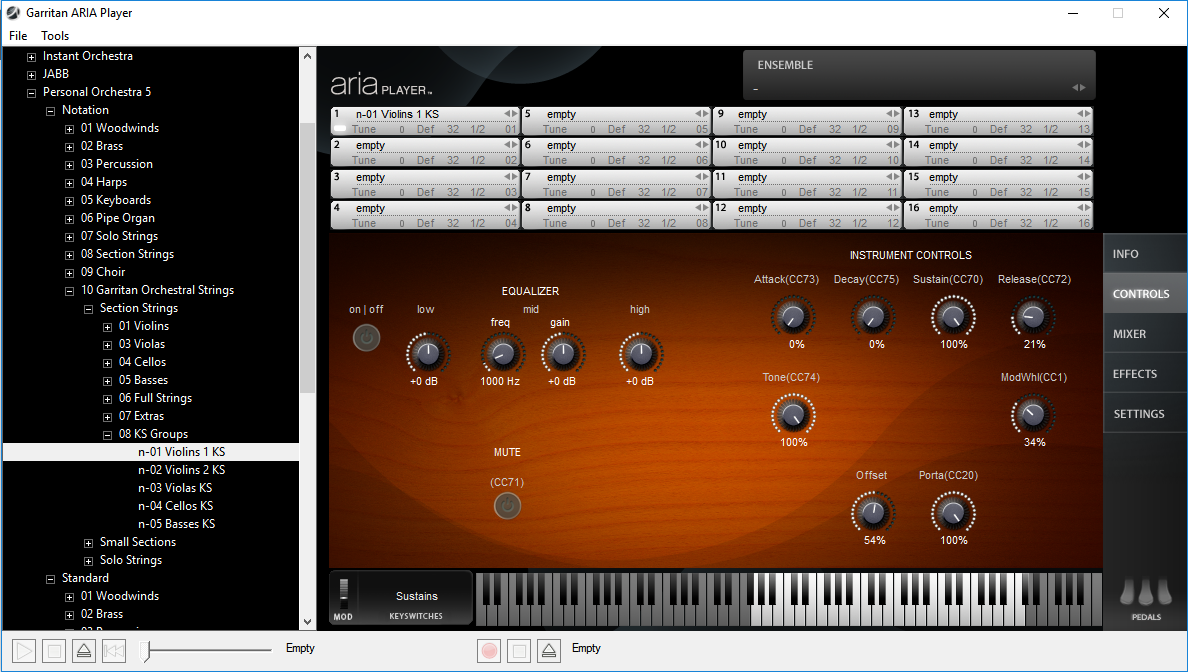
With the 'notation' version, I get 'legato/portamento' effects when using CC68, while CC64 'sustains'.


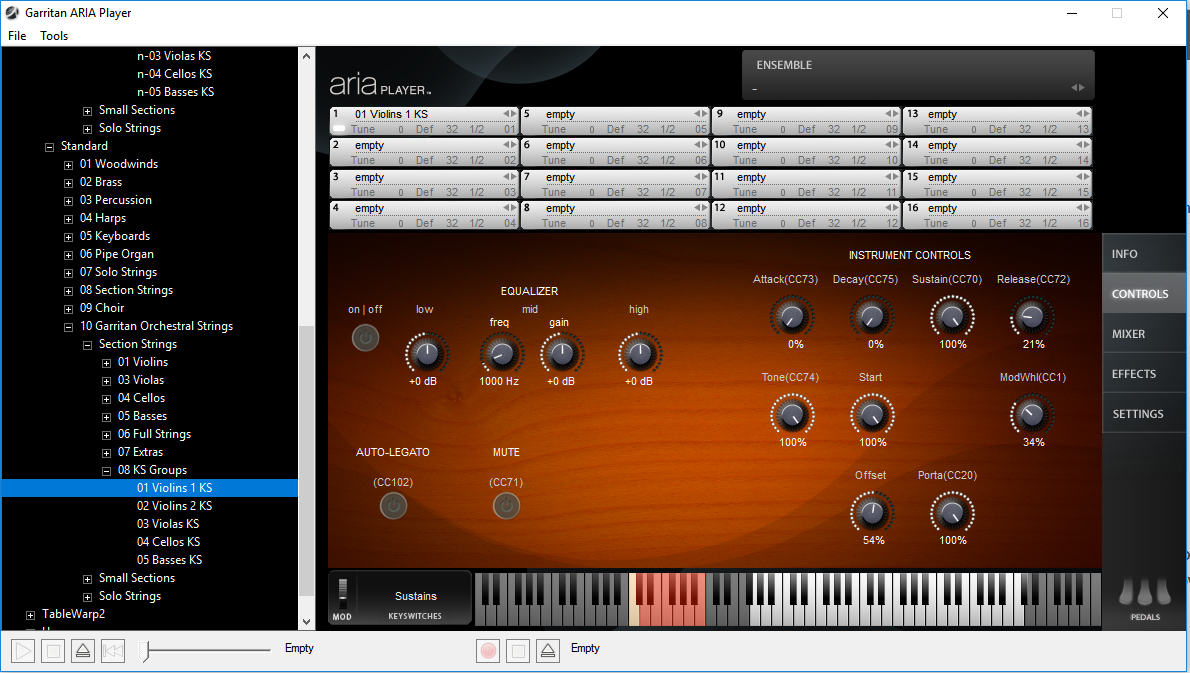
With the 'standard' version I did get 'legato/portamento' effects using CC64, but CC68 does 'nothing'.


It seems to matter in this case which version of the instrument is loaded.


Note, it might be worthwhile to also experiment with CC102 (auto legato).  When CC102 has been set to 127, if notes 'overlap' a bit it's supposed to crossfade a little between the two.


One thing that does make a BIG difference with the new "Orchestral Strings" (GOS) is the CC119 parameter.  Using this you can change how much of the 'attack' part of the sample gets played.  I.E.  CC119,0 plays the entire attack portion of the sample (more like a downbow/upbow).  CC119,64 would play the second half of the attack (some extra force and/or bow speed change).  CC119,127 would skip the entire attack (more like the bow is already going full speed and simply grabbing a string where the finger is already wiggling for vibrato) and start the sample where it already has a high amplitude and finger motion for vibrato.


CC119 seems to be synonymous with the "Start" pot that shows up in the Control panel for the 'standard' variant of the newer String instruments.  I think they added cc119 support to the sfz file at the last minute before releasing GPO5, so the little pot in the control panel doesn't dance about like most automatable controls in ARIA....but CC119 does seem to 'do the same thing'.  Since the notation and regular variants of the instruments use the SAME sfz file (just a different GUI), then it will also work with the 'notation' version of the instruments even though there is no 'Start' pot at all in that GUI.


For fast or legato passages I find that it's best to max this out, otherwise all you get is the 'attack' part of the sample on 'short' notes and it's not only 'too soft' relative to the rest of the mix, but it also sounds like some poor soul is 'sawing' the violin in half!  I've found judicious use of CC119 to be crucial for the solo strings as well. 


In short, the new GOS strings are nearly useless in their 'default' state, but you really can make them sound quite fine (relative to the price for the library) if you get the 'settings' right, make many variations, and bounce around between them as needed.  For this reason I've added to the <control> area of the sfz file a default setting of 127 for CC119.  If I want more downbow/upbow with attacking sorts of bow effects, I'll just drop in a CC119 event to that effect.


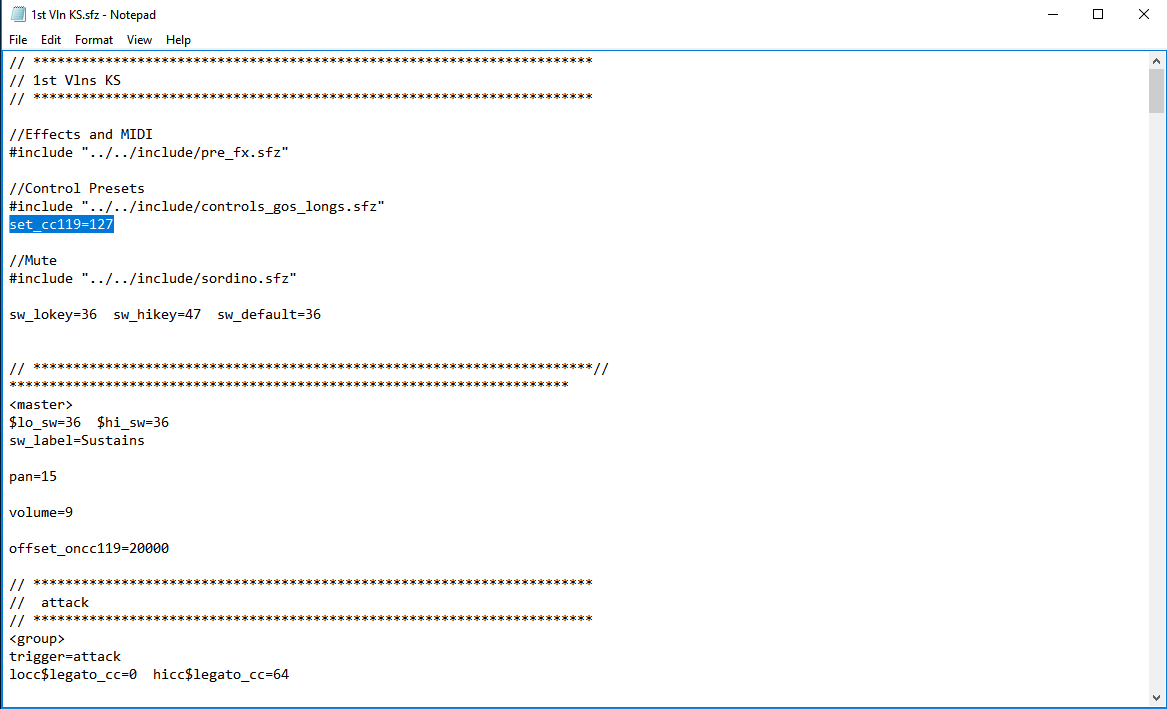
To set CC defaults (the initial setting a control gets when ARIA first loads the instrument) in an sfz (Always back up the original first!): 

In this case, on my Windows system Garritan Libraries installed to "%SYSTEMDRIVE%\Garritan\ Personal Orchestra 5".  So I browse to that location and dig around in the ".\Instruments\Orchestral Strings\Violins 1" folder to find the "1st Vln KS.sfz" file.  I open that in a text editor and add "set_cc119" to the <control> section.  Note that for some instruments the sfz might point to an 'include' file to get lines of text for the <control> tag.  If so, I'd recommend doing your set_cc default just under the include line, unless you know you want this new default to apply to all instruments that might use the include file, and in that case you could elect to instead find and add your default to the include file itself.


Now when I first load the Violin instrument, the default "Start" point for the attack should be 127 (even though it might not show up in the ARIA Control panel that way).  Of course I can change this at will with CC119, or using the 'Start' knob.

Comment actions Permalink
Avatar
0

P.S.

What are you using for sequencing?  A DAW?  Notation software?  Which one?


I ask because it might be easier to go with a channel hopping work flow than trying to mess with key-switches and constant CC changes.

For example:

You could build several variations of 'arco' using the single sound instruments (no key switches) in an ARIA instance, each on their own channel.  You might like different arco variants for different tempos and passage styles.  Just bounce MIDI channels between them as needed.  In my experience this is an interesting way to approach things in a linear tracking style DAW...I can start my sequence playing, open ARIA, and tweak stuff till it sounds right for the passage.  At that point, I leave it alone and start a new 'arco' slot on a new channel if I need something different, and repeat the tweaking process.  To change between my bowing variants, I just change the note on/off channels in the sequence (or enter them on different tracks, which I can bounce down to a single type-0 track later if desired for scoring purposes).


In contrast, if you go with a single key-switching variant, then you're going to be dotting controller lanes on almost every single note!  If you're using a notation package like Finale or Sibelius this isn't as big of a problem since you can build expression maps that spam many simultaneous CC events at the start of every single note in the score (kind of like patch containers), but with a DAW that's not using 'expression maps' you'd have to keep forcing all those dials to dance around via remote control throughout the piece (usually drawing them onto a lane, entering them in lists, or scripting them in with logic editors).

Comment actions Permalink

Please sign in to leave a comment.