New post
Avatar
0

Dear Hive mind,

Am I misremembering, or did there used to be a work around for extending the range of instruments IN GPO? I specifically remember adding a half step at the bottom of the clarinet to get a concert C sharp (i.e. creating an A clarinet).  I need some extra notes at the top of the 1st violin section patch - can any one give me some pointers?

Simon Andrews

Finale 2014.5 and GPO 5 on i7 iMac 4GHz 16GB running 10.12.3

simon@simonwandrews.com

1 comment

Date Votes
Avatar
0

Locate the sfz file for the instrument(s) you wish to extend.  Not sure about Macs, but for Windows they're typically installed somewhere like:


"%SYSTEMDRIVE%\Program Files\Garritan\Personal Orchestra 5\Instruments\"


Always make a backup of the sfz before examining and editing!


Using your favorite Text Editor, study the sfz markup a bit.  These are the opcodes that tell the ARIA engine what samples to use and how to play them back.  In this case you'll want to pay close attention to <region> tags.  They'll look something like this:


<region>  lovel=1  hivel=127  lokey=94  hikey=108  pitch_keycenter=95  amplitude=100  tune=0  loop_mode=no_loop  sample=Vlnf3SBiB6_0002102C.audio


You'll usually see several of these <region> opcodes in a row, and each sfz file might have several groups of them to define things like velocity layers, legato options, and even key-switches for a variety of articulations or bow styles.


Essentially what the <region> opcode does in the example above is establish a velocity range, key zone, pitch center, loop points, etc. for the sample "Vlnf3SBiB6_0002102C.audio".


lowkey=94 defines the lowest key this particular sample gets assigned.  In this case A#6.


hikey=108 is the highest key assigned.  In this case C8.


pitch_keycenter=95 lets ARIA know that the sample was recorded/sampled at a pitch of B6.   All of the keys assigned this sample that are not B6 get retuned up or down in real time.  So as you get up higher towards the C8, the sample is actually sped up.


If you wanted to extend the range of this sample, or this layer/zone of the instrument to something like a D#8, you'd simply change the hikey to 111.  How good the sample will sound when retuned that much will be very much dependent on the type of instrument.  Some stretch better than others!  You could also extend low ranges of instruments by lowering the lowkey opcode.


Be aware that some instruments have many velocity layers, as well as legato or pedaled zones and key switches for different articulations and whatnot.  For this reason you'll need to take care in studying the entire sfz to make sure you extend the range of all the layers and modes.


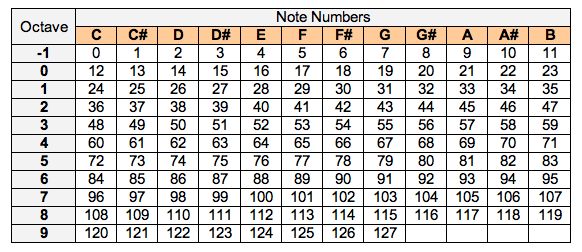
Note, that 440 A should always be MIDI note 69 (unless you're dealing with strange tuning scales that retune the entire instrument, I.E. to an A442).  That makes Middle C note 60 under conventional western music tuning scales.  Charts like the one below can help you convert note names and octaves into "MIDI Note Numbers".  SFZ Players recognize the Middle C as "C4".  ARIA also understands note names if you prefer to use those in lieu of MIDI note numbers.


Finally, be aware that some of the newer GPO5 instruments use #include lines in the sfz file that might point to another sfz which is used for more than one instrument throughout the library.  Be sure to follow through and check these #include locations for any relevant layers that might be present.  Stay aware that such #include files are probably also used in other instruments (I.E.  Violins 1 and Violins 2 from the Orchestral Strings library might share some information from a common include file).  ALWAYS keep a back up of any sfz files handy in case you need to go back to square one on an instrument without reinstalling everything from scratch!


You can find more information about tweaking or even making your own sounds for the ARIA Engine (and other sfz compliant players) across the internet.  Plogue's own ARIA Forums are a good place to start.


I hope this is helpful in your quest to attempt to extend instrument ranges or otherwise tweak sounds in the ARIA Engine to better fit your personal needs.

Comment actions Permalink

Please sign in to leave a comment.