New post
Avatar
0

I just can't get set up to use my Roland (RD-700GX or FP-7) "jazz scat" sound (or any other sound produced by the Roland) with midi output from Finale 2014.5 (mac El capitan) notation. The Roland is connected and outputs the sound that is the current sound in Finale score manager no matter what I do. (My goal is to get the vocal jazz "doo" sound which Garritan does not offer, am tired of the Garritan oos and aas.) It should be possible to set up Roland as an external sound source but no luck. Have tried messing with MIDI/audio setup in Finale, have read all I can find on Roland and on Finale setup. Is there a step-by-step somewhere or? 

I might mention that I have worked in Finale since 1991 and input FROM Roland to Finale on a daily basis to notate scores. 

3 comments

Date Votes
Avatar
0

Hi Jonathan,


IIRC, Finale just sends out GM numbers by default.


My guess is your Jazz Scat sound is in another bank or is a GS variation, etc.


That means you need to send an MSB, LSB, and PC message to change it to that sound.


Have you gone to the Instrument List and tried to create a New Instrument - because that dialog box lets you put in the MSB, LSB, and PC numbers?


But when you say "or any other sound", that leads me to believe you're not monitoring the audio from the Roland. You say it outputs the current sound that's in the score manager - are you sure you're not hearing the Garritan or Smart Music Synth?


How are you monitoring your Roland?

Comment actions Permalink
Avatar
0

Jonathan, I looked up the manual:


239 Jazz Scat 87 72 3 11208


MSB is 87, LSB is 73, PC is 3


It looks like it uses MSB 121 and LSB 0 for their General MIDI bank and that might be what Finale is calling to, though it could instead be whatever bank it turns on on, and then calls to sound within that bank, of which your Scat sound might not be one.

Comment actions Permalink
Avatar
0

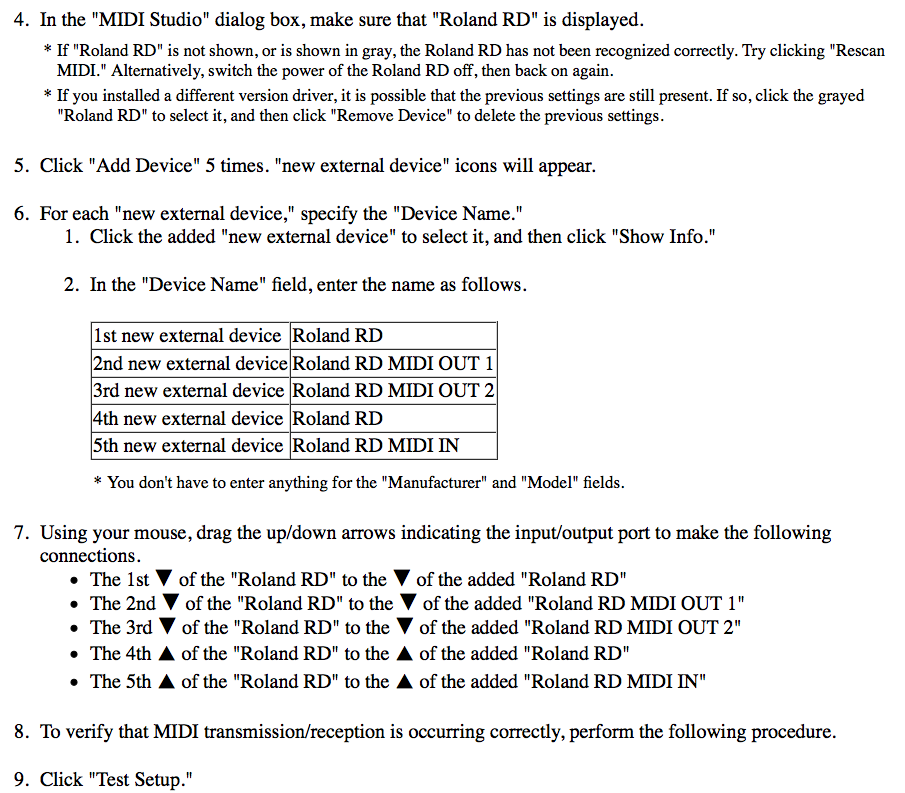
Thanks Steve. I finally figured it out today. I had never worked with MSB/LSB/PC setups before, just chosen available instruments from lists. By clicking on "edit patch" I entered the Roland MSB/LSB/PC numbers, but what solved the problem of no sound was to recheck the "MIDI studio" setup and then choose the correct output device in the "MIDI/Audio" "Device setup" list. Sounds simple, but I was led astray among other things by the installation instructions for setting up the Roland in "MIDI studio" in which you are told to add 5 external devices, one of which is called "MIDI out 1" and the other "MIDI out 2", so I had wrongly assumed that I should choose one of those. I also found the information both in Finale and Roland manuals/instructions lacking in detail and helpfulness. But maybe no one else has these problems:) since the forums didn't have much to say either.

Just in case someone else is interested, here is what the driver installation instructions say about MIDI studio setup:

In rechecking these I noticed that it was only when I had "test setup" on and clicked on the arrow to the 1st external device "Roland RD" that I got sound. After that it was just a matter of editing the patch in score manager to get jazz scat or other sounds. I don't know why I was to add 5 external devices--why not just one for in and for out? Maybe others can enlighten me. In any case, I am now a happy fellow! Thanks for your help.

Comment actions Permalink

Please sign in to leave a comment.