New post
Avatar
0

I am using Finale 14.5. I have entered one note for three layers in my alto sax part (example: layer 1- c, layer 2 - e, layer 3 - g). On playback, only one note sounds and not the whole chord. I've switched voices and used the tenor sax sound and do not have the problem. Is alto sax in the Garritan collection monophonic?

1 comment

Date Votes
Avatar
0

Which Specific Garritan Library?  I.E.  Jazz and Big Band 3, Concert and Marching Band, Finale's Included Sound Bank?


Some of the more expressive 'solo' Garritan instruments are indeed monophonic.  This is essential to implement independent dynamics and other 'expressive' controllers for each 'player'.


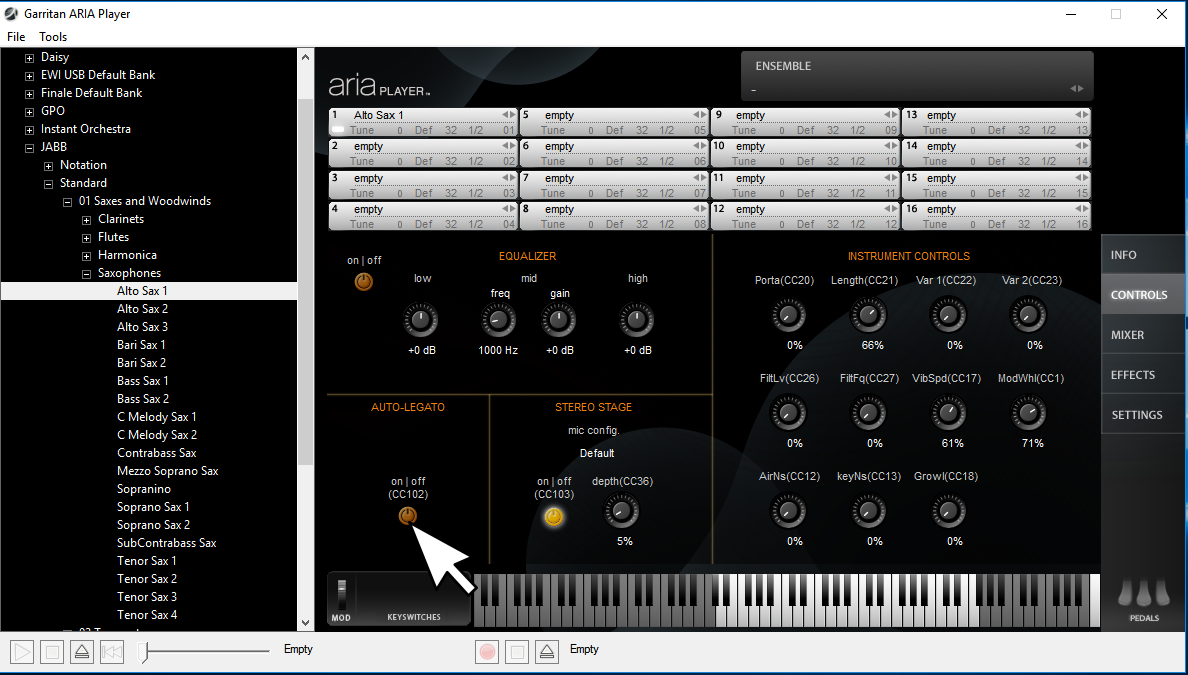
Some instruments from the "Standard Sets" can be toggled into a polyphonic mode if you look in the control panel and be sure that 'auto legato' is NOT enabled (CC102,0). 


Note, the "Notation" sets may not have this "Auto Legato" control showing in the ARIA controls tab. 


In some cases with the "Notation" sets (or with Finale Bank sounds that don't seem to support divisi staves), you might still try sending a CC102,0 event to see if that disables the auto-legato feature and allows a polyphonic stave.  Sometimes Garritan instruments still have 'remote control' support for CC102 present in the SFZ instrument definition itself, but it just does not show in the ARIA GUI.  Just be aware that if you disable Auto Legato, then the instrument will need CC68 events to 'enable/disable' the legato crossfade effect as needed.

So what does Auto Legato do?  When enabled, it forces an instrument into a monophonic mode.  If the first note is still playing when a second note occurs (overlapping notes), then the 'attack phase' (tonging portion in the case of a sax) of the sample is removed, and there is a kind of crossfade effect applied between the two notes, AND, if you've set it accordingly, portamento effects are also applied.  This is why you can NOT play 'chords' on an instrument that has Auto Legato enabled.  It tries to apply the legato/portamento effects instead of just playing all the held notes at once.


When Auto Legato is NOT enabled, you should find that chords are now possible, and that the only way to get the 'legato-portamento' effect is to send a CC68,127 (for Notation versions) or CC64,127 (for Standard versions).  Such effects will be applied to all sustaining notes together (so not good for contrapuntal entries on the same channel/layer/voice).  When ready to stop these effects, you'd send CC68,0 or CC64,0 events respectively.


For more expressive sounding mock-ups, it's generally best to give each virtual player his own stave/track.  If you want to make divisi style staves for printing a more condensed score, then you could just 'mute' such a stave from playback, and 'hide' the 'individual player playback staves' when it's time to format and print the score.


Also note that some Garritan Libraries come with a "Lite" version of instruments, and these are typically slightly less expressive polyphonic variants of a mono-only counterpart.  You can use these for divisi written staves, or anytime you'd like to be able to play 'chords' in a live scenario using the same instrument's sample-set.


In summary, realize that getting control of the many parameters offered by some of the more complex Garritan instruments may require customizing the Playback parameters deeper in Finale.  I.E.  You can assign CC68 events to various score marks (I.E. Make a slur mark send CC68).  It's also possible to use the MIDI Tool for things like manipulating vibrato or taking advantage of things like shakes and falls that are supported by 'some' Garritan instruments.


Comment actions Permalink

Please sign in to leave a comment.