New post
Avatar
0

Hello i need to hide and collapse staves in the parts i usually do (to save space), sometimes also in the score.

In finale 2014 already the hide and collapse was a hit and miss sometimes worked other times did not, without any apparent reason. 

In finale 25 IT NEVER WORKS!!!!!

Is there anything that can prevent to hide and collapse or is it a BUG?


if it is a bug PLEASE FIX IT!

It is very very inconvenient not being able to hide staves, the parts become very long!!!!


thanks


teo
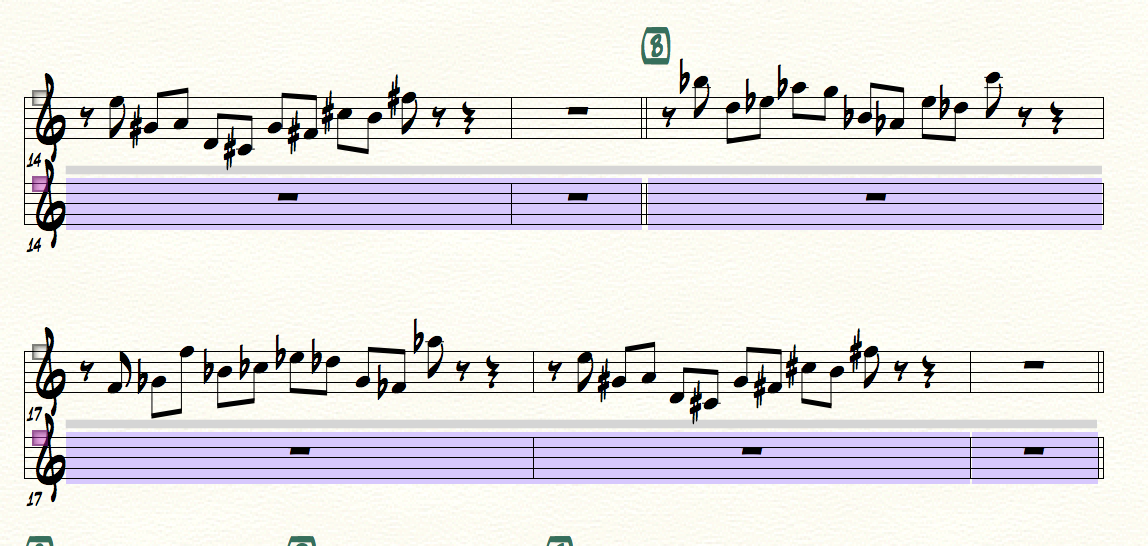
 

As you can see, i applied the the hide and collapse and nothing happens. 

It NEVER WORKS. Anybody else experiencing this?


Macbook pro with el capitan, finale 25

3 comments

Date Votes
Avatar
0

Hi Matteo,


It sounds like the issue may have to do with the definition of the staff style or some other file specific. Just to get some more info, if you right click the staff style (gray bar) with the Staff Style, choose Define Staff Styles, and then choose the hide and collapse style you are using in your score from the drop-down menu at the top of the Staff Styles dialog box, what do the options look like? Could you post a screenshot of that dialog box in your score in reply?


Hopefully we can get to the bottom of this one soon!

Comment actions Permalink
Avatar
0

Lawson!


thanks i realized you guys introduced the option score / parts !!!!!

In my finale 2012 i was using before, i don't think i had that or if i had it i never knew


for some reason this option was checked out at installation. i did not even know it was available. 

Please, when you guys introduce a new feature, can you please NOT put it as default?

same thing happened with transposing instruments such as bass, copying and pasting music outside of the range of the instrument was not correct because finale auto corrected to the available range. This option was new and checked out on installation... i went crazy to understand what was going on...

please don't introduce new behaviors as default! or if you do, please make an intro document / video specifying which behaviors are going to change from one version to another one... sometimes we just don't have time to deal with these problems... and this is why i tend to never update my programs... 

thanks for your help

now it seems everything is ok again


matteo


Comment actions Permalink
Avatar
0

Sounds good, Matteo!


I am glad to hear that the staff style is now working as expected. It sounds like the feature you are talking about (Force hide staff: in Score Only (Collapse), or was it a different feature?), was in Finale 2012, but perhaps was just on for this file? Either way I am glad that you found the problem, and I do agree that sometimes the default options (like the "Respect instrument ranges when copying or changing instruments" option) can be confusing.


We do have discussions around here about whether options like this should be on or off by default and there are, frankly, pros and cons to both opinions!


That being said, I do appreciate the feedback. It is helpful to always keep in mind the visibility of new features. When we introduce new features we do add them to either the Read Me document or User Manual's New Features in Finale article (that link is for Windows, but it can be found under What is > What's New). I also find the Interface Changes (What is > Interface changes) and Fixes in Finale (What is > Fixes in Finale) articles in the user manual to be informative.


Hopefully this will only keep getting better!

Comment actions Permalink

Please sign in to leave a comment.