New post
Avatar
0

Hi! I am now using ideas from Kevin M to switch between Garritan "aahs" and "oohs" on the same staff in choral works--the idea being to put the sounds in different layers and then move notes between layers when sound change is desired. This works fine and isn't as cumbersome as I thought, but the "aahs" volume is much louder than the "oohs" and I have been trying to reduce it without putting visible expressions (pianissimo etc.) in that would mislead singers.

My thought was to simply go to the MIDI tool and set key velocities to a lower level for certain regions. This I have done, as confirmed visually in the MIDI tool, but there is no effect on playback even if velocities are set to 5 instead of 64. I also tried reducing continuous data levels but no luck. I have turned human playback on and off but no difference.

Any suggestions?

Mac El capitan, Finale 2014.5, Garritan sounds.

2 comments

Date Votes
Avatar
0

Volume for  sustained sounds in Garritan is frequently not controlled by the attack velocity but by a different Controller (C11 ?). 

  • Realize that you can apply dynamics to the different layers and hide them CTRL-ALT-SHIFT+H. Changing volume in the Aria mixer will not work, since it responds to changes in Finale's written dynamics.
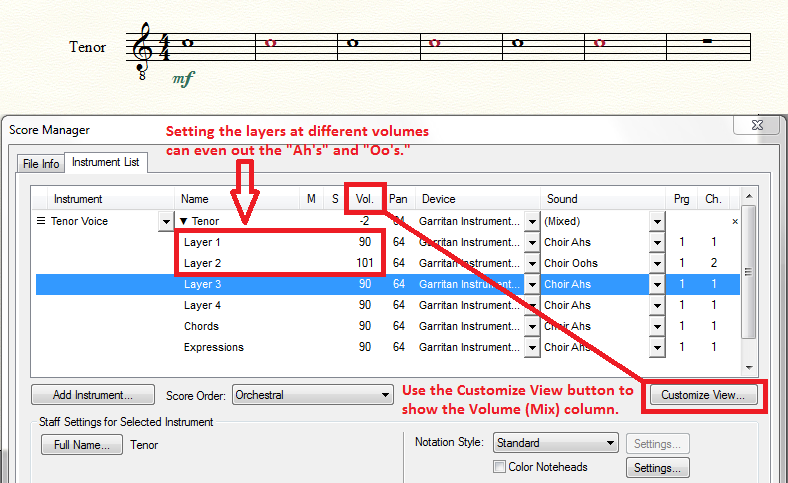
  • Have you tried adjusting the volume in the Score Manager?


Comment actions Permalink
Avatar
0

Thanks very much! Somehow I hadn't noticed the "customize view" button on score manager, but have now tested results using volume changes in layers. Hiding dynamics is another good tool, but the score manager volume change is more efficient if switching back and forth between sounds since only a single change is needed even if the sound occurs several times.

I had realized that sustained sounds might not be controlled by attack velocity, but other things I tried with the MIDI tool didn't work either. As a result of this issue I ended up delving deeper into things I really hoped I wouldn't need to learn, staring a long time at all the items in human playback preferences and trying things there so that I would know what they affected, also messing with "custom" human playback styles, and finally jumping into the world of Aria player. There, in Aria player, I had the same problem others have discussed in which changes in mixer volume jump back to default when "play" is pressed, but I did find that for choral sounds there is the ModWhl(CC1) controller which I could set to specific volumes for a certain sound. 

In any case, thanks again!

Comment actions Permalink

Please sign in to leave a comment.