New post
Avatar
1

While working on this piece, I pressed something inadvertently and the systems are now spread out unevenly and some overlap. I have tried fixing it using the Spread Systems Evenly option in Page Layout, but I am only making it worse. I've researched this on the internet, in forums, and online user manuals with no success. If someone could to explain to me how to fix this, I would be very appreciative. I am also attaching the file for you to review. Thank you.

3 comments

Date Votes
Avatar
0

Try using Distribute Systems ( near bottom of the menu). Set the number to a reasonable amount.

Just a thought.

I have been struggling with similar issues all day.

Comment actions Permalink
Avatar
0

I used Distribute systems to try to fix what I did. There is some weird spacing going on and moving the system doesn't move anything far enough. Is it weird that the handle boxes and much farther apart than the system itself? Do I need to adjust that and if so, how it that accomplished?

Comment actions Permalink
Avatar
0

I suggest you try this on a copy of your file for safety sake.


To try to restore and manipulate the appearance of your systems with a bit more control than the "Space Systems Evenly," try this:

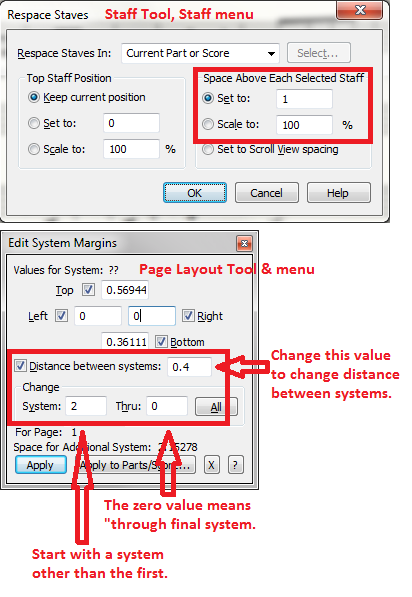
  1. Select the Staff Tool and the staves of all systems that need readjusting. Then use Staff menu > Respace Staves to set all staves to a baseline distance apart. (1" to 1.25" are more or less the Finale defaults).
  2. Then in the Page Layout Tool choose the first system that needs respacing (but not the first system, which always has additional spacing for the title info) and the Page Layout menu > Edit Systems Margins option to alter the distance between systems. I generally start by adjusting all systems (using zero as the System Thru parameter) and then going back to make any needed changes page by page.


Hope that helps.


Comment actions Permalink

Please sign in to leave a comment.