New post
Avatar
0

Using Garritan IO4 and COMB2 with Presonus Studio One Professional on a Windows 10 computer.

I rely on Garritan, both COMB2 and PO4, for a number of instruments and am pleased with the quality of the samples, however the volume of sounds is markedly lower than other sample libraries that I regularly use. I have tried searching for a solution and, in the knowledge base, I found what seemed to be the solution to my problem however I am unable to implement it. I have confirmed that I am using the most current version of the Aria Player and Engine. According to the article I can alter the volume by the following steps:

Open the Aria Player.
Select the Instant Orchestra patch that is too quiet.
Click Controls.
Turn on the Expression Switch.

I have tried to follow these steps however, both in freestanding and VST instances of the Aria player when I select the patch and click Controls, there is no setting for Expression Switch. The only controls are for ON/OFF for the Equalizer, ON/OFF for Auto-Legato, and ON/OFF for Stereo Stage and the Instrument Controls (Porta, Length, Var 1 & 2, etc.) I have the slider in the Mixer window all the way up as well. I have seen other references on other forums to raising the master volume in the mixer however I do not see a slider or setting for Master Voume, only the 16 sliders that correspond to the various patches/channels.

At present the only workaround I have, which is time-consuming and frustrating, is to lower the volumes in my DAW for all non-Garritan instruments.

Any advise or insight would be most appreciated.

1 comment

Date Votes
Avatar
0

Something that might be helpful to know, is that Garritan Libraries tend to use CC1 (Mod Wheel) or CC11 (Expression Volume) events to control the dynamics for Wind, Brass, and Bowed-String instruments.  Some instruments of this nature might also change the style of attack according to note-on velocity a bit, but this 'note velocity' doesn't effect the note's attack 'volume' for such instruments.  While this approach is pretty common for orchestral and wind band libraries, it's a little different from the General MIDI method, where note on velocity can change the attack volume of a note (striking a key harder makes it louder).  Also note that CC1 and CC11 changes are relative to the Master Volume of the instrument (CC7).  So, you can enter all sorts of dynamics with CC1, and later if you do a CC7 Master Volume change for the track, all of those CC1 dynamics will 'scale' with your Master Volume changes.


It's also helpful to know that for such Garritan instruments, CC1 AND CC11 do the same thing (expression volume); but you could use both types of events in a project to help isolate note attack volumes from things like hair pin dynamic changes over time (crescendos, sfz, etc.).  I.E.  You might set your attack volumes using CC11, and do your hair-pin dynamic changes with CC1, thus making it easier to find events and make relevant changes in your DAW's MIDI Editors and scripting/logic features. 


A little extra info:  Some Garritan instruments have multiple samples for different volume levels.  I.E. playing softly might use a different sample from playing loudly.  Sometimes the sample/layer changes are done via CC1/CC11, and sometimes via Note Velocity.  Sometimes they 'crossfade', and sometimes they simply 'change' from one layer to another.  This behavior can vary from library to library, instrument to instrument, and the only way to truly know is to either 'try it', look in the documentation for the Library, or examine the sfz file for the instrument directly (you can look at them with a text editor, and even make edits...but always keep backups if you do).  Even more instruments will just have a single layer, but will alter various filters and envelope settings in real time as you play.  The point to this paragraph is simply to inform that sometimes instruments expect individual note volume and attack style to be implemented in different ways.  The more 'expressive' an instrument is by nature, the more more 'options' it is likely to have...including methods to induce things like vibrato, and even portamento effects, so, it's not uncommon to have an instrument where velocity changes just adjust the attack envelopes for relative-attack-volume-over-time, and/or various filter/timber-over-time settings, while the actual note volume (pp, p, mp, mf, f, etc.) is done via CC1/CC11.


For the wind instruments in COMB2, be aware that instead of using 'note on velocity', individual note dynamics are controlled via CC1 (Mod Wheel) or CC11 (Expression Volume) events.  In the least, you'd want to insert a CC1 or CC11 event (between 0 and 127) at the beginning of the track for 'expression volume'.  I.E.  CC1 @ 64 sets expression volume at 50%.


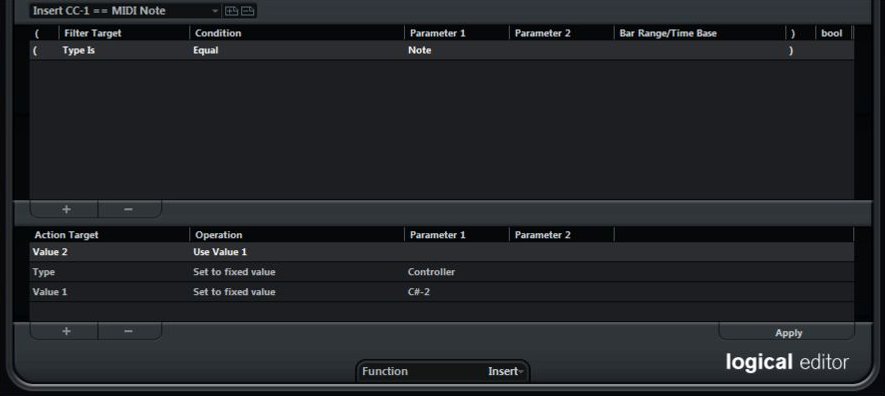
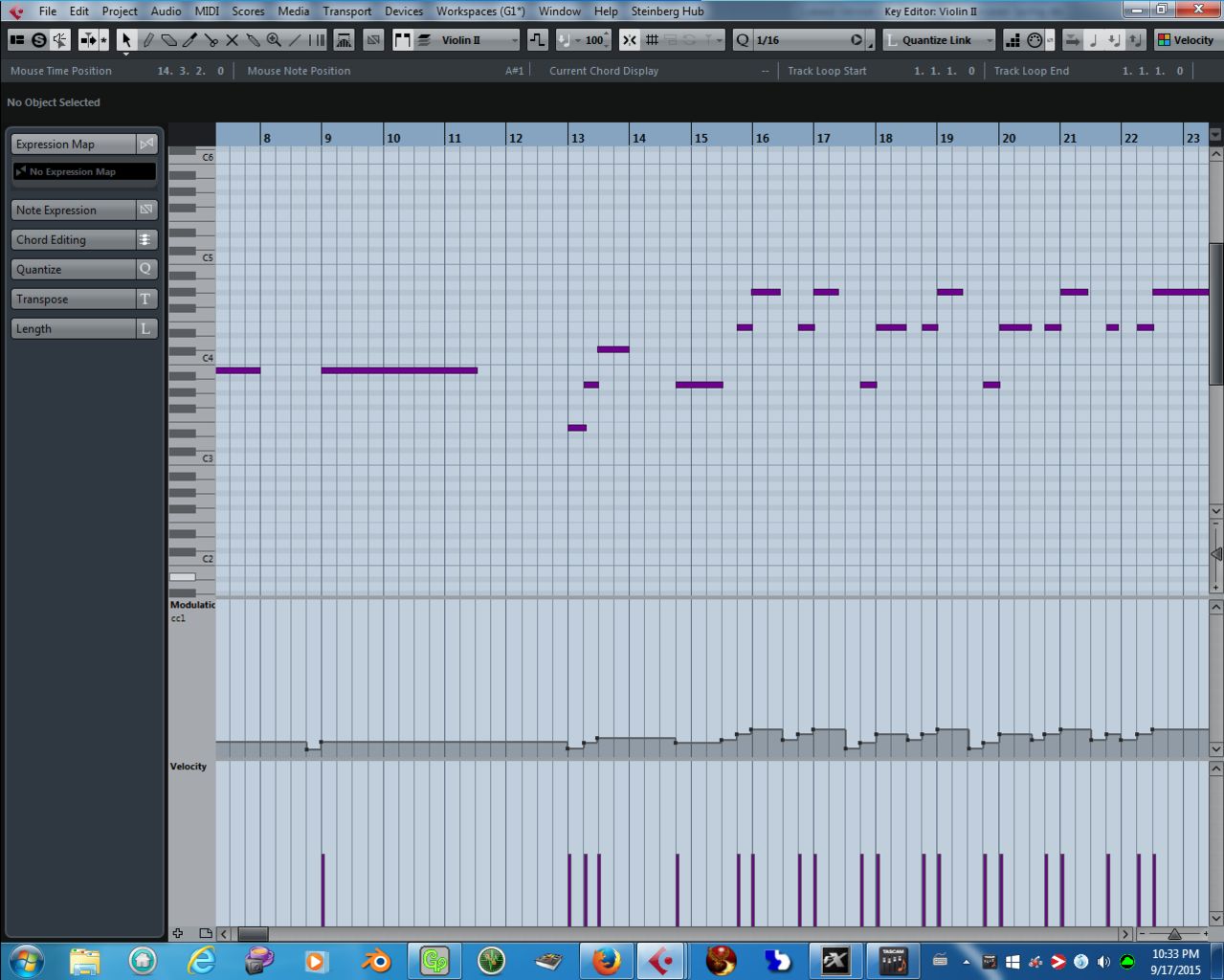
I'm not sure how to do this in Studio One, but there is probably a way.  In Cubase, I can make simple little scripts called Logic Editors to quickly/easily batch edit such processes, and I'm pretty sure that Studio One has a way to do these sorts of fast and easy batch edits as well.  So, run whatever script or logic editor the DAW has to insert a CC11 or CC1 event that's equal to the MIDI note-on number just before each note.  This will give a good starting place for fairly realistic dynamic changes.  As notes go higher in pitch, volume will get gradually louder, and notes go lower, note attack volume will get slightly softer.  From there, you can manually make note by note adjustments with your MIDI editors to change note attack dynamics as required, or run more scripts/logic editor passes to balance everything out to your ear's pleasure.


(Example of a Cubase MIDI Logic Editor that inserts a CC1 event before all selected note-on events.)

(Results after running the above logic:  Notice that each note now has a CC1 event on the same time stamp, and its value is the same as the the MIDI Note.)


IO (Instant Orchestra) provides two different modes for interpreting dynamics.  You can use GM mode, which responds to key velocity for note attack volume, or "GPO" mode, which uses CC1 (Mod Wheel) or CC11 (Expression Volume) for Winds, Brass, and Bowed instruments as described above.  This can be toggled from the IO control panel, or using CC104 events.


GPO4 and GPO5, COMB, World Instruments, JABB, etc.

All of these libraries use a combination of methods, depending on the type and nature of the instrument.  Some will use CC events to control dynamics (Winds, Brass, Bowed Strings).  Some will use velocity (Pianos, Percussion, Plucked Strings, In some cases percussive bowed strings, etc.).  A few in GPO5 can even use either method (or both at the same time if you tweak everything out just right using hidden CC112 events along side your CC1 expression and Velocity lanes).

Comment actions Permalink

Please sign in to leave a comment.