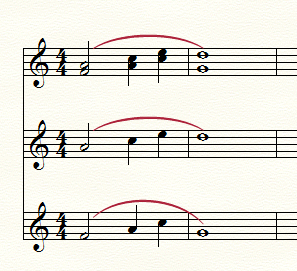
- When you have taken the time to add phrase markings with Smart Shape tool, they are not copied when you explode parts. Dynamic markings, lyrics, etc. all copy but not phrase markings. This was has been a problem starting around Finale 2014 that has not been fixed. A quick workaround is after you exploding your parts, is to copy the one part with the correct phrasing and then to through Selected Items and marking only Smart Shape Tool, you can copy and paste them to the other parts which is much quicker than doing it manually. However, this is a glitch and needs to be fixed. I am running Finale 25 and Mac 10.11.1.
Please sign in to leave a comment.


1 comment
Date Votes