New post
Avatar
1

Over the years I've continued to have intermittent issues with notes tied over the barline not being sustained for their full value (just playing for the value of the left-hand note).

I've tried deleting the notes and replacing them. I'm confident that I'm using ties and not slurs. I've tried the "Check Ties" command.

Nothing fixes the problem consistently -- and since I mostly write vocal music (either lead sheets or voice-piano arrangements), there's a point when deleting and replacing notes gets frustrating in terms of restoring the lyric that gets deleted at the same time.

Surely I'm not alone in having this problem. And if I am, what am I doing wrong? 

BTW, when playback encounters a tie, sometimes I hear a little skip or glitchy noise as well.

Thanks!

Mark

Mac OS 10.12.4

Finale 25.3.0.276

Play Finale through Audio Units

Human Playback: Standard

Garritan Instruments: Bb Clarinet Player 1  (for tied notes)


4 comments

Date Votes
Avatar
2

Under Midi Audio/Device Set-up/Audio, make sure it's set to 24/96, and 4096 Buffer Setting.

Lower Values will cause glitches.

Comment actions Permalink
Avatar
4

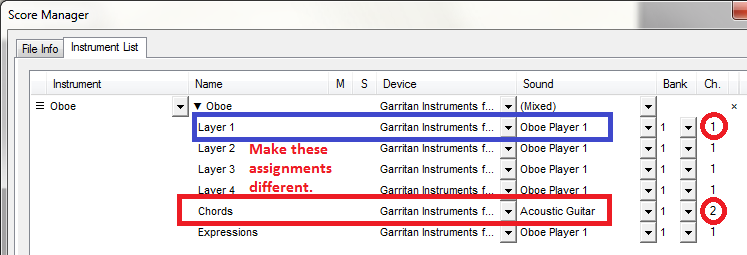
Realize that if you use chord symbols on a part and use the same instrument/MIDI channel for the chords as for the primary voice(s) on the staff, a chord change will cut off a sustained note in your primary voices.


The answer is to set the chords to a different instrument sound than the voices on the staff.


Comment actions Permalink
Avatar
1

Thank you both for your advice -- very helpful!

I don't think I would ever have figured out the chord/tie thing on my own. I did have the chords in the same voice, but muted. Seems like even when they're muted, the cutoff still takes place.

Comment actions Permalink
Avatar
0

three years later and this just saved my life!!!!! thank you  J Adrian!

Comment actions Permalink

Please sign in to leave a comment.