New post
Avatar
0

I'm trying to change the shapes of some notes to "X" for muted strumming in my piece. The problem I'm having is when I make the selection to change to X, what is displayed on the staff is a 16th note instead.
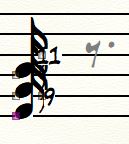


I've tried restarting the program, and have tried other documents, but the same thing is happening each time. Any known fixes?

2 comments

Date Votes
Avatar
0

Make sure you are using the Selection Tool (and only use a single click).

This looks as if you might have double-clicked on the note, which would put you into the Simple Entry Tool.

Comment actions Permalink
Avatar
0

I've gone through by clicking the measure, then right-clicking the box next to the note, selecting edit, de-selecting the "use default carrier" box, clicking the "select" option which pulls up the symbol selection window. I then tried both possible "X" options. Both of them display incorrectly as other symbols when selected.

--------------------

I fixed the issue by deselecting the option for using the default notehead font. After the font changed from "Broadway Copyist Text 11 plain" to "Broadway Copyist 24 plain," a new selection box was available for symbols. The X's now display correctly.


Comment actions Permalink

Please sign in to leave a comment.