New post
Avatar
0

Hi All,

I just did a time signature change from 6/8 to 6/4 that didn't quite work out. The initial notes of the first measure ended up in the measure before where they should be. So that - the 1, 2/3 which should be in the proper place of its measure notated in the 4, 5/6 beats of the measure before.

So wondering if there is a way to push the necessary notes (and all the ones preceeding) 3 beats ahead ... and insert the few that notated early into their proper place. That way the whole piece would be back in time.

Hopefully that reads OK, but please let me know any questions.

Thanks a million,

Les


5 comments

Date Votes
Avatar
0

Hi Les,

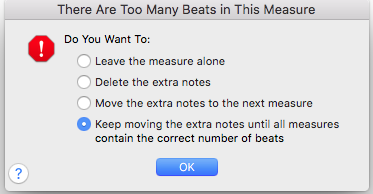
I think what you need to do is: Select Speedy Entry. Make sure "Jump to Next Measure" is deselected. Select the measure where you want to insert the first three beats, positioning the note entry cursor on the first beat. Then hit shift-5 to insert a quarter rest before the first beat or shift-6 to insert a half rest. Use the Enter key to replace the rest(s) with the notes you want. Finally hit the close square bracket ] to advance the cursor to the next measure, and the following dialogue box appears:

Select the fourth bullet, and the rest of the measures should adjust as you need. You'll need to do the same for each staff.

Hope that helps.

Arnold

Comment actions Permalink
Avatar
0

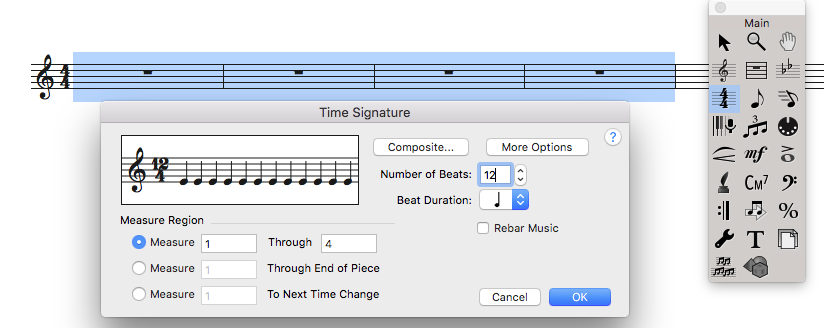
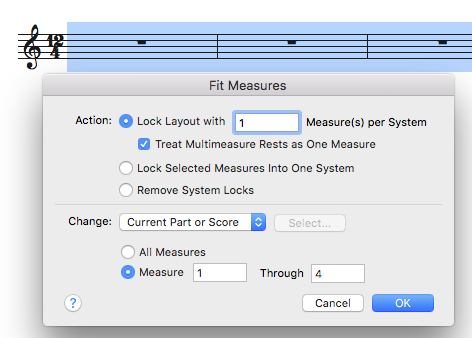
How to change time signature to 12/4 at the beginning of each line with a bar line at the end of each line.

Comment actions Permalink
Avatar
0

1. Use the Time Signature Tool to change the time signature in the affected measures to 12/4.

2. Choose the Selection Tool, select the measures and then choose Utilities: Fit Measures (Mac command-shift-M) and fill in the dialog box:


Comment actions Permalink
Avatar
0

How do I change the time signature to 3/2?

Comment actions Permalink
Avatar
0
Comment actions Permalink

Please sign in to leave a comment.