New post
Avatar
0

I installed JABB3 a couple of days ago into Logic Pro X on OSX ElCaptain 10.11.4.

I have the samples all working and can adjust the controls shown on the control panel but can’t automate them. 

What I really now need to know is:

Why isn’t JABB 3 showing up in my logic X’s automation control? I can’t automate JABB 3 and since I can’t there is no way of finding the Midi CC’s for the other fx like trumpet fall-offs, shakes etc not shown on the control panel.

Why isn’t there key commands for the above mentioned fx? The only key commands I can find for the brass is for the different mutes.

What do you get extra in the $50 upgrade? Do I need the upgrade to get the fx not listed on the Control panel?

Why does it keep telling me that my serial number is invalid for the upgrade?

Please help?

10 comments

Date Votes
Avatar
0

ARIA Player does not implement VST automation directly, but you can automate the controls using MIDI CC messages.


With an instrument loaded into an active ARIA slot, look beside a control in the ARIA control panel, and in parenthesis you'll see the CC designated for that control.


I personally don't know much about Logic, but I suspect you could keep a CC lane among your usual VST automation lanes somehow, or you could automate ARIA from directly inside your instrument/MIDI tracks.  Perhaps MIDI Draw is a good method for your workflow?

Comment actions Permalink
Avatar
0

If you have JABB3 already, that is the latest version.  You do not need to upgrade.

Comment actions Permalink
Avatar
0

With JABB3, it's definitely a good idea to read the manual pretty carefully, as there are various methods to control things like brass falls, doits, and kisses that are not obvious just by looking at the control panel. 


Instead of using key-switches for articulation changes, the designers of JABB3 elected to control the special articulations for Brass Shakes using CC64 (not obvious looking at the control panel).  Falls, Doits, and Kisses (Trumpet) are done with CC15.  To get various bucket/plunger/wah-wah mute effects you'll also want to manipulate CC16.


There is a reference chart somewhere around page 67 in the JABB3 manual listing all the CC events that can be applied.  It's worth keeping a copy open during your first forrays into using JABB in an open tracking DAW like Logic....as some of this stuff does NOT show up in the Control Panel....so you don't know it is there without the manual.


You can always find the OM of a Garritan Library by clicking the info tab of a loaded instrument.  Inside the splash screen for the instrument will be a link to the manual.  In most cases it will open a local PDF version of the manual; while in some of the newest libraries (LIke GPO5) it takes you to an online manual (if connected to the internet).

Comment actions Permalink
Avatar
0

Hey Brian - thanks helping me with this! I appreciate it. 

So I want the trumpets to do fall-offs, shakes and doits but the CCs that apparently trigger these fx aren't located on the Aria Player Control Panel. This what the Garritan support guy said,

"Not all CC's are listed on an instrument's Controls panel, but Finale and any DAW (like Logic) has means of adjusting CC messages"

This seems crazy to me - Anyway, so because I can't automate there's no way of finding CC#15 (that's apparently what controls fall-offs) and no way off communicating with Aria Player. Even when I adjust one of the other Controls that is a knob in the Control Panel in real time logic wont write it.

So frustrating!

I looked in MIDI Draw but that's unfortunately not the answer (thanks for the suggestion though!)

Cheers

Scott

Comment actions Permalink
Avatar
0

OK, see if you can figure out how to open a CC lane in your actual MIDI editor.


From there you just draw in the events you want, where you want them.


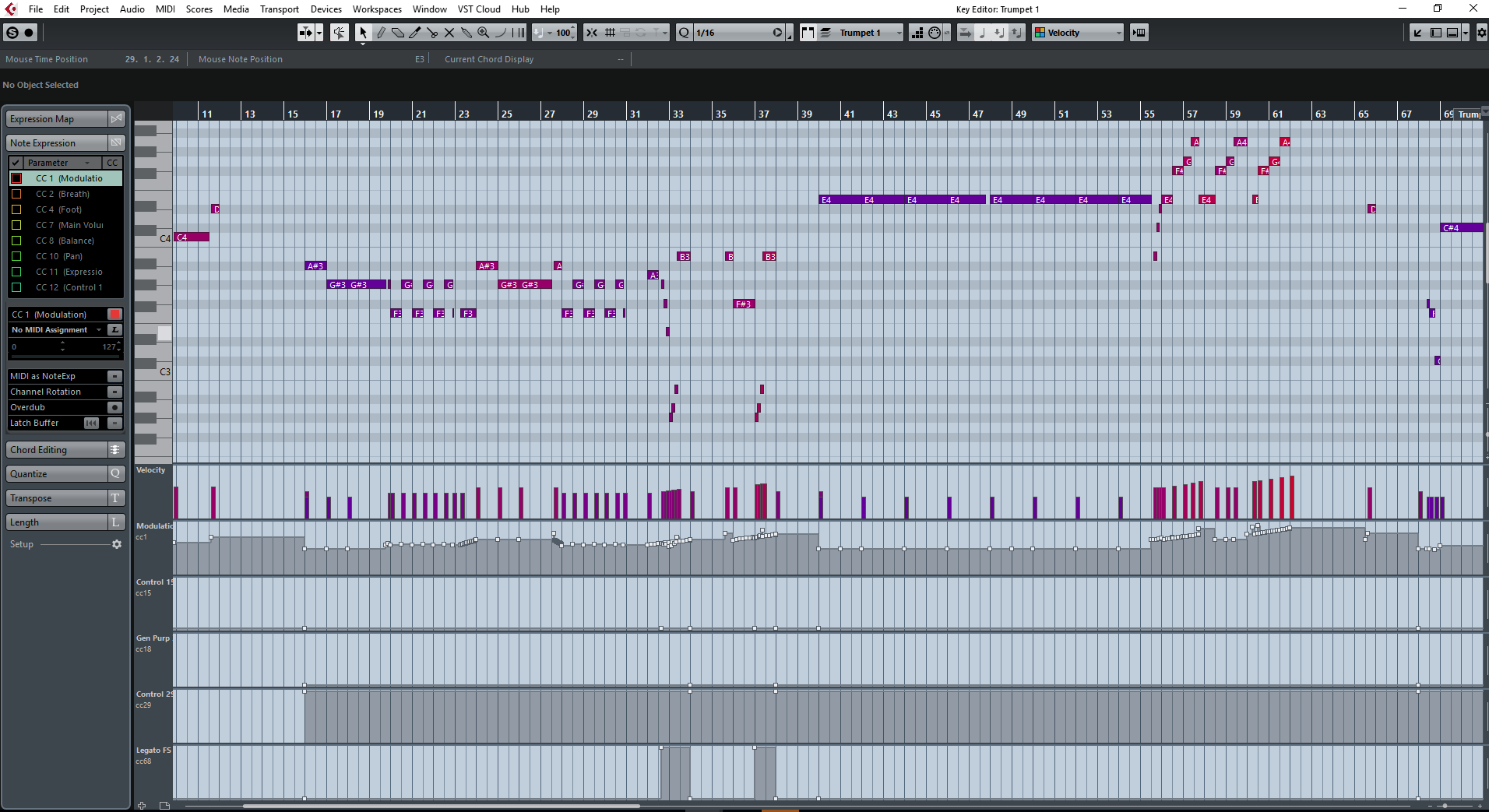
Wish I could be more helpful specifically with Logic, but here is what a typical First Trumpet part looks like for me in a CuBase MID Key (Piano Scroll type) Editor (I'm fairly sure Logic has similar abilities):


Notice how I set up controller lanes where I can just draw stuff on them.  In Cubase, I could also elect to keep this data in track automation lanes, or even locked into individual note expression containers (Double click a note, and draw the controller data there, so it moves around with the notes if quantized/copied/pasted/etc.).  Logic is a very mature and powerful DAW as well, so I would not be surprised if you don't also have LOTS of options in work-flow and where you keep things there as well.

Comment actions Permalink
Avatar
0

Brian I think I might have cracked it! I managed to get a fall off happening! so exciting. I'll keep experimenting - thanks heaps for your help!!!


All the best to you sir!

Comment actions Permalink
Avatar
0
Comment actions Permalink
Avatar
0

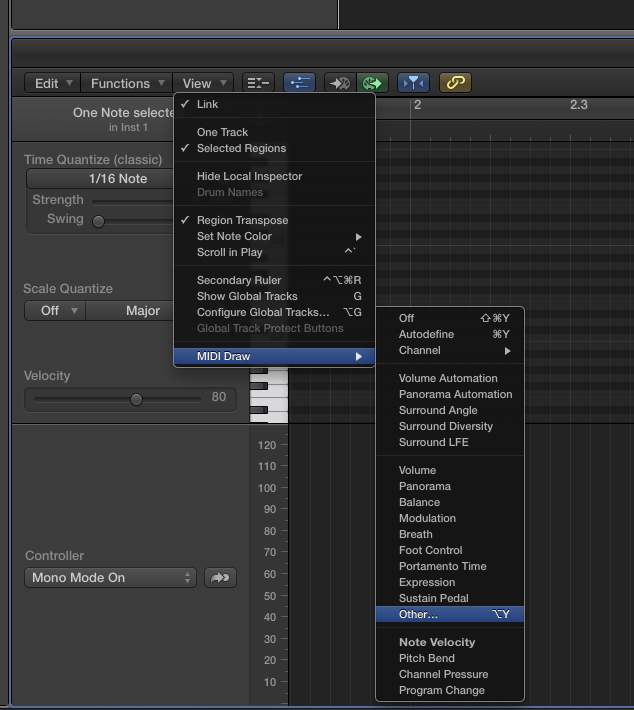
As Brian showed you, this is done in the DAW, not the Aria player. I use Logic and it's very easy to do.  When you're in the piano roll view, go to View, midi draw, other.  From that you'll see a list of all of the midi controllers. Choose #15 and draw you're data in .


Comment actions Permalink
Avatar
0

Thanks Jeffrey - much appreciated! 

Comment actions Permalink
Avatar
0

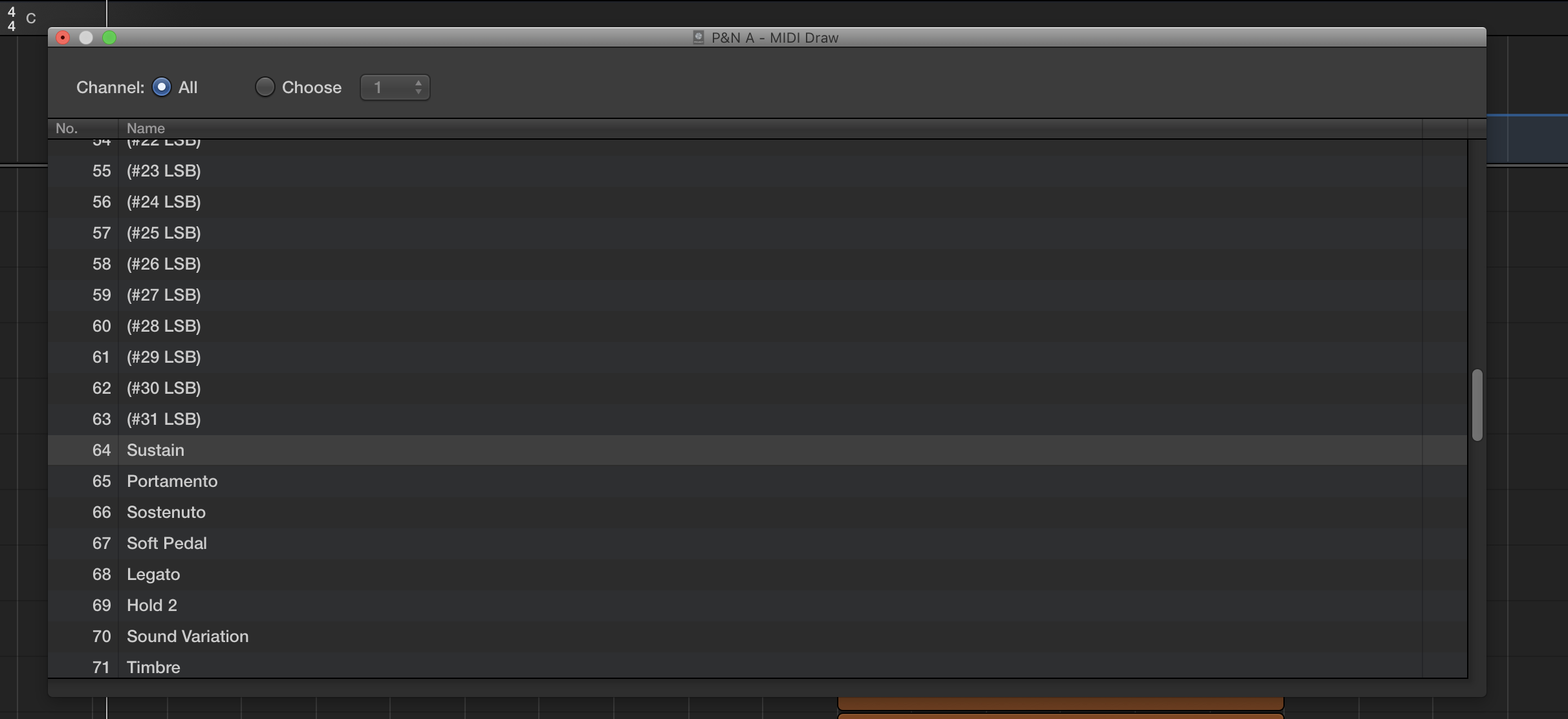
Hey Jeffrey, I got the falloff and the doits working fine but when I select MIDI Draw then Other in logic, there is no CC#64 on that list for trumpet shakes and so I'm unable to get them working. Next to number 64 in the MIDI Draw/ Other list is 'Sustain' I was thinking that maybe 'sustain' has been assigned to CC#64 and maybe I need to re-assign 'sustain' to another CC and free CC#64 up for trumpet shakes? 

Do you have any ideas? I'd really appreciate it!

Cheers


Scott

Comment actions Permalink

Please sign in to leave a comment.