New post
Avatar
0

Windows 10, Finale 25

For years I wrote arrangements - hundreds of them - using the Encore notation program and a Korg X5DR hardware MIDI module because of its Latin percussion sounds as one of the drum kits and reasonable other instrument sounds.  I have recently undertaken to transfer the arrangements over to Finale via musicXML.  I still use the X5DR, and Finale recognizes it.  The issue is that I cannot create a percussion map that both plays the correct MIDI notes and puts the notation on the line/space I want with the correct note head.  Here are the facts (see the picture below to clarify my explanation:

  1. MIDI/Audio -> Play Finale thru MIDI
  2. MIDI/Audio -> Device Setup -> MIDI Setup sees MIDI Out  as USB MIDI and MIDI In as Oxygen49 (my MIDI Controller Keyboard)
  3. Audio setup doesn't matter because it is the output of the X5DR
  4. In the Score Manager window, all tracks use USB MIDI Studio26c
  5. There are three percussion tracks: Timbales, Congas and Bongos. I can set up staff position and note head types for them but not the MIDI note numbers.  They play fine (the X5DR Latin percussion MIDI note assignments are not like GM Drums) because the correct notes were imported.  The issue is that the notation is not what I wanted.
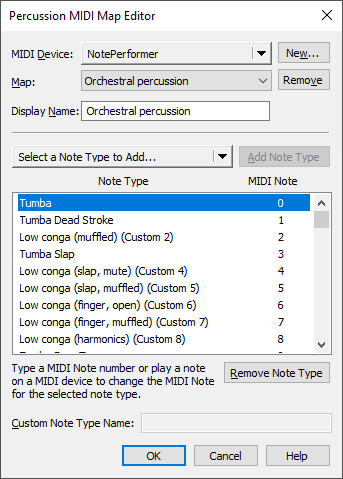
  6. Using MIDI/Audio -> Device Setup -> Edit Percussion MIDI Map I have created a kit called X5DRPercKit into which I added all the percussion instrument types (hand percussion has different strokes as individual types) for each of the three instrument setups (Timbales, Congas and Bongos).
  7. This information never gets connected back to the staff position and note head types so the MIDI note numbers are different in the two places.  Therefore the notation is wrong.

Any suggestions? What am I missing?

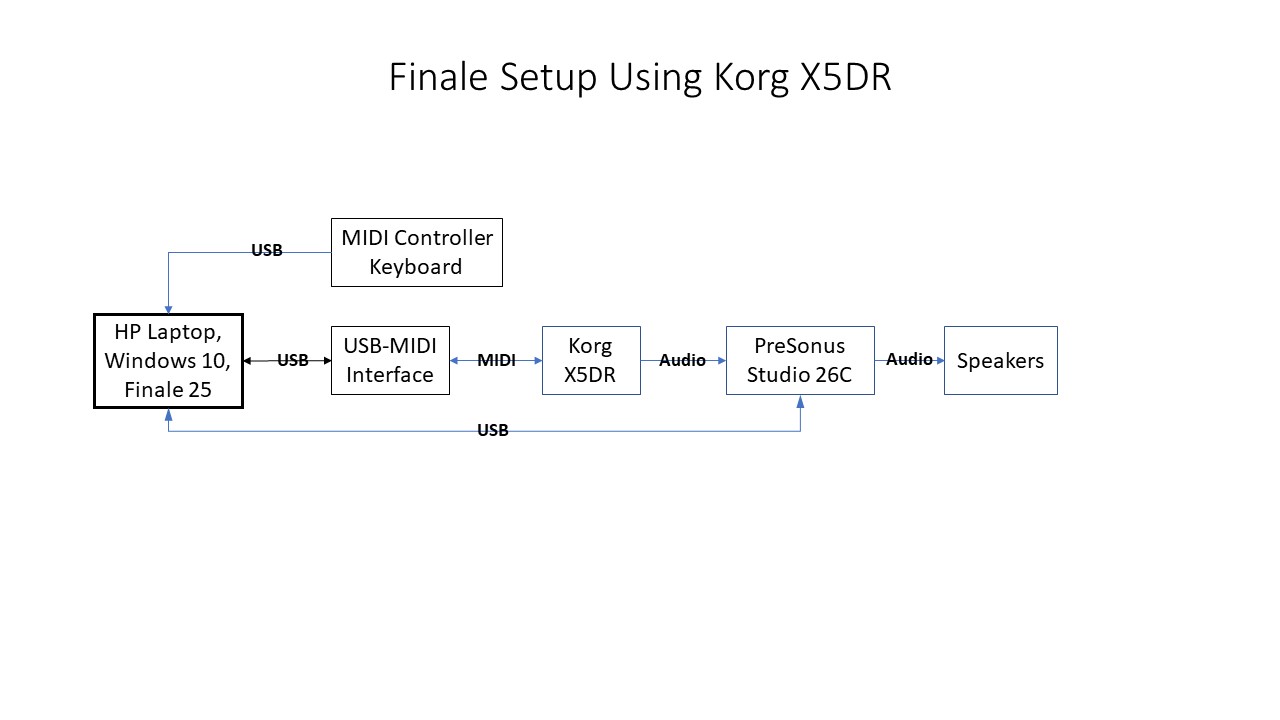
Here's my setup:
8 comments

Date Votes
Avatar
0

You may already know this, but...


The Percussion Map connects instrument names to the MIDI codes that play the sounds.


(The Percussion Input Map is something else again, which I won't go into here.)


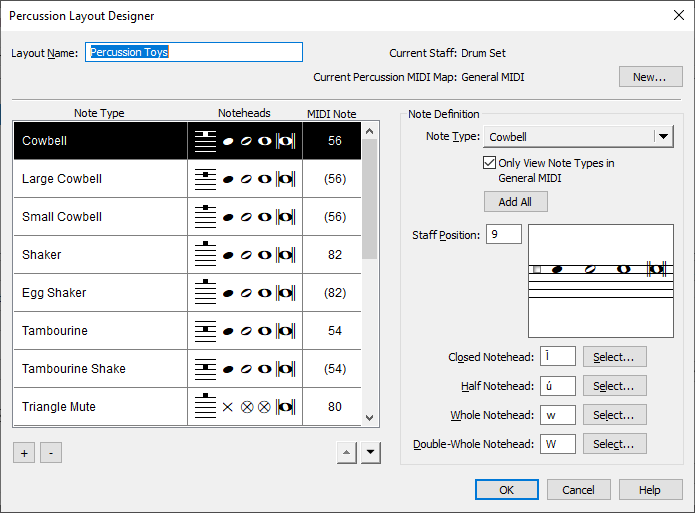
The Percussion Layout connects those instrument names to lines, spaces, and notehead symbols on the displayed staff.


Comment actions Permalink
Avatar
0

Thanks Jan. I have created layouts for the three percussion instruments: timbales, congas, and bongos needed in my scores. The layout tool won't allow me to change the MIDI note numbers. It's as though the tool has already made its mind up what device will play back the music. 

Separately, I have created a MIDI map for the synth module X5DR and the drum kit (channel 10, program 65) that has the Latin percussion sounds I need, with the same note names as in the layout, plus the correct MIDI note numbers. Those numbers match the MIDI of the imported arrangement. But because the layout has the wrong MIDI note numbers, the notation is wrong. And, as I said, I can't change them in the layout tool, even though every note name matches one in the map tool. They simply aren't talking to one another. The score plays back correctly, it's just that the percussion notation is wrong. So, I can't print a score out to sell it.

I'd do it in Encore, which I used to create them, but that software is old and buggy in Windows 10 and the company is out of business. 

Comment actions Permalink
Avatar
0

Then perhaps you should send your file to MakeMusic support via the "Submit a request" link above.


I would check the Map you are using is the correct one at the top right of the Layout panel. Since you haven't shown any panel images of what you have done already, diagnosing your problem further is nearly impossible.

Comment actions Permalink
Avatar
0

These are the steps I follow when creating percussion maps and layouts.

1. I create the percussion map first. The MIDI note numbers match the midi note numbers for the assigned sound through the playback device.

2. Create the percussion layout for the selected percussion midi map. The midi note number displayed in the layout dialog can't be changed (as you've discovered) because it has already been set within the midi map.

3. If you want to change the midi note numbers (to make note entry easier when using a midi keyboard for example) you would need to create a new percussion midi map and then go through the process of selecting this new map. The steps for this are in the manual/help. I don't use this much so I'd need to review.

Comment actions Permalink
Avatar
0

Thanks, Ted. I understand exactly what you're saying. But one question remains. I created the MIDI map under the name X5DR, the name of the Korg MIDI module that does the playback, but the layouts have the names of the three instruments: timbales, congas, and bongos that I'm trying to get to get correct notation for. (And I remind you that the score was imported from another notation app.) Does having differing names frustrate the recognition by the layout?

Comment actions Permalink
Avatar
0

As I reread you original post and subsequent replies it sounds as though you have created a single percussion midi map for your sound module. You've also created 3 separate percussion layouts, correct my if I'm wrong on this point.


If all of the sounds you are interested in using are part of the same instrument group from the sound module (you mentioned the X5DR Drum Kit) then I would create a single percussion layout and name this new layout X5DR Drum Kit.


There are a couple of things to check in the Percussion Layout Designer. Make sure that the Layout Name is what you want it to be, you can also create new layouts from within the Score Manager. Current Percussion MIDI Map matches the one you've created, Click New and select it from the displayed list. I'd also check the box for 'Only View Note Types in Percussion MIDI Map.


Based on your comments in this thread I presume you are good with using the Score Manager to assign Percussion MIDI Maps, selecting the Percussion Notation Style and selecting the matching Percussion Layout. That last step, assigning/selecting the percussion layout brings up a list of all the layouts for that file. If you don't see it here, then you can create a new one using the buttons at the bottom of the window.


The thing I learned early on when dealing with Finale and percussion is that the MIDI Maps are available for all Finale files. Create them once and any file (previous or new) will have access. Percussion Layouts are associated with a single file. You would have to export a library that contains the layouts and then import it into a new file.


I hope this helps. 

Comment actions Permalink
Avatar
0

Thanks, Ted. After your clear explanation, I think that where I went wrong was to use other sound sources than the Korg X5DR Percussion Kit (the X5DR is the hardware MIDI module and the Percussion Kit is one of its 8 specialized drum kits - the one with all the Latin percussion instruments I need) in the layout. I just need to go back and redo the layouts using the correct source. And thanks for the heads-up about the need to export the layouts into a library. I wouldn't have figured that out by myself. And, further, I'll check out the Percussion Input Map and what it does.

Comment actions Permalink
Avatar
0

Thanks Ted Boliske for your explanation.  I realized several things and was able to accomplish what I needed to do.  First I needed to create a new MIDI Percussion map.  I selected the Drum Kit of interest from my X5DR and found a suitable drum name (or used the Custom option to create one) for each MIDI Note Number in my Drum Kit's range.  This gave me a readable basis with the correct MIDI Note numbers to create separate Percussion Layouts for Latin Hand Percussion, Congas, Bongos, and Timbales.  And following your hint, I exported it to a library X5DRPerc.lib with only percussion layout option selected.  Thus I have the library to import into any new arrangements I make.

The other thing I realized along the way is that those inscrutable PercNoteType numbers are simply the ones connected to the individual percussion sounds in Finale's Garritan Instruments for Finale.  Since those samples have nothing to do with the playback using my hardware synth, they are only important if I were using Finale's sounds.

Comment actions Permalink

Please sign in to leave a comment.