I am trying to lower the click volume in Finale 2014.5 I use Windows 10.
I change the velocity in the Click & Countoff dialog box but no change occurs. Th click is set to Finale sound, If I change for a MIDI sound, well, no sound is heard...


This issue, among with many others in Finale, is very annoying! Even many free applications do provide the possibility to easily change the loudness of the click track! Dear developers at makemusic make an effort and try to make finale more intuitive! It#s no wonder that so many musicians are switching to Sibelius & co;-(

This certainly is something that should work in Finale. As such, it has been reported to our developers. As a workaround, I usually suggest switching to the MIDI Note option in the Click and Countoff (MIDI/Audio > Click and Countoff) dialog box. That option will allow you to edit the key velocities for the Down Beat and Other Beats fields.
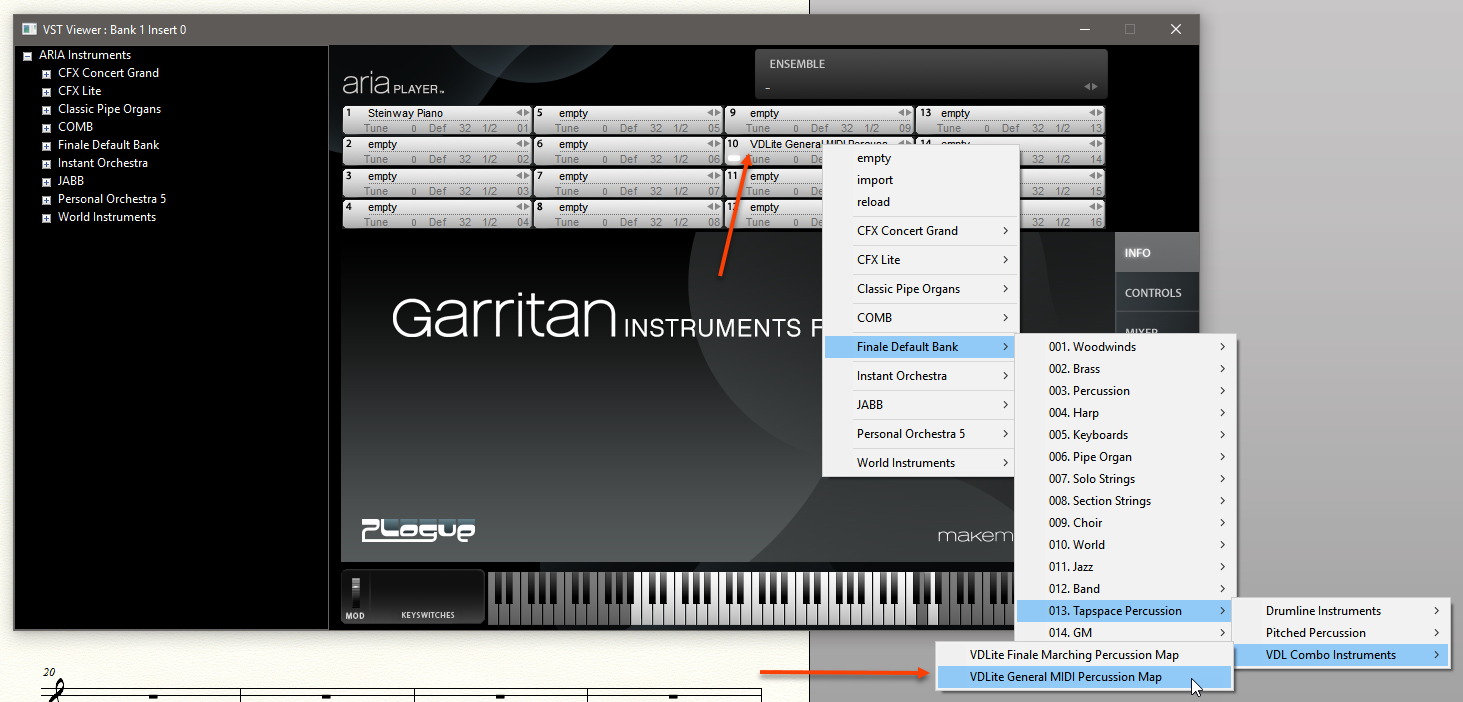
If you are not getting any sound when choosing MIDI Note, it is most likely because you are playing through VST (MIDI/Audio > Play Finale Through VST), and there isn't a sound loaded into channel 10 in your VST/AU plug-in.
To do this in the ARIA Player, you can choose MIDI/Audio > VST Banks & Effects (Windows) or MIDI/Audio > Audio Units Banks & Effects (Mac), click the pencil icon next to the ARIA Player in Bank 1 and click on the tenth channel slot to load a sound (as depicted below). One good sound to choose would be Finale Default Bank > 013. Tapspace Percussion > VDL Combo Instruments > VDLite General MIDI Percussion Map.
Please sign in to leave a comment.
3 comments
Date Votes