New post
Avatar
0

Friends:I have a problem, maybe you can help me solve:I'm working on a score for orchestra. Starts with  tempo quarter = 92. In half the work il tempo changes to quartes = 150 (faster) Then towards the end, returns to the initial tempo.It happens that  the initial tempo is not achieved and the program, obstinately maintains a slow tempo. To achieve quartes = 92 I have to write  = 150. This works as a fix for a Audio file. But in the score can not  write something that is not true. The director will read quarter = 150. Of course it can be corrected in the score of the director, but I would like to know why this happens. Thanks

windows 8 / Finale 2014

4 comments

Date Votes
Avatar
0
Comment actions Permalink
Avatar
0

One other thing: don't edit tempo changes, only create new ones.  On Mac at least, there is a bug whereby if you double click to edit a tempo expression and click edit it in the expression selection modal dialog that pops up then the text will change but tempo in playback won't. For example, change it from quarter note = 120 to quarter note = 100.  The text will change but tempo in playback won't.  Everywhere you assign this tempo change, it will playback wrong.  Delete your tempo change expressions in the expression selection dialog and create new ones.  

Finally, as noted before, the tempo field in the playback window is only used if there are no tempo expressions in the score.  

Comment actions Permalink
Avatar
0

Forgive me if, since this appears to be your first post, I assume you do not know all the in's and out's of the expression designer.


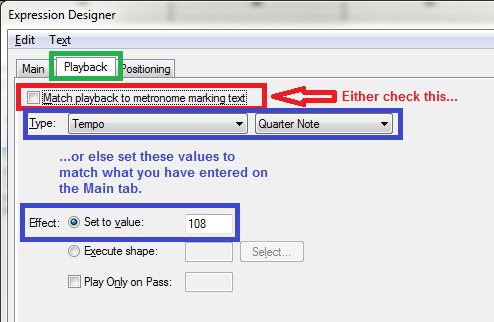
Just changing the tempo in the Expression Designer's > Create Tempo > Main tab will not change playback. You also need to make one of two changes on the Playback tab to match what is on your Main tab.


(There is another way to manage this, but it isn't easier, just different; so I'll skip it for now.)

Comment actions Permalink
Avatar
0

Thanks!  I've never actually noticed that tab. 

Comment actions Permalink

Please sign in to leave a comment.