New post
Avatar
0

Hi Just discovered a new bug in Finale 25 on Mac El Capitan 10.11.6 (15G31)

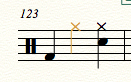
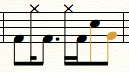
On editing an older score (finale 2014) in Finale 25, some of the notes on the drum set part are randomly changing colour. This appears in parts and score. The only solution I've found so far is to copy the bar contents and re paste them onto the same bar. This makes the random colours go back to black. This is not a layer issue. All notes are contained in layer 1... Anyone else found this issue?

Thanks for fixing human playback speed. Now my files playback instantly instead of waiting 6-10 seconds in version 2014.5
2 comments

Date Votes
Avatar
0

Hi John

The yellow notes indicate that they're not used by the current percussion map.

If you select the note (with simple entry) and then shift up/down you will see then change to black as they're assigned to the correct 'value' for the current percussion map


One method for dealing with this is to use the Midi tool and select the note to find out what midi value they are (eg midi note 60)

Then exit the midi tool nd from the utilities menu, select "Transpose percussion Notes..." This will show you a list of currently unassigned percussion notes, and offer you a chance to assign them to the correct note type.

https://usermanuals.finalemusic.com/FinaleMac/Content/Finale/IDD_CHANGE_NOTE_TYPES.htm 

The above is the manual entry for that tool.


Cheers...


Daz :o)

Comment actions Permalink
Avatar
0

Thanks Darrin. I never seemed to have had this "issue" with the earlier versions of Finale, but the drum set part was a midi import from Logic. Who knows what exactly goes on between the two programs sometimes.

Thanks for your assistance

Comment actions Permalink

Please sign in to leave a comment.