New post
Avatar
0

Hi,

Please, can any of you show me how to write the next staff?

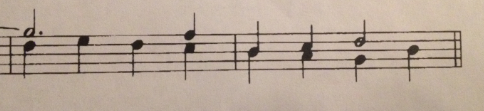
When I try to make a divisi, the second or third note takes invariably the same length as the first one. How to enter notes at the same beat with different lengths, as in the example below?

This is for Finale 2010 under Windows 10 platform.

Thanks in advance

Jesús Rodríguez


4 comments

Date Votes
Avatar
1

Those notes that have the stems up are in Layer 1. If you look at the bottom left of your screen you'll see small buttons "1" "2" "3" "4." Those are buttons relating to which layer you are in.
So if you click "1" you should type in those notes with the stems up
Then click "2" and type in the notes and you will see them appear as a different color and the stems will be down. 

Hope that helps!

Comment actions Permalink
Avatar
0

GREAT!! CJ

It worked, perhaps that knowledge is in the online user's manual but I had no patience to read through the whole manual as I am a beginner.

:-)

I appreciate your clear explanation.

Regards from Spain

Jesús Rodríguez


Comment actions Permalink
Avatar
0

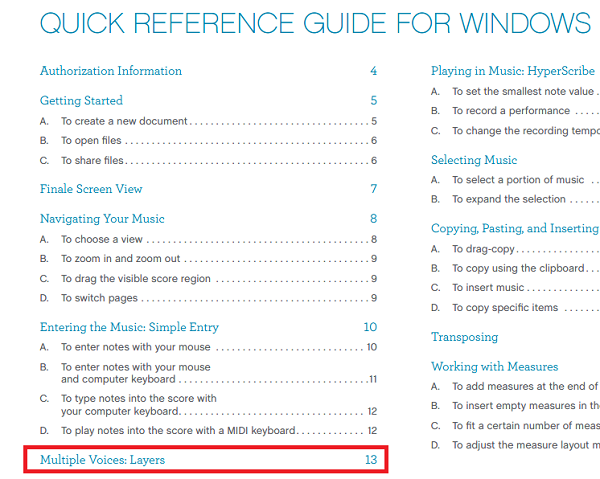
If one doesn't have time to read the entire manual, I recommend looking at the contents of the Quick Reference Manual, accessible from the Help menu in Finale 25. Finale 2010 likely came with a small book with a printed version.


Comment actions Permalink
Avatar
0

Hi,

Please another question :-)

I know how to write 1-bar repeat, but I don't know what to do with the following example, can you help me please

Thanks

Jesús

Comment actions Permalink

Please sign in to leave a comment.