New post
Avatar
0

Using the new Finale 25 on my Windows 10 HP Pavilion PC...


Is it possible on a single staff for chords to have separate/independent instrument sounds from the melody notes--without having to attach the chords to notes/rests in a different layer of music than what the melody is in?


Oh, yes...this lead sheet I'm working on was previously created using an earlier version of Finale (way, waayyy earlier...2000...).


Thanks!

Brett Hawkins

2 comments

Date Votes
Avatar
0

Hi Brett

Select the a chord that you want to play with a different instrument.

Right click, and select "Edit chord Definition" (see https://usermanuals.finalemusic.com/FinaleWin/Content/Finale/CHDLG.htm?cshid=23100 )

In the fretboard section, click on Edit (see https://usermanuals.finalemusic.com/FinaleWin/Content/Finale/FRETEDITDLG.htm?cshid=23106 )

From there you can edit/create an instrument that will play the chord (see https://usermanuals.finalemusic.com/FinaleWin/Content/Finale/FRETINSTDLG.htm?cshid=23104 )

There used to be a different way to get to a similar page in older versions, but I cannot for the life of me remember how to get there (sorry)


Cheers...


Daz :o)


Comment actions Permalink
Avatar
0

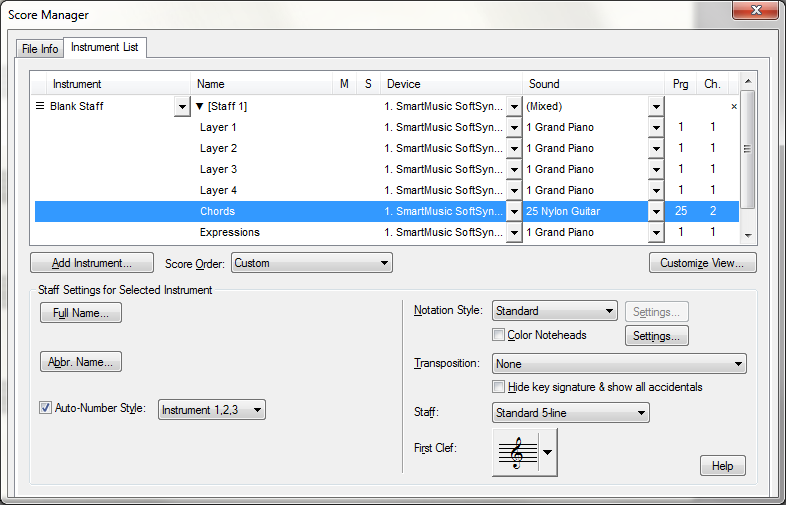
Without chasing Darrin's links to see if we are saying the same thing, I can tell you that you can set the instrument playback for chords in the score manager with the same pull-down list used to set different sounds for layers.

This has a secondary benefit. Sometimes changing chords during a held melody note can cut off the held note early, but this only happens if the chords and the melody notes use the same MIDI channel in the score manager.

Comment actions Permalink

Please sign in to leave a comment.