

I'm working on a lead sheet. On the second verse of the song, the rhythm changes slightly in one measure, so I entered it into Layer 2. However, when I went into Layer 2 to enter the lyrics, it renumbered the verse in the middle of the measure, since I have "auto number verses" selected. How can I keep my numbered verses, but eliminate that verse 2 indication in the middle of the measure?
I understand why Finale wants to number it, but I'd like to change it.

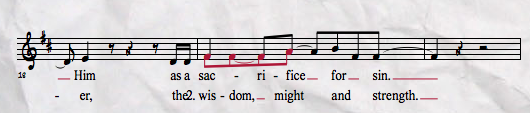 Here is a screen shot. I recognize that I told it to. And it correctly labeled Verse 2 at the top of the music where it begins, but because the lyrics for verse two in this measure, and this measure only are in Layer 2, it renamed it. I totally understand why. I just want to be able to disable that portion.
5 comments
Date Votes