

Finale 2014.5 on win10
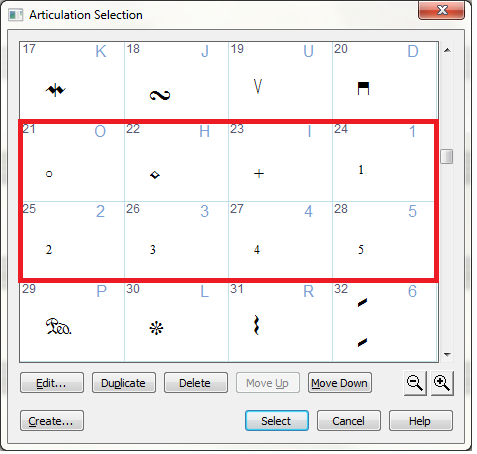
I have loaded prior a file and began work to add fingerings using the articulation tool. To my surprise the articulations for that purpose have vanished from the drop down table. This is not the case with some of my other musx files so I am guessing the table is stored along with this particular file (the documentation does not discuss this). I am assuming that I can somehow reload the articulation table using the file:load-library option. There are several libraries containing articulations and it is not clear which is being used but I tried several including the "Maestro Font" (is that the default?) however I cannot get the table re-established with the fingerings. I really do not want to re enter 5 pages worth of score on a new document to get my articulation table back! Any advice appreciated--
Fritz

2 comments
Date Votes