
I have a windows 10 operating system and I am completing a Berklee online assignment in Finale Note Pad 2012. I am trying to add a double sharp using the simple entry tool instructions by hitting SHIFT+= on my keyboard. However, that creates a * like sign instead of a ## sign. The double flat keyboard shortcut SHIFT+- is working fine but it is only the double sharp that is not working. I have tried it on several different computers and opened file with windows explorer and internet explorer etc. but to no avail. Others in the class say it has worked for them. Any ideas.


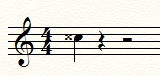
1 comment
Date Votes