New post
Avatar
1

I'm using Finale 2014.5 on a Mac with El Capitan version 10.11.16. I want to use alternate notation for only PART of a measure, and regular notation for the rest of the measure. I know this should be easy, but I cannot locate the instructions on how to do this in the manual (after quite a lot of searching). Can anyone help me -- or guide me to the part of the manual that can help me? Many thanks!
Andy

5 comments

Date Votes
Avatar
0

What kind of alternate notation are you after. Changing noteheads is a lot different from using slash notation.

Comment actions Permalink
Avatar
0

Changing noteheads (rhythmic notation) is what I want.

Comment actions Permalink
Avatar
0

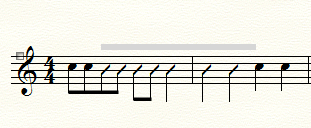
If this is what you want

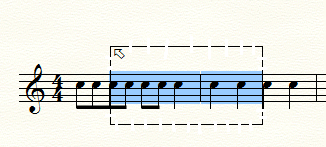
It is a Staff Style. Using the Staff Tool select the portion(s) of measures you wish to change and then (perform the Mac equivalent of) right-click on the highlighted/selected area (or use the Staff Menu pull-down) to apply the Rhythmic Notation staff style.

Hope that helps.

Comment actions Permalink
Avatar
0

Yes, I found this much in the manual.  However, when I use the Staff tool to select the portion of the measure I want, it only allows me to select the entire measure.  Am I missing something?  (And thank you for all your help thus far -- I really do appreciate it!)

Comment actions Permalink
Avatar
0

When you select partial measures, you need to start your selection rectangle outside the staff and drag through it. See if that works.

Comment actions Permalink

Please sign in to leave a comment.