New post
Avatar
1

 Mac OS Sierra...So they took away one of the most useful tools on the bar and left me searching high and low for an easy and convenient way to change tempos from measure to measure. Why Why Why???

Can someone please help me in finding a way to change tempos like the "good old days"??

4 comments

Date Votes
Avatar
0

Isn't it annoying - if it's not broke don't fix it.  Here's what you need to do.   Tempo changes are now handled by the expression tool.  Click the expression tool and double click at the beginning of the measure you want the tempo change (or anywhere in the measure).  On the left choose tempo alterations.  On the bottom click Create Tempo Alteration.  Name it anything (or nothing).  Click Payback on the top.Click Type and choose tempo.  Set a value (like 60, which means quarter=60).  Click OK.  Assign it to a beat in the measure you want the tempo change.  Then right click on it in the score and unclick Show - if you don't what it to be seen.  Voila - life is good. Much more cumbersome than using the old tempo tool !!!

Comment actions Permalink
Avatar
0

Thanks so much for your answer. I still do not see how to assign a number of measures with the new tempo. I can change one measure, but then it goes back to it's original tempo. How do I tell it how many measures I want that tempo to be, like in the old Finale?

Comment actions Permalink
Avatar
0

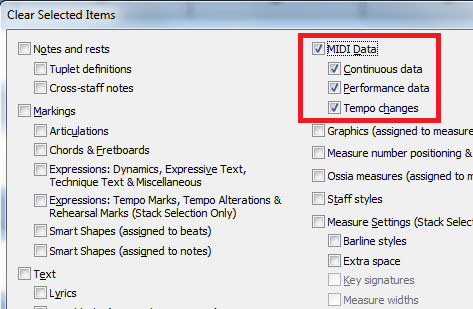
I can see it changing but would not expect it to go back to the original tempo unless there is MIDI tempo data already in teh file that overrides it. You can check this by selecting the entire file and under Edit > Clear Selected Items choose all the MIDI items to clear.

I suggest trying this on a COPY of your file, just in case.


Comment actions Permalink
Avatar
0

Sorry to say that didn't work either, but many thanks for your effort.  I'm calling Support tomorrow!

Comment actions Permalink

Please sign in to leave a comment.