New post
Avatar
0

 Hi everybody, 

I have questions regarding some Score writing and then notation not transferring properly to the parts... I'm guessing it's something simple but just can't find it.

First, here's what I use: iMac 21.5 (2011) that I recently updated to 10.12.1 and I recently updated from Finale 2011 to Finale v25

I've been writing scores for an ensemble I teach at University level and when comes time to extract the parts, a lot of things are not carrying over. The main problem is this: Things like Coda signs, D.S. al coda, some things form the repeat tool and most things form the Expression Tool won't carry over. When I use them in the score, the top staff of every group will have it, but the other staves will only have the little squares. That's fine for the score but in the individual parts, all I can see is the square. The only way to get the sign is to erase and re-assign... 

Perhaps I have something "on" or "off" that I'm not aware of?

Thanks for your help!


Carlos


6 comments

Date Votes
Avatar
0

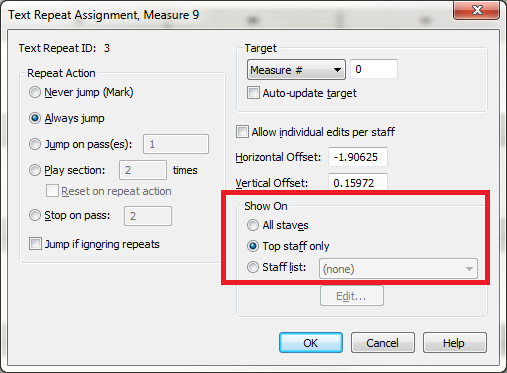
Where an expression shows up (in parts) depends on the Staff List settings in its Category.


When I ask for a D.S. structure, the default setting (Top Staff) puts the instruction on the top staff of each part. So unless you turned off the display of such items in Staff Attributes, the standard settings should work.


Comment actions Permalink
Avatar
0

Perfect, it worked! Thanks for your help!

Comment actions Permalink
Avatar
0

Do you really need to be extracting parts instead of leaving them linked? Since the implementation of linked parts, I've only had to extract parts on very rare occasions.

Comment actions Permalink
Avatar
0

You're asking this of the OP two years after his last post?

:-)

Comment actions Permalink
Avatar
0

Hilarious! I hadn't seen the date on the first post. The question is, how did this thread get bumped up, making me assume it was current?

Comment actions Permalink
Avatar
0

I long ago stopped trying to explain this forum software.

Comment actions Permalink

Please sign in to leave a comment.