New post
Avatar
0

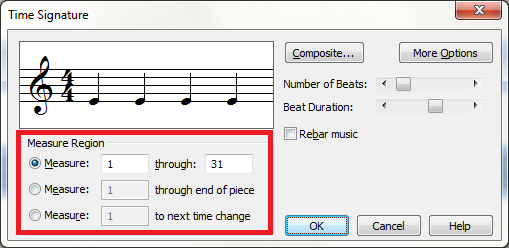
When I change the time signature, it only changes it for that one measure and then reverts back the original, 4/4, the next measure. If I try to change the 2nd measure, nothing happens. Even if I select all, Ctrl A, it still only affects the 1st measure.

6 comments

Date Votes
Avatar
0

Did you select the correct Measure Region option? Usually click on Measure (whatever the number is) to the next time change.

Comment actions Permalink
Avatar
0

What Martin said...


Comment actions Permalink
Avatar
0

In a piece I'm currently working on, I changed the time signature mid-piece and it resized all my staves!  This has never happened before. I'm fairly experienced with Finale, but I have no idea what changed.  I opened a brand new document and it did the same thing.  I can go into my previous scores and change the time signature and no resizing occurs.  I must have changed something in the overall settings for the document, but I have NO idea what!

Comment actions Permalink
Avatar
0

Did you ask Finale to "re-bar" and are your systems all locked?

Comment actions Permalink
Avatar
0

I unchecked "re-bar" on the time-signature menu, but I'm not sure ALL of the systems are locked.  I will check that.  Thanks!


Comment actions Permalink
Avatar
0

JADRIAN -- THANK YOU!  I locked all the systems and the time signature change worked perfectly and nothing shifted.  Most of my systems were locked because I had moved measures to next or previous systems, but not all were locked.  I learned something today from you -- and I am MOST grateful!

Comment actions Permalink

Please sign in to leave a comment.