New post
Avatar
1

Finale 2014.5, El capitan, macbook air 2013, 1,7 ghz, 8gb memory, 

When human playback is on (Garritan) some notes not on the first beat of the measure either drop out entirely (choral or wind voices) or become very short staccato notes (piano). The pieces I am working on were originally in earlier versions of Finale.

I have gone through and cleared bit by bit all the various elements: articulations, midi data, expressions, etc. but the problem remains. The only way to get rid of the problem is to turn off human playback, but that is not a desirable way of proceeding.

I also turned off scrolling playback, no help, and exported audio to check if the wav file was okay, and I checked the computer resources and activity levels, but the results were always the same.

In addition, I went through all the human playback preferences and playback options and tried every variation I could, as well as the various styles of playback (standard, jazz, etc.) and custom versions. No luck.

Frustrating since I have much more to work on and don't have a solution. Any ideas?

6 comments

Date Votes
Avatar
0

I'm on Windows, but hopefully the post is still relevant to the situation.


I suspect you still have HP techniques embedded in the score.  Even though you are disabling them in settings, they're still present on the Stave itself.  To get rid of these you will need to 'clear them'.


An interesting thing about Finale's Human Playback, is that events can get embedded into the score, and using the MIDI tool you can gain more control over exactly when and where this happens. 


This makes it possible to run multiple passes through the HP techniques system for different sections of a score.

Example: 

Say for the first movement you want to use a certain technique that calls up a a more martelle sound from GPO5 in ARIA Player for notes marked staccato, and you want to apply a baroque style groove, but in the second movement you don't want that anymore, and instead want a true staccato sound that'll be generated by something you have loaded in an instance of some other plugin (Kontakt, HALion, whatever), with a classical style groove.


So, you could activate techniques for the martelle sound in HP settings, select the first movement only of the score for the stave, then use the MIDI-Tool to choose the groove for the selected section of music and 'apply human playback'.  Boom, those techniques are now embedded into the score.


Next, you go back to HP settings, disable your martelle technique, and enable one for your other staccato sound (which can involve a channel bounce to an entirely different plugin, yet live on the same stave).  Then, highlight the stave for the second movement, and 'apply human playback' in the MIDI-Tool a second time.


If you had your flags set right when you applied human play back, now the second movement is embedded as well, and it did not alter or change your first movement stuff.


So.....

What happens if you want to remove any Human Playback stuff that is embedded into the score?


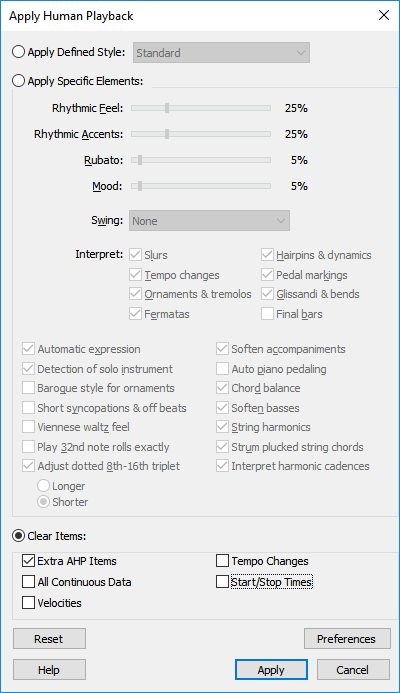
1.  Activate the MIDI tool, Select the staves/measures you want cleared, and go to "MIDI-Tool/Apply Human Playback".


2.  At the bottom of the "Apply Human Playback" dialog there is a "Clear Items:" section.  This can be used to remove all embedded events of types that are 'checked', for the 'currently selected range of staves/measures'.  In this case, we want the "Extra AHP Items" removed.  Set that up and click "Apply".


Now any embedded techniques in the selected section of music have been removed.


Comment actions Permalink
Avatar
0

Got a kindly reply from Brian Roland showing how to use the midi tool "apply human playback" options to clear midi data (don't see Brian's reply here but it came to my E-mail). Unfortunately, no luck. I had already used the midi tool to clear but followed Brian's procedure in case it worked.

Since then I have copied over music to new files, gradually using the edit filter to copy less and less until I only copied the notes themselves, but lo and behold the same problem was still there, don't know why, unless I turned off human playback. I have also restated Finale a few times since I know that can help sometimes.

I would attach a few bars of one voice but don't see how to attach a musx file and don't have it online as of now.

Best wishes, Jonathan

Comment actions Permalink
Avatar
0

Not having heard any other suggestions, I have explored various things. The pieces I am working on are choral, and in those many notes simply drop out, but when I use Garritan piano instead the notes are there but very very short as in staccato/marcato. I have copied over to new files, new staves, exported as xml and reimported, but the problems remain. Somehow the problem is in the "notes themselves" and not in any midi or articulation or expression settings, since I have copied just notes minus those with same result.

However, even when I go in and erase a measure and put fresh notes in they still cut out or are extremely staccato if piano sound is used, so there is something weird that may have to do with the file having originated in a Finale version a few generations back.

Baffling. I can of course rewrite the works from start as new files and not have the problems, but that is hours and hours of work and there should be some simpler solution. Any help??


Comment actions Permalink
Avatar
0

I think I will give up on trying to correct the problem. The score I am working on now dates all the way back to 1992 and thus to a very early Finale version, and I think the problems are somehow a result of that.

BUT! If anyone has tips, let me know.

Comment actions Permalink
Avatar
0

Will your version of Finale export as XML?  If not natively, perhaps through Dolet?

You could try exporting them to XML or MIDI and importing them back in. 


If you're not having luck figuring out how to 'repair' your problem scores, it might save you a bunch of time vs rebuilding the entire thing from scratch.


Comment actions Permalink
Avatar
0

Back again! I went through forum posts again and found one that spoke to my condition at https://makemusic.zendesk.com/hc/en-us/community/posts/218318608-Playback. The post was about repeated notes not playing and I realized that all my missing notes were repeating notes. One comment said it was a bug in start/stop times in human playback that has subsequently been fixed in v25. I started reading more about midi and playback and lo and behold the problem disappeared when in human playback preferences I chose either "ignore midi data" or "no midi data" in note durations under midi. I was SURE I had tried this various times, but in any case, now playback seems okay with human playback and just this do not incorporate note durations in midi data.

I also think it was not due to the file being from an earlier Finale version since the piece I was working on was fairly new this time.

Maybe I will have to upgrade to v25, we'll see... But for now things work.

Comment actions Permalink

Please sign in to leave a comment.