New post
Avatar
0

Finale 25; Windows 10

When going to page view, after a certain point, the notes change size.  The only way to adjust the size is on a percentage basis.  How do I get all the notes the same size BEFORE adjusting them percentage wise??

Document>Document Options>Fonts has no effect whether or not measures are selected

Utilities>Change>Note Size uses percentages.

So, what I think I need to do is find a way to make all notes the same size first, then adjust by a percentage.

Step 1 eludes me

HELP

12 comments

Date Votes
Avatar
0

I'm having trouble understanding the issue.


Could you elaborate on:

"When going to page view, after a certain point, the notes change size."

Comment actions Permalink
Avatar
0

Is there a way to attach a file?  If so, I can send it to you.

Comment actions Permalink
Avatar
0

Unfortunately, the best any of us can do is attach an image.

Comment actions Permalink
Avatar
0

Let's see what I can do


Page View

Scroll View

Please note the note size difference in Page View
My attempts to change/fix it are noted in the first post

FWIW:  This was imported from XML generated in SmartScore X2

Comment actions Permalink
Avatar
0

Ok, yeah I see ....


I could be wrong, but it looks like just the noteheads were resized and not the note. If that is the case, there is a handy plug-in you can use.

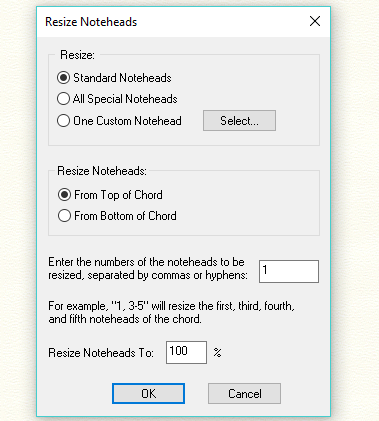
Select everything and from the Plug-ins menu >Note, Beam, and Rest Editing>Resize Noteheads.


If that doesn't work, then use the Change>Note Size from the Utilities menu.


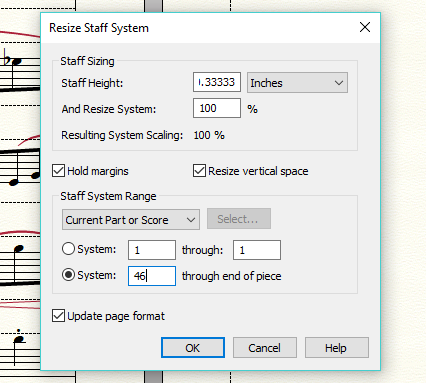
Looking more closely at the image, it looks like the system has been reduced. You'll need to go use the Page Layout tool and from the menu, choose "Resize Staff Systems (System Reduction)" at the bottom of the menu. Make sure you select "System [1] through the end of piece" for the affected range and enter a size you want (82 EVPUs is the Finale default).

Comment actions Permalink
Avatar
0

No go...

and the change note size from the utilities menu was tried before ... see first post.

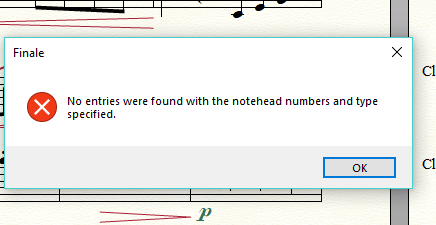
Both methods use a percentage to change the note/note head size.  Since the notes are of a different size, the percentage works starting with the current size of the notes.  The first step needs to be to make all the notes the same size, then the percentage method will work.

Therefore, for the utilities and plug-ins to work the notes need to all be the same size before adjusting.

All type of qualifying a selected area gives the above error.

Comment actions Permalink
Avatar
0

just edited my previous post.

Comment actions Permalink
Avatar
0

Again, it is doing the adjustment on a percentage basis, therefore the relative size stays the same only larger or small. but the same relationshp size-wise.

Even so, it doesn't change anything.  And, regarding the note size,  to adjust as a percentage means I would need to guess at the percentage to use by trial and error.  Not a very good way to proceed for something that will be used in a performance etc.

Comment actions Permalink
Avatar
0

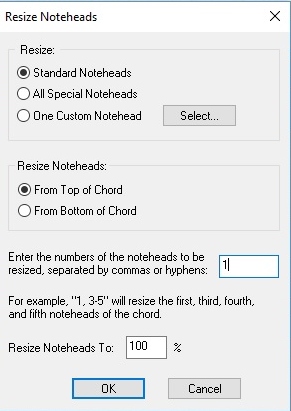
It appears to be a combination of the different resizing functionalities. I'm certain you messed up the input for "Resize Notehead" plugin. To be fair, it is a bit confusing. If you are dealing with a single line of music (no chords or multiple voices on the same staff), then you should input 1. This parameter is for selecting which note(s) in the chord you want resized. Try the plug-in again.


Comment actions Permalink
Avatar
0

selecting a range


But now the small notes are larger than the previous notes.... again, this is because a percentage is used ... 

Well, it's midnight at this end, and I need to stop.

I will re-import the file in the morning and see if that helps any

Thanks for your help.  Now, if we can find a way to make everything the same size without playing with percentages we'll be good.  Otherwise I hope the re-import makes things go away.

Tks

Comment actions Permalink
Avatar
0

When you resized the systems, you should have selected the range for the entire piece that way all systems would be the same staff height.

Comment actions Permalink
Avatar
0

After all that, I reimported the MusicXML file and all issues went away ... thanks for your patience

Comment actions Permalink

Please sign in to leave a comment.