New post
Avatar
0

Hi all,

Only purchased GPO5 a week or two ago, so still new to the ins and outs of this plugin.

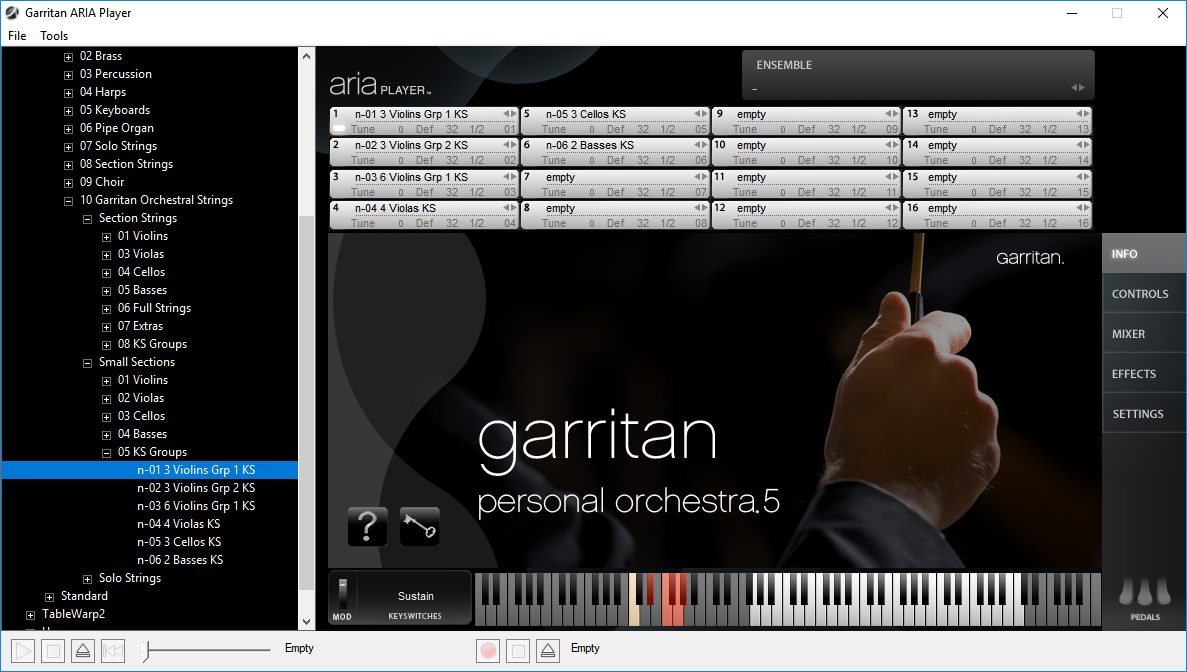
While most of the instruments and associated key switches work as expected, I cannot get the keyswitches to work in any of the cellos.

For example:

I write a cello part in Cubase's key editor, which will play back fine, but when I add keyswitch notes at C0, D0, E0 etc in the key editor, these are not recognised by GPO5. If I use the mouse and hit the keyswitch in the Aria player, then the corresponding articulation will play, but not via Cubase's key editor.

Keyswitches work as expected in all the other GPO5 instruments that I've tried. It seems to be a problem only with the cellos.

Any help much appreciated.

Windows 10 (64bit)

Cubase 6.5

GPO5  player 1.872; engine 1.933

9 comments

Date Votes
Avatar
0

Be aware that there are two variants of each instrument in GPO5.

The notation version, where each instrument name begins with the letter n:  Most of these have the key switches starting with MIDI note 0.  There are some exceptions (a bug with the small group strings) which I will address later in this post.


And the standard version, where instrument names do NOT begin with a n:  These have key-switches in the octave just below the instrument's lower range.  Unlike the notation versions, in the standard versions of instruments, the key-switches are visible in the ARIA interface.


When making a soundset for Sibelius I discovered that there are some issues with the new "Garritan Orchestral Strings" that shipped with GPO5.  The problem seems to be limited to the 'small group' bowed strings.  I will do some digging and pull up the key-switches for you in a new post.  I'll also see if I can make a simple Cubase expression map for you, which would allow you to easily enter these key-switches in the technique lane of the Cubase Key editor (or via text/symbol entries in the score editor).

Comment actions Permalink
Avatar
0

Here are the key-switches (as note number, and names/octaves for Cubase) for the Garritan Orchestral 'small ensemble' strings.  I believe these should work with both the notation, and standard variants of the instruments.

Small Group Violins: (n-01 3 Violins Grp 1 KS, n-02 3 Violins Grp 2 KS, n-03 6 Violins Grp 1 KS)

36/C1 = Sustained

39/D#1 = Staccato

41/F1 = Pizzacto

42/F#1 = Col Legno

43/G1 = Spiccato

44/G#1 = Staccato


Small Group Violas and Cellos (n-04 4 Violas KS, n-05 3 Cellos KS)

24/C0 = Sustained

29/F0 = Pizzicato

31/G0 = Spiccato


Small Group Contrabasses (n-06 2 Basses KS)

0/C-2 = Sustained

2/D-2 = Spiccato

5/F-2 = Sustained


I will have to revisit this thread at a later date regarding the possibility of sharing some Cubase/Dorico 'expression maps' for these instruments.  I tend to build them 'as I go' for specific pieces, but I'll see if I can't organize some good 'templates' that provide a good 'starting place', from which you can expand and develop your own.

Comment actions Permalink
Avatar
0

Many thanks, Brian, for the very comprehensive reply. It's much appreciated.

I should be able to put your pointers and suggestions to the test at the weekend.

Thanks again,


Steve

Comment actions Permalink
Avatar
0

After experimenting some more, and following Brian's pointers, I've come to the conclusion that all my KS Cello files have a bug. All other KS instruments work as expected.

Looking through this forum I seem to be the only one experiencing this bug(?), so maybe my download/install was corrupt. Anyhow, I'll try an uninstall and reinstall with a fresh download. Hopefully that will fix it... fingers crossed!

Comment actions Permalink
Avatar
0

Update:

I uninstalled the Aria Player and GPO5 samples, downloaded again and reinstalled - Still the same problem! I have noticed that some of the other instruments also have the keyswitch problems (choirs & flutes). I have also noticed that 3 of the keyswitches in KS Cellos DO work (whole step trills, whole step trills mutes & 1/2 step trills).
Sadly, this issue is rendering GPO5 pretty much useless for me. I'm not sure where to go from here, other than look for an alternative :(

Comment actions Permalink
Avatar
0

Other than the small group strings mentioned above, where key-switches in the notation version are not in the lowest octave, it all works here.


I wish I could be more helpful, but difficult to assess what is going on from an invisible distance.  Are you using the standard, or the notation version?


One thing I can think of to consider/check, is that Steinberg does not use the same "Oxford" convention for naming octaves.  This can indeed lead to user confusion.


For all MIDI instruments, note 69 is 440A; however, some software developers (Such as Plogue, the Makers of ARIA) call this A4, while Steinberg calls it A3.  So, when considering note names/octaves, remember that Steinberg references are one octave lower than those used by the ARIA and sforzando players.


Next, I'd give the key-switches a try in the Stand Alone ARIA Player using your MIDI keyboard/controller (if you have one).  This trouble shooting step can help determine if there might be some setting in Cubase that is somehow filtering or altering the key-switches.


If none of that helps:


I would suggest logging in to your MakeMusic product account, and filing a support ticket


You might want to provide screen shots and ARIA logs showing your Cubase work-flow, where you have put the key-switches in the sequence, etc.  You could also post these here in case users like myself see any potential issues that you can fix right away as the user.


To have ARIA generate a file that packs all of its logs you'll want to find and run "AriaReporter.exe".

This is usually found in: "C:\Program Files\Plogue\Aria\AriaReporter.exe"

If for some reason it's in a different place on your system, use your windows explorer file search utility to find "AriaReporter.exe".


Running AriaReporter.exe generates a gzip-tar archive containing comprehensive logs of everything the ARIA Engine does (or tries to do).  These files can also be found in your user home directory (usually hidden by windows) if you ever wish to pull them up in a text editor and try to make sense of them yourself.


Attach this AriaReporter archive to your support ticket.


Next, I'd recommend running dxdiag and attaching the profile it generates to your support ticket.  This is a simplified method of providing tech support with information about your system build.  To do this tap your windows key and type in "dxdiag" (without the quotes), and tap enter.


It may take a minute or so before anything happens, but you should eventually get a "DirectX Diagnostic Tool".  In this Window, click "Save All Information".  This report will not compromise your system security.  It simply lists all of your hardware, and associated system software drivers.


Name and save the report to a location you can easily access and attach it to your support ticket with your ARIA Engine logs.


It has been years since I have filed a support ticket, so I can't say how long it takes these days for them to be processed, but last time I did so, it was morning time (CST) during a normal work-week (no holidays or anything) and I received a reply from a human tech support staff member the very same day.


Good luck......


Oh, in terms of GPO value.  Is it the best library out there?  No way, but it's been more than worth the price I've paid.  It's a great box of bread and butter sounds.  It's easy on system resources, and for the money, it's still a hard library to beat.

Comment actions Permalink
Avatar
0

P.S.


I do realize that key-switches are important, and they should be working!  None the less, it might also be conductive to your workflow to consider using fixed variants of the instrument articulations across multiple tracks (channel bouncing) instead.  Why?


If you give each articulation type his own instrument slot in ARIA, you can keep multiple renditions all tweaked out and at your fingertips.  It doesn't require quite as many CC events to shape sounds on demand.


Examples:

With key-switches, to change up the release time of a given note, you might also need to enter some number of CC automation events each and every time you wish to make such a change.  In contrast, you might have 5 or 6 different variants of a spiccato attack built in different ARIA instrument slots, all ready to go. 


Any time you want to use one of them, simply 'bounce channels' for the given note(s).  For me it's easy to do this by simply keeping different articulations on their own track until later in the project, when I will eventually 'freeze' the tracks, and merge them into one with the output channel set to 'any'.


With what I call the 'GPO Legacy Strings" (All strings NOT in the Garritan Orchestral Strings directory), one can tweak out the non-sustained short bow samples into all sorts of interesting articulations....to be more sautellie or martelle like, etc.


The newer Garritan Orchestral Strings have something close to 20 sound shaping parameters, as well as more base bowing style samples to work from.  In a tracking DAW like Cubase, I've found that it really can come in handy to simply keep each 'articulation' I wish to build and shape in his own ARIA instrument slot, on his own channel. 


Example:  I might have a dozen different variants of pizzicato loaded, tweaked and ready to go.  Rather than spamming ARIA with 20 CC messages every time I want a different pizzicato style, I just 'channel bounce' among them.

Comment actions Permalink
Avatar
0

Steve,


In browsing the Dorico forums this morning I ran across a post you might find interesting.  John has provided some expression maps for GPO5 there.  I have not tried them in Cubase, particulalry not a version as old as 6, but they might work.  It is worth a try:

https://www.steinberg.net/forums/viewtopic.php?f=246&t=135922

Comment actions Permalink
Avatar
0

Brian, I am so grateful for your input.

I do however, have to embarrassingly confess that the problem was "user error".

As per your suggestion I tried the standalone version - keyswitches worked fine.

This got me looking further at Cubase, and in particular, the track that I had used for testing GPO5.

There it was! I had somehow switched in an "Expression Map"! Turned the EM off, and now all keyswitches working fine.

I'm now going to slope off into a dark corner and hide until my embarrassment subsides.


Comment actions Permalink

Please sign in to leave a comment.