New post
Avatar
0

I have an xml file that I opened and changed all the audio from ARIA to Garritan. I could hear the file both when entering notes and playback. I saved that file to use as a template. When I started a second file with that original, I can no longer hear any audio at all (neither entering notes or playback). I opened up the first document and can hear it fine, but nothing on this second file. I've restarted both the program and the computer and still no audio on this one file. Any ideas? I'm on a PC running the most recent version of Finale. Thanks!

8 comments

Date Votes
Avatar
1

"I opened and changed all the audio from ARIA to Garritan. "


This sentence doesn't make sense. Aria is only a sample player. It doesn't make any sounds on its own. Garritan is a collection of sounds, but it needs a sample player to play them. Hence, you can't change audio from one to the other, they work in tandem to produce sound.


I would suggest using the setup wizard to create a test file. The setup wizard should load everything correctly and produce sound. Once you hear sound on this test file, then analyze what is different about the audio setup from your existing file.

Comment actions Permalink
Avatar
0

Try MIDI/Audio > Reassign Playback Sounds on the file that is silent.

Comment actions Permalink
Avatar
0

Reassigning Playback Sounds didn't work. Now, when I play the file, it will play maybe one line, but doesn't sound right.

When I first opened the xml file, all the audio devices were set to "ARIA Player." I changed them to Garritan and didn't have any problems. 

I've compared the audio set ups with other files that work, and they are identical.


Comment actions Permalink
Avatar
0

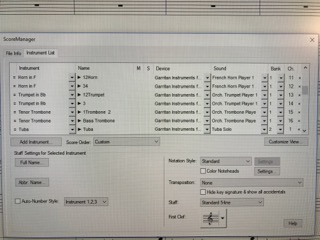
Can you include an image of your Score Manager screen?

Comment actions Permalink
Avatar
0

Comment actions Permalink
Avatar
0

When you reassign sounds, the program will use the instrument names in the leftmost column to select the sound regardless of the names chose in the second column from the left.


Try (on a copy of your file for safety, if you wish) to change the leftmost column to match the name of the instrument you wish to hear and then apply Reassign Sounds again. See if that does not help.


Thanks for the image. Even if small, it helped.

Comment actions Permalink
Avatar
0

I have the same problem - tried all above - dosen't fix - I'm on Windows 10

Comment actions Permalink
Avatar
0

A few more specifics would help us.


  1. Which version of Finale?
  2. Can you give us a more detailed description of the problem. (Presumably you did not start by changing "all the audio from ARIA to Garritan," so when did the problem start?)
  3. Had you experienced the problem before or is this your first try with Finale?
  4. Can you hear audio from other programs?
  5. Have you, or has Windows update, made any changes to your system recently?


These are some of the things that would help us deal with your specific situation.


Thanks.

Comment actions Permalink

Please sign in to leave a comment.