New post
Avatar
0

Finale 25.5 - Mac

Hello,

I am inputting choral music for one of my professors (he handwrites his music), and the piece is for TTBB choir and SATB choir  w/ piano accompaniment. I originally had 8 staves for the choral parts. My Prof. requested, to reduce page numbers, that I use only four staves and switch between the two choirs. This switch happens early on with the beginning of the piece as TTBB, and then switching about 30 measures later to SATB for the rest of the piece. 

I was able to do this successfully, but I want to have the "abbreviated staff names" to change from SATB in the beginning to TTBB while keeping the abbreviated SATB in place after the switch. 

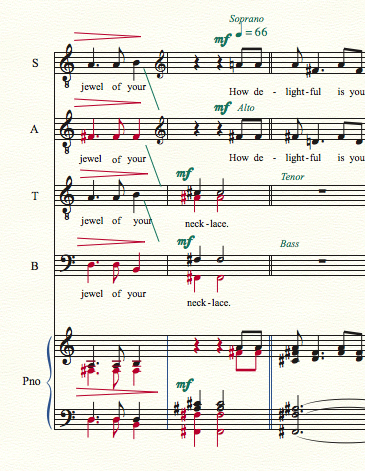
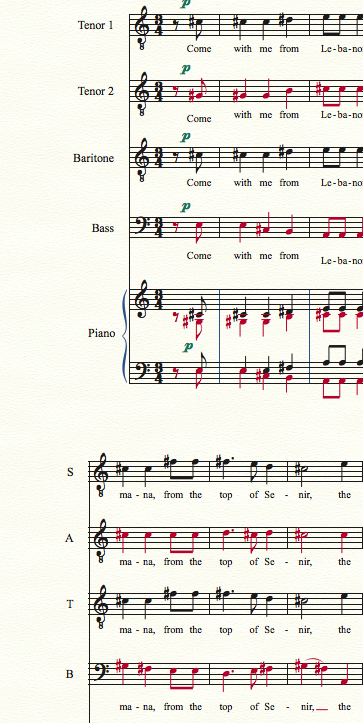
The first picture is the beginning of the piece with TTBB. The second picture is only a page later switching to SATB. I want to keep the SATB abbreviations from this point to the end. I need to somehow change the beginning of the piece to TTBB without changing the abbreviated names later in the piece. 

I'm sorry if this is a confusing question. Am I making this too complicated or has someone done this before and has any advice?

Thank you in advanced!  


5 comments

Date Votes
Avatar
0

One solution would be to include all parts in the score and hide staves where needed. Example:


FULL SCORE:

Soprano

Alto

Tenor

Bass

------------

Tenor 1

Tenor 2

Baritone

Bass

------------

Piano


Another solution would be to use group names instead of staff names. With group names, you can select a measure range for the Full Name and Abbr. Name to apply to. A group's Full Name will only appear if  it begins the score.

Comment actions Permalink
Avatar
0

Finale has a built-in method for this. Select the part of the top staff you want to be Tenor 1. Go to Utilites>Change Instrument. Choose Tenor Voice from the list of instruments, under Voices. The staff will change to that voice, along with the clef and the abbreviated staff name. 


Unfortunately, it will be T. 


To correct this, with the Staff Tool selected, right-click the abbreviated staff name where it first appears. Select Edit Abbreviated Staff Name. Change to what you want. It will be changed for the entire passage, every system.


Repeat the procedure for the other staves.


There used to be a method using Staff Styles, which would change the clef and the abbreviated staff name. I never liked this, because it was too easy to copy the wrong Staff Style somewhere else by accident, or erase it.


BTW, your last image is wrong. It is supposed to be Tenor 1 on the top staff, but it is marked Soprano. You should probably add an indication that the staff has turned back into a Soprano staff, too, if it happens mid-system.

Comment actions Permalink
Avatar
0

Staff styles would still work in Finale v25, but I am partial to George's solution of including all the parts and hiding staves when necessary. I would also strongly encourage you to arrange your system divisions so that the change from TTBB to SATB happens at a system break.

Comment actions Permalink
Avatar
0

The biggest disadvantage of J Adrian's Verkouteren's solution is that it ONLY works on system breaks, unless you turn off "Avoid Collision of Systems", hide clefs, and have a very steady hand dragging them together, which is way too much kludging for me.

Comment actions Permalink
Avatar
0

Thank you! Thank you! Thank you! I greatly appreciate the advice!! George, That will be what I do next time when I am starting from scratch. The project this is coming from is a large scale orchestral piece being reduced down to choir and piano. I have been working with my Professor on this for 3 years. So I am doing a lot of copy and paste/chopping work. 

Chris, I did not know about the "change instrument" utility. That has saved me from all the headaches of trying to figure this out! I was able to highlight the area that needed to be TTBB in the beginning, and I was able to keep SATB for the remainder of the piece after the switch. 

Thank you again everyone for all the advice! I am grateful for a friendly Finale/Makemusic community!

Comment actions Permalink

Please sign in to leave a comment.