New post
Avatar
3

I'm using Finale 26.0.1.655 on Windows 10. I'm noticing issues where the screen doesn't refresh properly during note entry (and occasionally during lyric entry as well). For example, if I click into a measure in Simple Entry, then start entering notes with my MIDI keyboard, the original note where I clicked will often stay, along with the notes I've entered over it, until I force a screen redraw by pressing CTRL+D or switching from scroll view to page view. Sometimes when I delete a lyric, it will continue to appear until I force a redraw.

I didn't experience these issues on Finale 25. Anybody else?

4 comments

Date Votes
Avatar
2

I have also frequently experienced the redraw problem with deleted lyrics.

Comment actions Permalink
Avatar
1

I have problems with virtually anything not redrawing correctly by time when I am editing music.  Examples in addition to the lyric delete problems noted above include but are not necessarily limited to the following:

  • Changing a not from one duration to another will show both (e.g. a quarter note changed to a half note will still appear as a filled-in quarter note until {CTRL}+D)
  • If changing the pitch of a note (e.g. grabbing a note with a mouse and dragging it) will show a note on both the original pitch and the new pitch until {CTRL}+D
  • If the tie direction flips (e.g. due to adding notes to a chord), the tie is still shown as being in both "over" and "under" positions until {CTRL}+D


These issues don't occur all the time, but they do occur on a rather frequent basis.  I never had any redraw issue as frequent and troublesome as this until I upgraded from Finale 2014.5 to Finale v26, and I've been using Finale for ~20 years.

Comment actions Permalink
Avatar
0

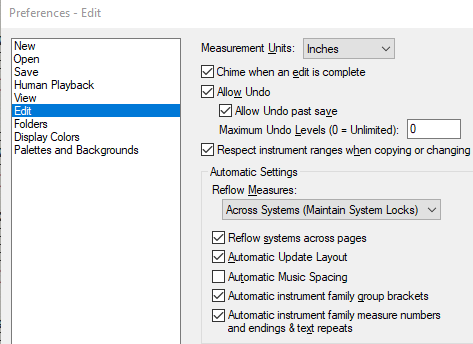
Certainly this is a real nuisance and is certainly not typical. I would start by checking the redraw options in Edit > Preferences.


You should also consider that you may need to contact MM Support via the "Submit a request" link at the top of the page.

Comment actions Permalink
Avatar
0

Yes, Finale is showing that "Automatic Update Layout" is enabled.

"Automatic Music Spacing" is disabled, though, based on a past support issue regarding manual lyric adjustments or manual note adjustments being needlessly lost when making changes in a different part of the music that has zero impact elsewhere.  (Example: Suppose in page layout view I have 4 systems with lyrics, and I make some type of minor edit in system 3 [the exact type of edit doesn't really matter].  Even though absolutely nothing changed on systems 1, 2, or 4, Finale apparently decides it needs to try to respace those systems anyway and loses all manual lyric/note adjustments.  So, MM Support's suggestion was to disable automatic music spacing so manual adjustments wouldn't be lost.  My first preference would perhaps be for Finale to remember manual adjustments as a relative offset when respacing; short of that, I wish that setting could be applied on a per-file basis, instead of being a global setting, because for most files, I actually do want Automatic Music Spacing.)

At any rate, I did try enabling Automatic Music Spacing, but I am still observing the same redraw issues.


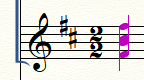
Back more directly to the topic at hand, here is an example that more clearly exhibits in a single screenshot some interesting effects of the redraw issues.  In this case in Simply Entry mode, I used the mouse to select and drag.  The notes were changed and the stem then flipped, but Finale renders both what was and what now is; additionally observe how the B and C# (one pre-drag and the other post-drag) appear as one common blob.

NOTE: I'm using the Windows {ALT}+{Print Screen} to capture these images, because changing focus to another app (such as Snipping Tool or Snip & Sketch) seems to trigger Finale to perform an automatic redraw.


I've gone ahead and submitted a support request to Make Music support.

Comment actions Permalink

Please sign in to leave a comment.