New post
Avatar
0

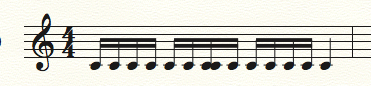
Hi, using 2014.5 and Mac OS 10.9.5. I am having a problem with importing a detailed MIDI percussion line that is generated by an algorithmic program. What happens is that after importing, the music *sounds* correct when played back using the playback feature, but the notation is way off. The rhythm consists only of 16th notes with 16th rests inserted and so Finale should not have a hard time intepreting that. In fact, in another, even simpler file, the music is a steady stream of 16th notes and there are still unusual issues. I have played around with quantization settings and a number of other settings. Is this normal? How can it be fixed? The music isn't too complex and the notation is full of wonky errors like like double noteheads and dyads when only single notes sound. In the picture attached (not the percussion line) the sounding music correctly has no dyads, even on playback, and the weird double noteheads sound as individual notes, correctly. This is what the import looks like
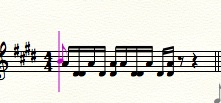
this is the correct "passage"
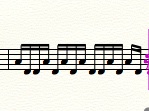
Good luck and thanks!

14 comments

Date Votes
Avatar
0

Dean,


Midi import has never been perfect. I've always had to make manual corrections. I'm not making excuses for Finale, just pointing out that this is nothing new. In addition, Finale has percussion maps which define where on the staff a note appears. If in your DAW, a different positioning system is used, that would cause notes to be in different staff positions after the midi import.


Besides trying different quantization settings, there's not much else you can do. If your DAW has the ability to export an xml file, that would be worth a try. Good luck.

Comment actions Permalink
Avatar
0

Sure, this answer helps, In the sense that the percussion maps may have something to do with it. I understand errors of a certain sort, but this isn’t even music notation? Maybe you could answer one last question, what exactly are those double noteheads and why are they appearing? In terms of fixing things, in the case of solo percussion lines or melodies, it’s easier just to enter the music. Other instances where the midi files actually are remotely correct? Because what’s the point of that particular aspect of that technology otherwise? But if playing with the quantization settings is all I can do, I think I’ve come to an end here.

Comment actions Permalink
Avatar
0

The example I gave is of a single passage of straight 16th notes alternating between two pitches. If there is something wrong there in terms of how to translate that into notation software, there’s no reason to include such a feature. I couldn’t write anything any easier for it to transcribe, except a single line of 16th notes on one pitch! Onwards...

Comment actions Permalink
Avatar
0

If you are dealing with pitched percussion (which I suspected from the key sig in your original post before you confirmed it above) you would not be using percussion staves (or maps) at all. I suspect that somehow the MIDI generator is putting different sounds on different voices and that Finale is somehow misinterpreting the rests--although since MIDI normally deals with starting time and note-length, I'm not sure why this is happening.


If the rest of the part is as straightforward as this, I would likely just type the notes in using speedy entry (using a MIDI keyboard) and perhaps then copy and paste the rhythm/notes wherever needed. I might even use the repitch tool (along with my MIDI keyboard) to fix any passages that use the identical rhythm but with different pitches.


Hope that helps some.

Comment actions Permalink
Avatar
0

Thanks, I suppose if the line was long and complex, a full part, say, it might be worth (or?) going in and making the massive amount of corrections needed. But the fact that the import cannot handle a line of 16ths notes correctly tells me that at least for this kind of import and export, there no utility to it. It is a single line, exported with the "violin" sound, not two instruments. Not only will this require writing out the music by hand and then copying it into the notation software, a good exercise but an extraordinary time taker, it is remarkable that MIDI import cannot handle such a simple call from a file. I should note that the import PLAYS the music back as sounded in the MIDI file, but as you can see with the bizarre double noteheads and incorrect dyads that spun out of a line of single notes, as well as changing time signatures, etc. it is a complete loss. What is MIDI typically used for in notation programs? Not being able to handle a two pitch single line without rests in even divisions of the beat makes it functionally useless. Thanks! Also, if other notation programs you can suggest that can functionally handle even simple lines like Eine Kleine Nacht Musik correctly, it would be helpful to know them and use them rather than Finale's illiterate feature as it exists in exports from Mathematica.

Comment actions Permalink
Avatar
1

Dean,


I wonder if any of us would have different results with your file. Would you be able to uploaded this file to Dropbox or another file sharing site, where we could give it a try?

Comment actions Permalink
Avatar
0
Comment actions Permalink
Avatar
0

Dean,


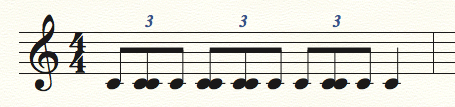
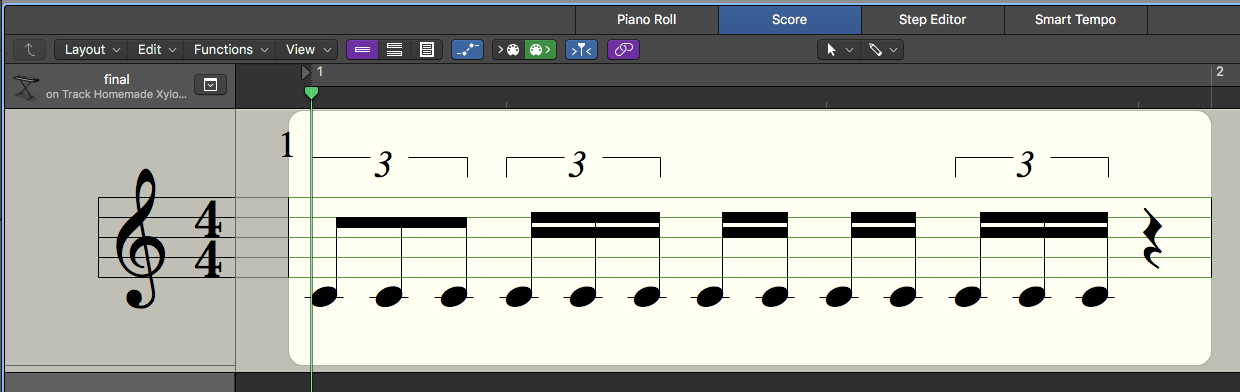
This file is different from the one we're discussing here. All I'm seeing is one measure of notes on a single pitch. The rhythm shown varies depending on the quantizing being used.


This is Finale importing with a 16th note quantization.


This is Finale importing with a dotted 16th quantization.

And this is what I see in Logic Pro after importing this midi file.

Comment actions Permalink
Avatar
0

Correct, it is a different file and I apologize for that, if you play the rhythm back, using playback, at a tempo where you can hear the rhythm, The rhythm is nothing like it, I will have to add the correct rhythm later. But using playback, everyone can hear the discrepancy.

Comment actions Permalink
Avatar
0

>> It is a single line, exported with the "violin" sound, not two instruments. 


You said it was an algorithmicly-generated percussion part. You'll get more helpful responses if you don't move the goalposts.

Comment actions Permalink
Avatar
1

Dean,


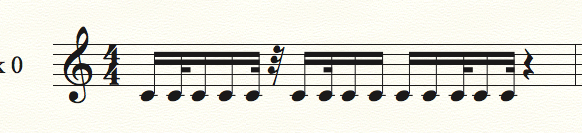
After listening to the playback I imported the midi once again, this time with a 32nd note quantizing. This looks more accurate.

Comment actions Permalink
Avatar
0

Hey, that looks pretty good! It’s not accurate in terms of where the rests are, but it actually resembles the rhythm. I’ll check more of this out tomorrow. Very nice.

Comment actions Permalink
Avatar
0

Jeffrey, I took your advice and imported with 32nd note quantization and the correct rhythm appeared! Perfect import, (although I'll change the values to 16ths) – thank you so much for putting in the extra work. You solved the problem. If you have any idea why it requires 32nd quantization or if it's possible to adjust EDUs to get the same result but in 16ths, feel free to let me know! I didn't know enough to change the quantization values and among my experiments didn't try that one! Best, Dean

Comment actions Permalink
Avatar
0

Oh, additionally, I had previously set two other settings to achieve this result: in "create percussion staves" I changed the channel from '10' to '1'. Also, under 'quantization' and 'more settings' I *unchecked* "minimize number of rests". The result was not 'woodblock' as assigned in Mathematica, but 'hi bongo' but a percussion transposition fixed that...not bad!

Comment actions Permalink

Please sign in to leave a comment.