New post
Avatar
0

So, I've successfully set up a score using GPO5 and JABB. Sounds great. Problem: does not respond to dynamic markings or accents. Tech support told me to turn on Human playback, which I did. Still did not help. Interestingly, a few instruments do respond. Like, Garritan Inst, Elec Bass, Garritan instruments, Steinway Piano and GPO Basses Lush. A third party drum set I installed also responds. What am I doing wrong? Cannot figure it out.  Thanks

13 comments

Date Votes
Avatar
0

Do you have any paid Garritan product or just the ones that come with Finale?

Comment actions Permalink
Avatar
0

Paid.  GPO5 + JABB

Comment actions Permalink
Avatar
0

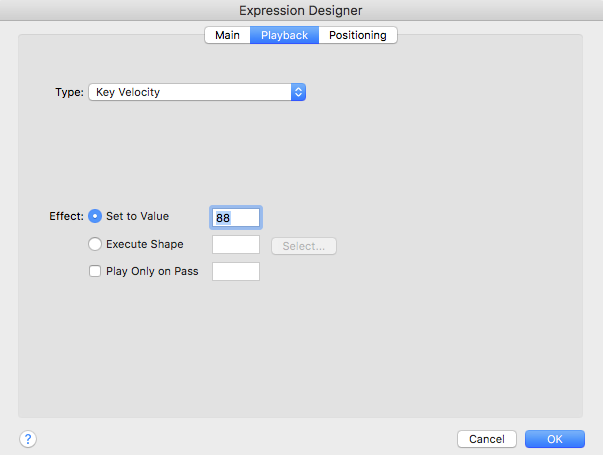
Just figured out what to do, and it works. dynamics markings were set to key velocity/value. I changed it Controller/Volume. Seems to have done the trick. Now to figure out how to get my accent mark to work  (under articulations that does not seem to have this option)


Not to even mention that I cannot get one KS function to work.  Baby steps......

Comment actions Permalink
Avatar
0

Did you load instruments from the notation folder?


You shouldn't have to change the settings in dynamic markings. Human Playback should be doing that for you. Because some instruments use CC#1 for volume and other instruments use velocity.

Comment actions Permalink
Avatar
0

I did. I'm at my wits end. Can't figure our why none of this working

Comment actions Permalink
Avatar
0

Do your staves have names? (i.e., the violin staff is labelled violin and has a violin sample assigned to that staff?)

Comment actions Permalink
Avatar
0

yes

Comment actions Permalink
Avatar
0

Bottom line: Anything that is dependent on velocity does not work. The workaround with dynamic expression was to change it to volume controller, but this is not available from within the articulation menu for accents (only velocity).  As it is, I think my workaround is just that, and I must be doing something wrong. Willing to pay someone to look at my file to check what I've done incorrectly, including how to get ANY key switch to work

Comment actions Permalink
Avatar
0

Interestingly, I set up a new file from scratch using setup wizard. Full Concert Band. Can't get it to work either. Not dynamic expressions or accents. Only on the piano staff the expressions work. Weird

Comment actions Permalink
Avatar
0

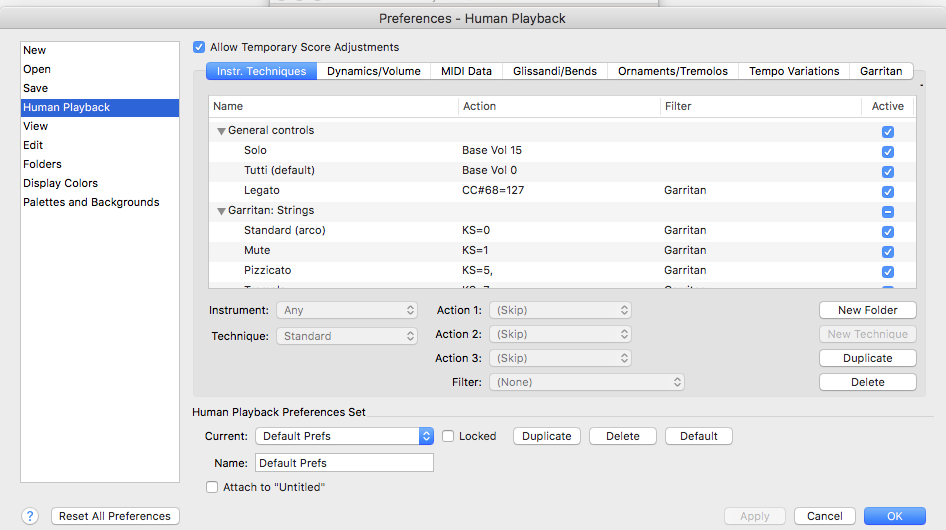
I'm at a loss. It seems like it should be working by the things you tried. This is what my default Human Playback controls look like. Is there anything different about yours?


And this is what the playback tab on a "f" dynamic looks like for me. This dynamic affects winds, brass & strings (CC#1 volume) and Piano, Percussion instruments (Velocity based instruments)


Comment actions Permalink
Avatar
0

Yup. Looks exactly the same. Didn't change any defaults. Frustrating. At this point I'd be happy just to at least get my accents (articulation) to work for now. Thanks SO much for caring. Appreciated

Comment actions Permalink
Avatar
0

Update (found this somewhere)  When using space bar play, dynamics won't play. Use the controls to play will interpret the dynamics. But it brought up  new problem. Let say I have 4 bars, 2 half notes in each bar. Change dynamic marking on each bar. Before the new bar (dynamic) plays, the prior notes gets shortened. why?

Comment actions Permalink
Avatar
0

I've not had that problem. One small thing I forgot to mention. I usually put an empty measure at the front of my score, before playback begins. This seems to help anything that Human Playback encounters in measure 1.

Comment actions Permalink

Please sign in to leave a comment.