

Hello everyone,
Finale 26 running on MacBook Pro 2017 OS 10.14.6, Mojave (also on Mac Pro 2009 OS 10.11.6, El Capitan) -- the problem is the same on both computers and platforms. Also note, that this is the first time it's happened; normally I'm fine.
Here's my situation: I'm orchestrating an opera. I do all my orchestrations in Finale 26 and then export the orchestra midi file into Digital Performer for production using Vienna Symphonic Library. I transfer sections to my DAW, usually 8 to 16 bars exported from Finale. I have not experienced tempo errors in the midi files after importing them into my DAW, but sometimes I like the trumpet samples from NotePerformer and I'd like to use them in place of VSL. So in order to do so I have to extract the Trumpet(s) from the full score, export it as an aiff file and then import that into my DAW tracks window with all of the other tracks exported from my Finale document. And this process has been working just fine, until now. If you look at the attachment of the extracted trumpet part, the errors begin around bar 83 where there is a tempo marked as Largo quarter not = 49. The notes on bar 86 (with the fermata) play fine, but the bars after the "a tempo" are noticeably accelerated. It's quite obvious the tempo is significantly faster than 49 bpm but I do not know the exact bpm marking because (at least I am not aware of) Finale doesn't have a metronome window indicating bpm as the score plays back. My guess is the "fermata" and "a tempo" markings may have something to do with this, but I was unable to find anything in my research. If I wasn't exporting an aiff file into my DAW for production purposes I wouldn't care how the extracted part played back Lol. But I really like the trumpet sample! :)
Thank you,
Mark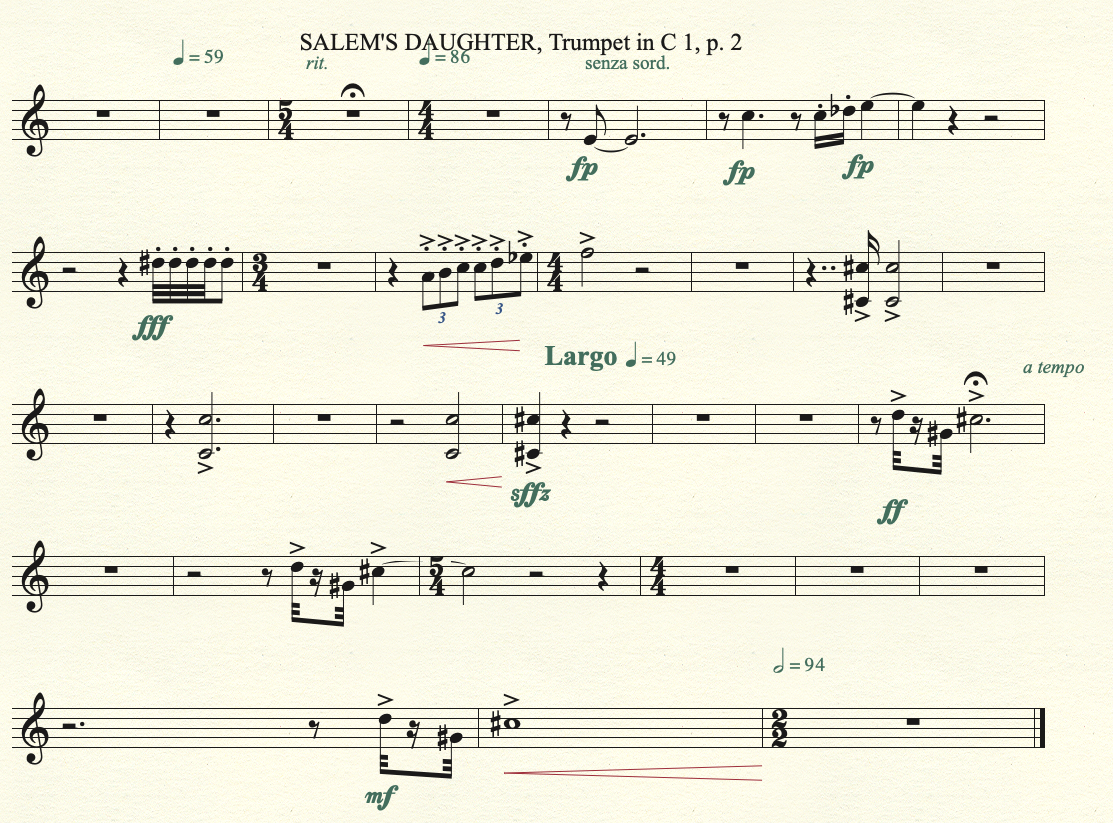


5 comments
Date Votes