

I use Finale 25 on a Mac OS High Sierra. I just now installed an update that was prompted to me by the app lately each time I opened a Finale file. It appears that with the installation of the update that I now have lost the function of automatic placement of articulations, and that all previously placed articulations have been moved to errant locations.
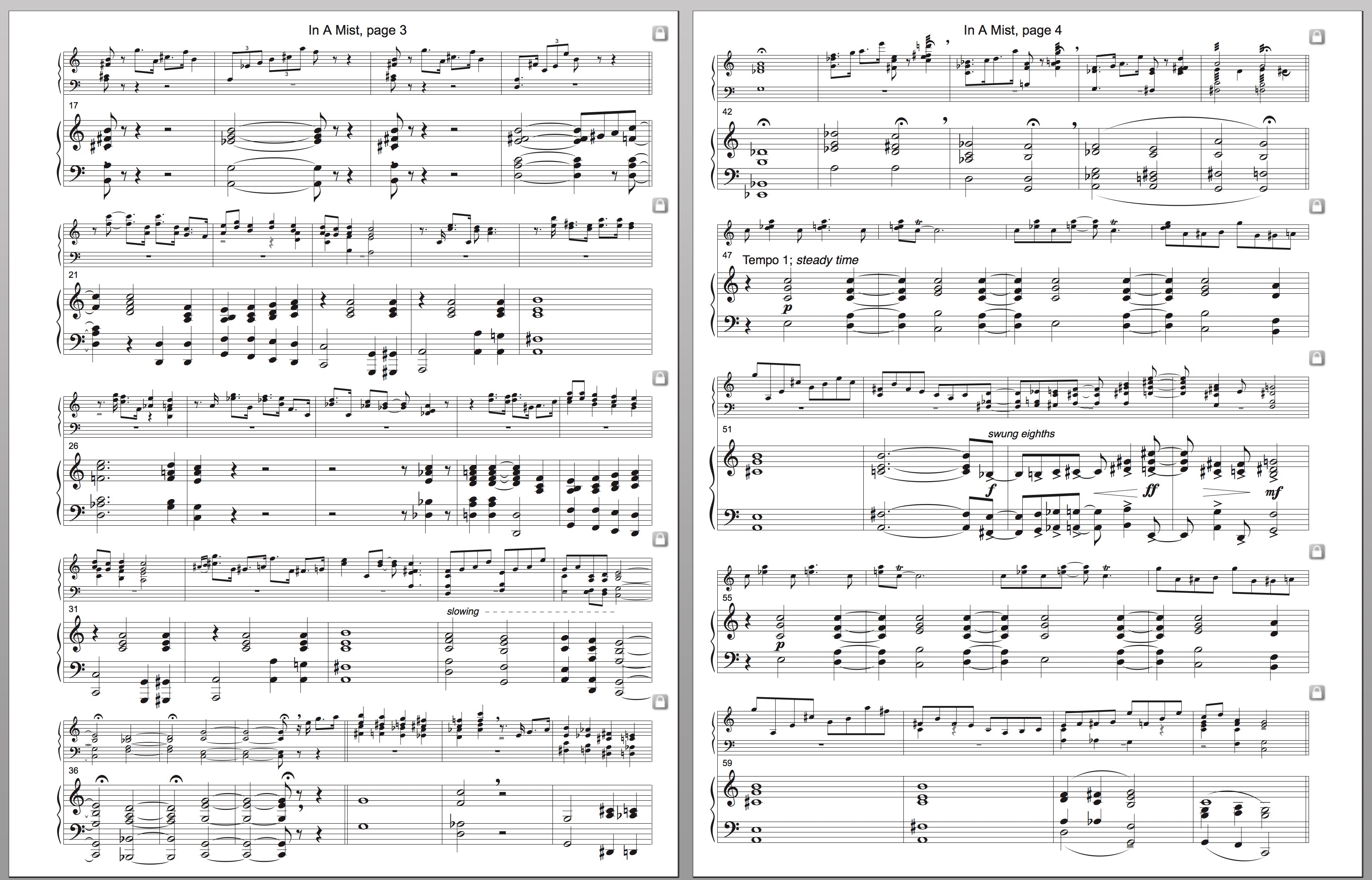
After installing the update, I opened the Finale file I am currently working in to discover that all the articulations such as tremolo markings, staccato dots, and fermatas in the score have been moved to errant locations. They are no longer properly aligned to the notes to which they belong, but instead are off center or are "floating" nearby. I originally had used the articulation tool to enter those markings.
When I now apply new articulations, they no longer automatically appear in their proper alignment with the notes to which they are assigned. It is now necessary for me to drag the marking into proper alignment. Furthermore, when I leave the articulation tool, some of the articulations I just dragged into proper position move out of position on their own. I can not afford to open any of my previous Finale files I have written, because doing so would result in those files being instantly ruined by this problem with articulations alignment.
I would be extremely appreciative of any help with this, as I can no longer use Finale until this problem is resolved.


3 comments
Date Votes