New post
Avatar
0

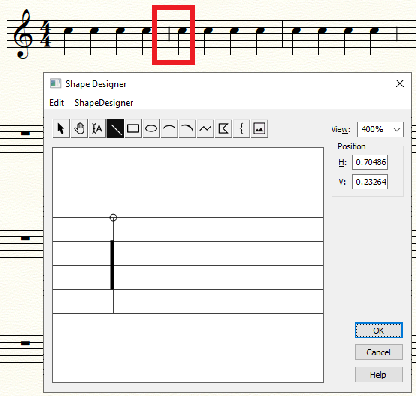
I've written a rather long piece which mixes unmetered chant and metered choral pieces, about 50 pages long.

I've discovered when I use my custom half bar line in chant sections, at some point later all my half bar lines disappear in the entire piece. When I created it, it was no. 79 in the custom list. After they disappear they all appear to be reset to option no. 1 in the custom list, except that the no. 1 custom bar line doesn't appear in its place either. So I can't move my half bar line to the no. 1 position and have that fix the problem.

I'm not sure what triggers the bar lines to disappear. On another forum someone thought I might have made a change using "Edit Measure Attributes," at some point after setting the bar lines, which might have been the trigger. I am not sure that that is the cause, but I guess it might be.

It has created a TON of extra work for me to go back in a replace those bar lines throughout the work. Clearly there's a bug somewhere.

Windows 10, Finale 26.3.1.520

2 comments

Date Votes
Avatar
0

It seems to work okay for me (if the following is what you are after. I just created a new half-barline. Let me know if I have missed something in your description. I just created a new line in the BarLine context menu (from the Selection Tool) and applied it as "Custom" as I might do to a custom shape in the SmartShape Tool.

Comment actions Permalink
Avatar
0

Yes, it works initially. I entered all the barlines as I was creating the piece. I have used Finale for decades and used custom barlines and have never had this problem. 

After having done other updates and corrections and gone back over the file making adjustments, all of those custom barlines disappeared. This has happened multiple times in the process of creating this piece. Two people (zuill & motet) on FinaleForum.com were able to replicate the problem and said we appear to have discovered a bug.

https://www.finaleforum.com/viewtopic.php?f=5&t=19084&p=81575#p81575

It is very frustrating.

Comment actions Permalink

Please sign in to leave a comment.