Nueva publicación
Avatar
0

         How to make the positions of the adjusted notes fixed, so that even if some pitches or articulations are modified again, the positions of all the notes in the measure will remain unchanged?

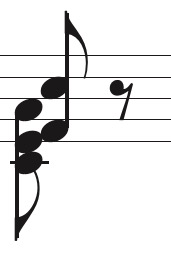
         We often encounter situations similar to the following figure: In a measure with the notes whose position had been adjusted by special tools (see Figure 1), we just made a slight adjustment to the pitch of the red layer (such as changing a single note into an interval, see Figure 2). What was depressing is that it always led to the change of the position and the stem direction between the red and blue layers (see Figure 3).    

operating system: Windows 10

software version: Finale for Windows 27.3

3 comentarios

Fecha Votos
Avatar
0

The position of the adjusted notes cannot be fixed, which often confused my team.

Acciones de comentarios Permalink
Avatar
1

… led to the change of the position and the stem direction …


1) I do not see any change in stem direction in your attached examples.

By your words “stem direction” you mean upstem / downstem - right?

I wonder whether you perhaps attached the wrong examples?


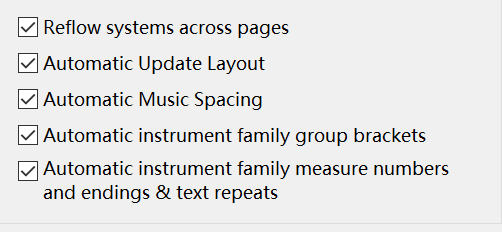
2) I wonder what automatic settings are selected in Preferences - Edit.

- Is {Automatic Music Spacing} selected or de-selected?


3) It is not clear to me, what layout you are trying to create.

What should be the final result?

Perhaps something like this (downstem part to the left)?

Acciones de comentarios Permalink
Avatar
0

Yes, the position changed but not the stem direction. We are trying to create an orchestral reduction. 

Thank u for reminding me to check whether {Automatic Music Spacing} or {Automatic Update Layout} is selected. Actually, both of them are selected in my automatic settings...LOL

Your suggestions help us a lot Aha! 

Acciones de comentarios Permalink

Iniciar sesión para dejar un comentario.