Nueva publicación
Avatar
0

I have Windows 10. I need to know how to program a voice with a piano accompaniment.

4 comentarios

Fecha Votos
Avatar
0

Thank you for including your operating system. What version of Finale are you using?

In full Finale the Setup wizard should be almost self-explanatory.

Acciones de comentarios Permalink
Avatar
0

Well, I have full Finale butI have tried every possible combination without success..Maybe I'm just not techy enough. Tom

Acciones de comentarios Permalink
Avatar
0

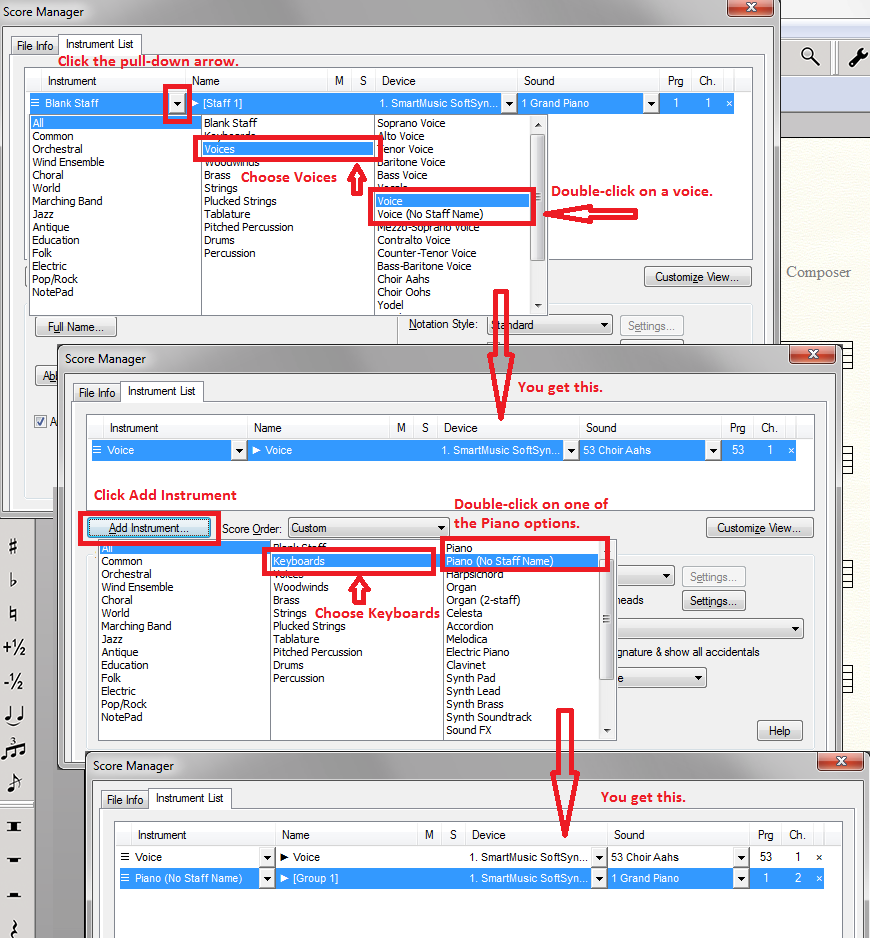
Okay...

  1. Open Finale.
  2. From the intro panel, choose Default Document.
  3. From Finale's Windows menu, choose Score Manager.
  4. On the Instrument Tab of the Score Manager you will see a pre-existing Blank staff.
  5. Click the pull-down arrow of the leftmost column
  6. In the second column of the resulting panel, choose Voices
  7. In the right-hand column, double-click your desired voice option.
  8. Click Add Instrument.
  9. In the second column of the resulting panel, choose Keyboards
  10. In the right-hand column double-click on the Piano of your choice.
  11. You should have your Piano /Vocal score ready for input.


Acciones de comentarios Permalink
Avatar
0

Thank You. Tom

Acciones de comentarios Permalink

Iniciar sesión para dejar un comentario.