Nueva publicación
Avatar
0

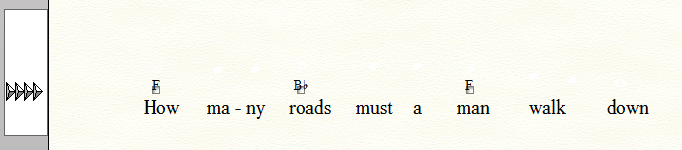
As a guitar player I often like to have lyric sheets with the chords over the words. Is there a way to generate this in a printed format?

Finale 2014.5 Windows 7 

6 comentarios

Fecha Votos
Avatar
0

If I understand you correctly, you need to hide everything in the staff except lyrics and chord symbols, right?


This is done with the Staff Tool.

To get to the Staff Attributes, double-click the staff.

In the pane “Items to Display”, de-select everything you need to hide.

Also, de-select the option “Display Rests in Empty Measures”.


Staff Attributes are “global” - for all the measures in the entire document.

If you need to hide items “locally” only, use a custom staff style instead of the Staff Attributes.

Acciones de comentarios Permalink
Avatar
0

Great !  Thank you !  The only thing I might want now is to remove the blank space where the staff was, but this will do. 

Acciones de comentarios Permalink
Avatar
0

… The only thing I might want now is to remove the blank space where the staff was …


I suppose that you mean the vertical staff height, right?


Page Layout Tool.

Page Layout menu > Systems > Edit Margins…

Acciones de comentarios Permalink
Avatar
0

yea !  I can minimize it by leaving the fret boards off, but it still looks awkward. The lyrics are closer to the next chords below them. 

Acciones de comentarios Permalink
Avatar
0

OH!! I missed the directions in your last response. Yea that helps a little, tho it also minimizes the font. You can only go so small.

Acciones de comentarios Permalink
Avatar
0

You can use the margin triangles (leftmost for entire document) to adjust the baseline for hte chords without changing the size of the (hidden) staff. You can also increase the size of your lyric font int he Lyric Tool edit window.


Acciones de comentarios Permalink

Iniciar sesión para dejar un comentario.