Nueva publicación
Avatar
0

I am attempting to write a scale exercise. I want to include a picture of the fingerboard next to the scale. The picture needs to be different for each part, and the image doesn't need to be in the score at all.

I can't see how to do this. I feel like the answer is probably simple and I'm just not clicking a button somewhere.

Suggestions?

3 comentarios

Fecha Votos
Avatar
0

To do this differently for each part, you would likely have to extract your linked parts and add the fingering diagram to each separately. Presumably you could format the linked parts to leave room for the image (perhaps with a correctly sized blank placeholder?) before extracting.

Acciones de comentarios Permalink
Avatar
0

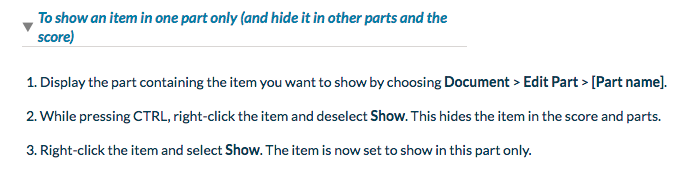
See the following instructions for showing an item in one part only. The big question is - does this work with graphics?

Acciones de comentarios Permalink
Avatar
0

Bruce's solution did seem to work for me just now, using a PNG file I attached to page 3 of the vocal part of the piece I'm working on now.  (I did need to hide the graphic in the score separately after re-showing it in the voice part; otherwise it showed up on page 3 of every part.)  Thanks, Bruce!

Acciones de comentarios Permalink

Iniciar sesión para dejar un comentario.