Microsoft windows 10
Finale version 25.5


I'll explain in more detail. I'm transcribing from audio. Finishing the piece, I was listening again and again to be sure that it's written correct. I wanted to make corrections right after the opening. The changes were time signature related and changing the notation. But to my suprise. The whole score moved the notes became tied over measures. The repeats, tempo markings, everything moved. I had to go over the whole score put back everything in it's place. I can imagine when it's an orchestra score with twenty instruments what a disaster that would be. Luckily for me it was only one, the melody line. I would like to have information how to change anywhere in the score, without effecting the whole score. Thank you

First of all, you probably could have clicked CTRL-Z to Undo the Changes. At least you'll know next time.
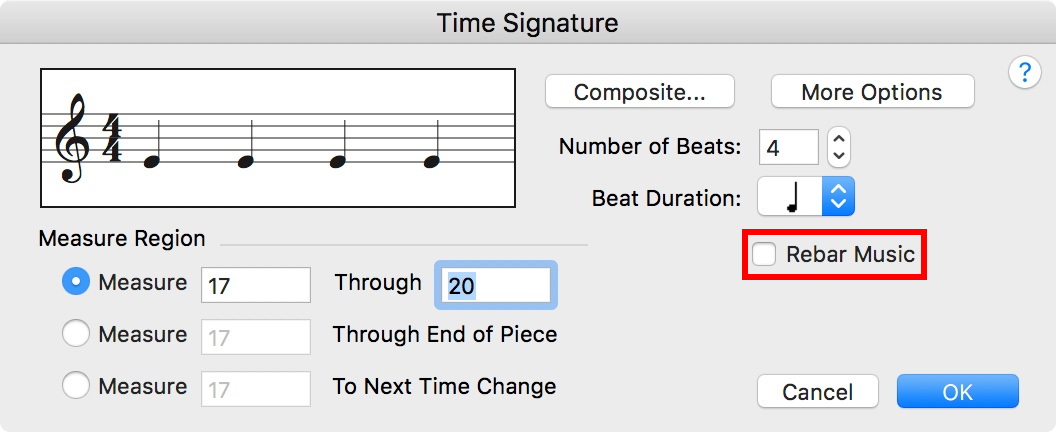
The problem was likely due to the Re-Bar option being checked in your time signature change box.
I also find it wuise to Save my document (frequently) and especially before I make a change that could have repercussions.
(This is probably obvious to you in retrospect. Sorry for all the extra work you had to do.)

You can change a measure or a few measures only. This is found in the Help files. I'm not clear on what you did nor what you want so it's hard to go to the right spot. Typing change time signature gets you ten pages of listings.
https://usermanuals.finalemusic.com/FinaleWin/Content/Search.htm?q=Change%20Time%20Signature
Be assured, you can certainly do what you want.
Mr. Halloran thank for taking the time to answer me. Did you read the comment that I wrote to explain my issue? To change a time signature I know. I'm using finale from Finale 2004. It's a problem when the score is finished and starting to change time signatures it influences the further measures. I was asking if there is away to lock the score, that what I add or change doesn't change the rest. This is what happened to me.

This happens to me a lot .... I think something is clear enough, but it really isn't. You are asking for specific help while giving surface information.
What notation changes did you want to make?
Also, what M. Halloran said is true (I' m not sure why you are dismissing it). You can select a region you want the time signature to affect, be it a single measure or (if you want) 8 measures, or (as you have found out), the entire piece.
What was the Time Sig before?
What are you changing it to?
How many measures do you want the meter change to affect?
Mr. Mohammad, I'll give you more detail. I'm transcribing a cappella from audio. The piece has five stanza, changes frequently the time signature to be exact in this score it's 13 times. It is rubato. As I transcribe, I write it down as a first draft. Then I listen over and over to check if I wrote it correctly. As I wanted to make a change in the time signature and fix the notation accordingly, I inserted extra measures to have room to navigate and picked the measures that I want to change the time signature. As I changed the time signature, the whole score changed. Everything moved all the notes became tied over measures, the double line for the end of the stanza weren't at the right place, the repeats, the tempo changes, the rehearsal numbers, rit. etc. everything was out of it's place. Now I never asked in the forum before I search for it myself. Here I searched, wrote in the search all kinds of ways. But I didn't get a answer to this specific question. Thank you
To get what you want it depends how you enter the time change. If you are using the selection tool + right-clicking on a measure you'll need to select the range of the measures you want it to affect. If you select only one measure using this method, it will affect all the measures to the next time change. If there are no other time changes, then it will more than likely do it for the entire piece.
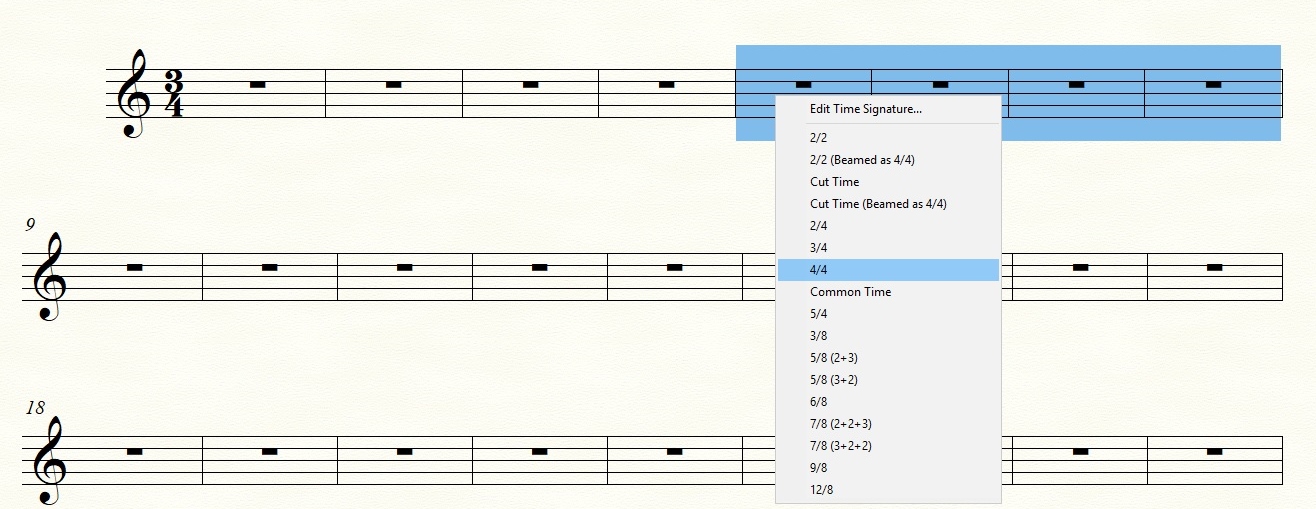
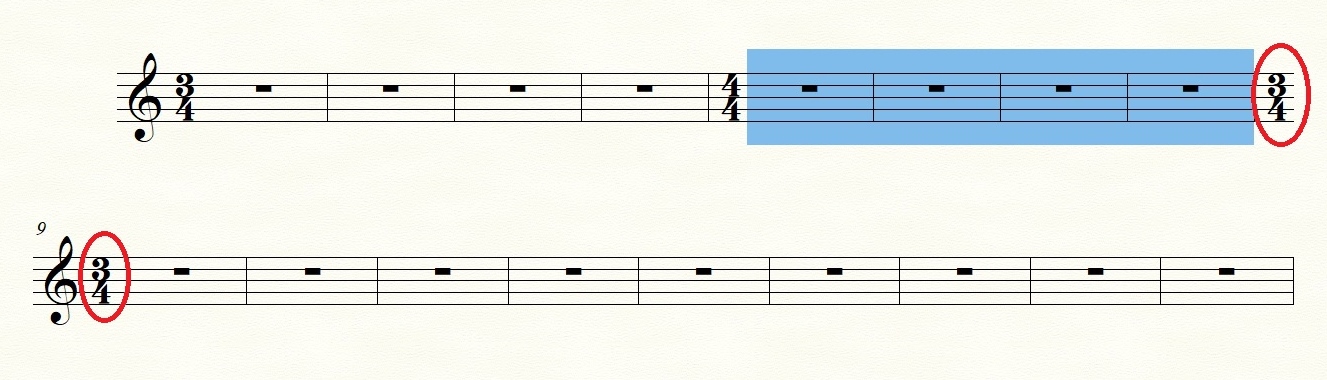
For more detailed options for time signature changes, you should use the Time Signature Tool and dialog box.
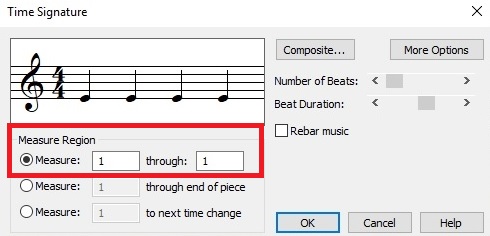
Thank you Mr Mohammad. I want to ask you if you tried what you showed me on a score that's already written? A empty score I don't either have a problem. My question (problem) is making alteration in middle of a written score. Please try to change in middle of a written score and tell me how it went.

… It's a problem when the score is finished and starting to change time signatures it influences the further measures …
… As I changed the time signature, the whole score changed …
… My question (problem) is making alteration in middle of a written score …
A guess:
If you take a look at George Mohammed’s screen shot, you will see that the option {Rebar Music} is de-selected.
Iniciar sesión para dejar un comentario.
11 comentarios
Fecha Votos