Nueva publicación
Avatar
0

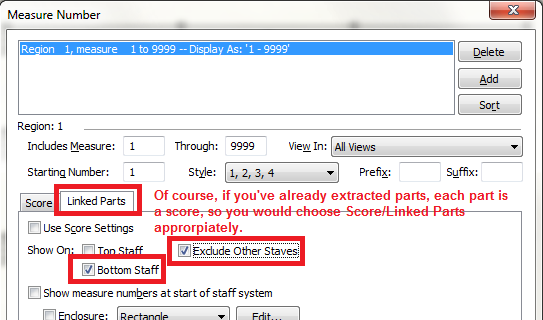
How to add measure numbers at the bottom once you have extracted parts?

Dell lap top

Finale 2014

Rich M.


19 comentarios

Fecha Votos
Avatar
0


Personally, I would use Linked Parts and not extract except in unusual circumstances.

Acciones de comentarios Permalink
Avatar
0

I cannot even pull up the measure number box.  When I highlight the measure icon and tap on the word measure up top, there are only 3 choices, none of them a box, and all three are "ghosted".

Acciones de comentarios Permalink
Avatar
0

Also, what does "Linked Parts" mean?

Acciones de comentarios Permalink
Avatar
0

Select the score, and then you should get the measure menu choices.

Acciones de comentarios Permalink
Avatar
0

How do you "select the score" , it is a single part.  There are no measure menu choices I can find.

Acciones de comentarios Permalink
Avatar
0

Many ways. Try Edit menu>Select all. Or Ctrl-A (Cmd-A on a Mac.) Or Selection Tool>click in first measure, shift-click in last measure...

Acciones de comentarios Permalink
Avatar
0

Richard,

To help us help you, can you tell us how much experience you have using Finale?

Also, please confirm that you are using full Finale rather than PrintMusic.

Acciones de comentarios Permalink
Avatar
0

Dear J Adrian,

I have been using Finale 9full version) now for about 25 years.  I do not handle "change" very well.  Believe it or not, I wrote three books (that were published) using Windows Vista and Finale 2007.  Talk about experience, that was fun.

R. Moon

Acciones de comentarios Permalink
Avatar
0

Although I have used Finale since the beginning, I do not recall what Finale 9 is, but if you have been using it for 25 years--and even if you have moved up to Finale 2007--it is not surprising if linked parts and the screens therefor do not appear on your machine. Perhaps another user familiar with 2007 can speak to whether the function you want even exists in that version. I simply cannot say.

Acciones de comentarios Permalink
Avatar
0

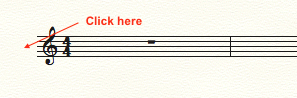
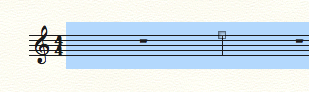
1. With the measure tool, click to the left of the staff


2. This will select the entire staff


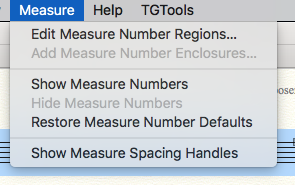
3. In the Measure menu, you should now be able to select Show Measure Numbers

Acciones de comentarios Permalink
Avatar
0

Actually, Finale 2007 does have linked parts - Finale 2007 is the first Finale version with linked parts.

Acciones de comentarios Permalink
Avatar
0

Mike,

I think Richard wants to put the measure numbers at the bottom of the system rather than the top. The question is whether that option is available in 2007.


Rich,

You have been talking about Finale 2007, but in your original post you say Finale 2014. Could you clarify this for us?

Acciones de comentarios Permalink
Avatar
0

JAV,

In one of his early posts in this thread, he didn't know how to select the staff, and so the measure number options were greyed out.

I was showing him how to pull up the measure number dialogue box. Then, he can see if your option is there.

Acciones de comentarios Permalink
Avatar
0

Dear Mike,

I have tried that both in the score and part.  Even after activating the stave, I get only three choices: Show Numbers, Hide Numbers (in grey), and Restore Defaults.   The window I get looks nothing like the one you sent me earlier.  Now I'm using Finale 2014, NOT 2014.5.  I am also having major issues with the "Special Tools Palette".  After checking several You Tube postings I notice 2014.5 has that palette on the left side, and in 2014 it is nowhere to be found.  Could it be that Finale sent out 2014 before it was really ready?

Thanks,

Rich Moon

Acciones de comentarios Permalink
Avatar
0

Richard Moon,


Just a thought:

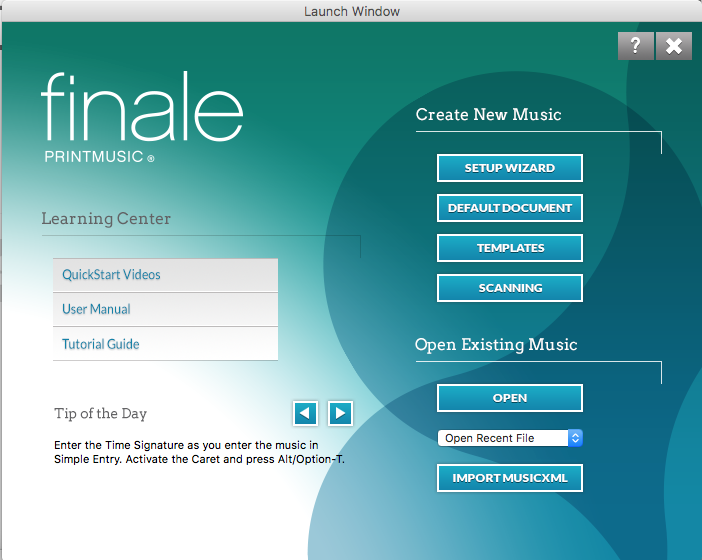
Perhaps you do not have the “full Finale”, but rather its smaller sibling PrintMusic?

That would certainly explain the missing features, like the menu item “Edit Measure Number Regions…”, and the “Special Tools Palette”.


If you actually do have the “full Finale”, then tell us what steps you've already taken, so that we can rule out things.

Have you e. g. tried trashing the Preferences file?

I think that it is called Finale.ini

Acciones de comentarios Permalink
Avatar
0

Rich,

When you launch the program, do you see this screen?

Acciones de comentarios Permalink
Avatar
0

Ah HAAAAAAAA!  Eureka!  That is the reason, you are absolutely right.  I did not know there were two versions.  Thank Heavens.  Even I was beginning to think I'm Crazy.  At any rate, when Finale helped me down load the trial version, that is what they gave me.  What am I going to do now, I d not know, but I'm sure glad all of you guys helped out in solving my "mystery".

Thanks To All,

Richard Moon

Acciones de comentarios Permalink
Avatar
0

Richard,

Glad we could help. If you decide to go to the full Finale, remember that there is an academic/theological discount. If you can qualify for either of these, it eases the pain!

Acciones de comentarios Permalink
Avatar
0

Richard,


It would help all of us here if you would use the pull-down menu behind your name at the top of the screen to add this information about your version of Finale and your computer Operating System to your Profile.


(Even though a lot of the fields in your profile are already filled in, there is an info box at the bottom where you can add this information.)


Thanks.

Acciones de comentarios Permalink

Iniciar sesión para dejar un comentario.