Nueva publicación
Avatar
0

I am using print music 1014.5 on a Mac 10.11.6. using Jazz plain, Jazz cord. I have reinstalled the fonts,etc.

6 comentarios

Fecha Votos
Avatar
0

For the accidentals in chord symbols, choose one of the music fonts - like the Jazz font, or the Broadway Copyist font.

Do not use a font like JazzText, or Broadway Copyist Text - these fonts are text fonts, not music fonts.

Acciones de comentarios Permalink
Avatar
0

Hi Peter,

I am using the Jazz “cord” font. I have 4 Copyist fonts. The first “copyist" is symbols only. Then there are “perc,” “text” and “text extended.” The same thing is true for the “jazz” fonts. The first is symbols. “Cord looks like it would be the right one, but again, it prints with the error I explained.
Acciones de comentarios Permalink
Avatar
0

You said "when you print." Do they show up correctly on screen? How about in a PDF?


(I can't check it, because I have an expired demo version.)

Acciones de comentarios Permalink
Avatar
0

… I have 4 Copyist fonts. The first “copyist" is symbols only. Then there are “perc,” “text” and “text extended.” …

The first font = the {symbols only} font is the music font.

You can use it for accidentals in chord symbols.


… The same thing is true for the “jazz” fonts. The first is symbols …

The first font = the {symbols only} font is the music font.

You can use it for accidentals in chord symbols.

Acciones de comentarios Permalink
Avatar
0

Any remedy for this? I am also having this issue. (Finale 2014.5 on an iMac OS 10.11.6)

Acciones de comentarios Permalink
Avatar
0

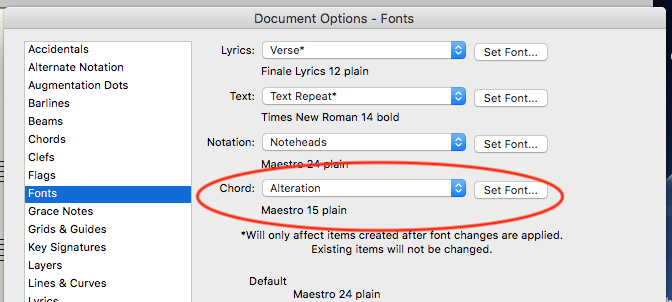
Take a look at Document Options > Fonts > Chord > Alteration


What does it say? You need to have one of the music fonts, there.


Acciones de comentarios Permalink

Iniciar sesión para dejar un comentario.