Nueva publicación
Avatar
0

Hi there,

I'm changing the time signatures in my score and Finale is re-doing all of my carefully made beaming(!).

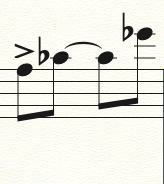
This bar in 4/8 is beamed correctly:
When I change it to 2/4 it looks like this, which is not what I want:
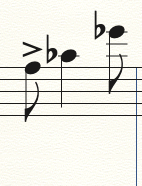
 

Short of just changing it back with Speedy Edit (which will take forever for the entire score) is there anything I can do to prevent this?

Thanks, 

David

8 comentarios

Fecha Votos
Avatar
0

Try selecting the measure and MIDI/Audio menu > Retranscribe

Acciones de comentarios Permalink
Avatar
0

Hi Mike,

Thanks for getting back! I tried that with the "mover" (arrow) tool selected and nothing happened.

My solution right now is to go in and delete all of the ties in the score, change the time signature and then go back and put all of the ties back in(!).

If you can think of anything else, please let me know.

Thanks!

Acciones de comentarios Permalink
Avatar
0

David McDonnell,


One question:


MIDI/Audio menu > Quantization Settings > More Settings


In the window More Quantization Settings, is the option

Soften Syncopations

selected or de-selected?

Acciones de comentarios Permalink
Avatar
0

You might also try making that change in the time signature window dialogue box and uncheck “rebar.” Thanks to a poster in the other forum for that tip!


Please put your Finale version and computer OS in your signature.

Acciones de comentarios Permalink
Avatar
0

Hi Peter,

"soften syncopations" is selected.

Thanks!

Acciones de comentarios Permalink
Avatar
1

… "soften syncopations" is selected …


- And de-selecting {Soften Syncopations} solves the problem - right?

Acciones de comentarios Permalink
Avatar
0

Sorry, that should say "displaying it as 4/8 or 2/4 or whichever you wish."

Acciones de comentarios Permalink
Avatar
0

Peter, I de-selected "soften syncopations" and it seems to have worked!

Wow that was a deep cut, thanks for the help.


Acciones de comentarios Permalink

Iniciar sesión para dejar un comentario.