Nueva publicación
Avatar
0

I would very much like to make my cue measures automatically smaller. For example, if the cue notes are 65% of the size of normal notes then it would be great to have the measure also at 65% of the normal width (or to be able to set this %). At the moment I have to shrink them manually and remember to always switch off Automatic Music Update. Of course this only concerns measures with no notes other than cue notes. Many thanks

Finale 27. Windows 11

4 comentarios

Fecha Votos
Avatar
0

J W Change

Acciones de comentarios Permalink
Avatar
0

I can only see "Note Entries" and "Notehead" size changes. These don't however seem to change the measure width, even if I respace afterwards ....... ????

Acciones de comentarios Permalink
Avatar
0

Ian you lost me. Don't you want all measures to line up with every other measure? I can't image having cue measures that were not lined up with whatever you are cueing. Am I not understanding?

Acciones de comentarios Permalink
Avatar
0

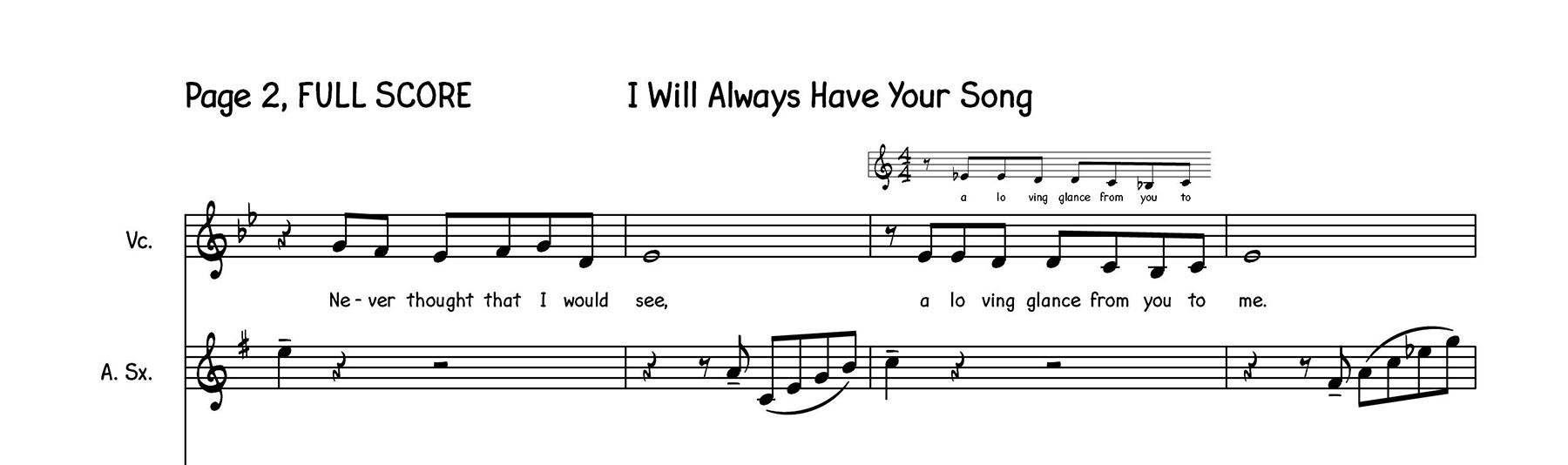
Is this perhaps what you want? Or at least the idea of what you want?

Acciones de comentarios Permalink

Iniciar sesión para dejar un comentario.