When trying to change time signatures, you can no longer click to the right or left of the scroll bar to make the numbers go up or down in the time signature window.


Hi C J,
I'm not using a composite key signature. In older versions of Finale, you could click to either side of the scroll bar to increase or decrease the numbers. Now, you have to drag the scroll bar, which can be less accurate, as it scrolls so fast that you have to take longer to get what you want. Using sierra....


Mico,
You can change time signatures by selecting the Time Signature tool from the Main Palette.
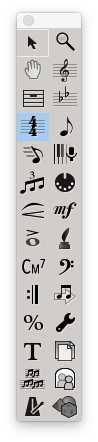
Then in your document select the measure you want the time signature to change in and double click (or press return). This will bring up the Time Signature dialogue box where you can change the time to whatever you need.
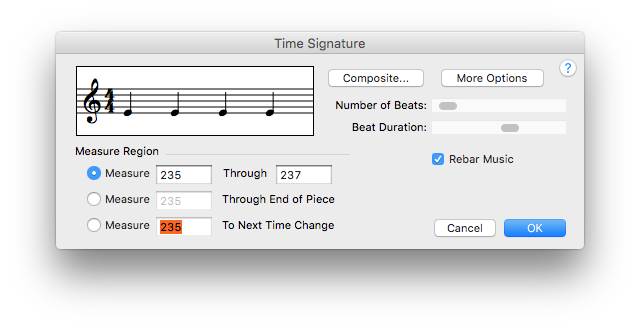 Hope that helps Mico!

Mico, if you are using Notepad, you cannot change time signatures midway through a composition IIRC. That's the "price" you pay for the free version.
(You need to put your version of Finale--or Notepad--and your computer operating system--in your post--or in your user profile--as requested in the Forum instructions so we have the info we need to help you more quickly.)
Oh, I see. Thanks, J Adrian.
I will need to upgrade to have the option to change time signatures in the middle of a composition. I am a student and was told about the free version by another classmate. Does anyone know how much of an upgrade I will need? I most definitely want to have the option to change time signatures in the middle of a piece.
I don't know why, but I did not see the forum instructions, that asked for my version of Finale or my computer operating system. I have a Macbook Pro laptop and I have Finale Notepad. I don't know if there is more information I need to give, but thanks for the nudge. Is there a way, I can go back and insert this information? Also, is there a phone number that I can call to speak to someone from Finale?
PrintMusic is the next level up from Notepad, and its print sample shows mid-score time signature changes. Perhaps you should go to http://finalemusic.com and download a trial version to see whether it is something you would be interested in. Be sure to look for an Education price if you are a student.
If you look at the top of this thread, your name in the gray stripe is a pull-down that will let you edit your profile at least enough to list your Finale program and version and your computer operating system. Then anyone who wants to check it out can click on your name in any of your posts to check out this info.

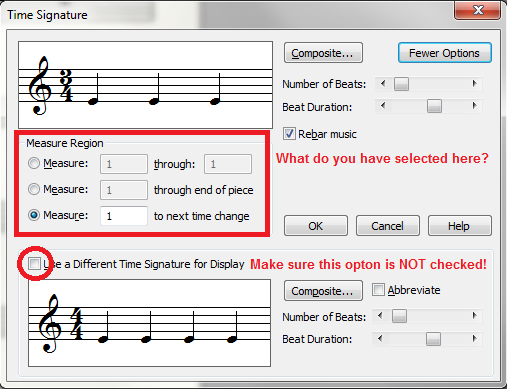
When I change time signature, either in the composition or starting a blank sheet, I set the time signature and it keeps defaulting back to 4/4. Is there anyone with a suggestion on how to correct this problem? I've even reloaded the program and it does the same thing. I have 2012c version that I bought two years ago. Thanks, Don

Iniciar sesión para dejar un comentario.
18 comentarios
Fecha Votos