Nueva publicación
Avatar
0

I am using a MacBook Pro and have been unable to get my Native American Flute fonts to work in Finale 25.1. Is there a trick - or plugin - or something I need to install, etc?


Thanks,

Don


22 comentarios

Fecha Votos
Avatar
0

It seems there are quite a few fonts available. I looked at this page: http://www.flutopedia.com/fonts.htm 

Is there something there that you use? I'll try to figure it out on my system.

I don't generally follow this forum. You can contact me at wawoodman (at) aol (dot) com.

Acciones de comentarios Permalink
Avatar
0

You don't say what fonts you are trying to use. If they are 32bit only, they might not show up in F-25 which is 64bit. 

Acciones de comentarios Permalink
Avatar
0

I'd like to use the NAFTracks_SixHole.ttf font from flutopedia.com.  But Finale says something about needing a "FAN" file in addition to the ttf -- font annotation? -- which is not there in Flutopedia.  Clint Goss (the guru behind flutopedia) is a PC person and doesn't seem to use Finale.  He says he can't help.  I REALLY would like to get this into finale.  I loaded NAFTracks_SixHole.ttf into the FontBook on my Mac and it shows up as an option in Pages, but not in Word.  Help!!  Thanks.  

Acciones de comentarios Permalink
Avatar
0

Mavis,

I used PopChar to access the fonts, and created a few Expressions. Would this work for you? (I'm sure these are wrong for the notes, but it's just for experimental purposes!)


Acciones de comentarios Permalink
Avatar
0

Wow!  I would love that.  But I'm a neophyte.  PopChar is a completely separate utility??  Can you please outline the steps to implement this?  Thanks so much.

Acciones de comentarios Permalink
Avatar
0

Mavis, if you're here in the States, call me at two oh six 523 nine six two eight

Acciones de comentarios Permalink
Avatar
0
Acciones de comentarios Permalink
Avatar
0

A FAN is needed with music fonts, to keep music spacing correct. But these fonts are used as text expressions, (or lyrics, if I can figure out how to do it more easily.) But they don’t need a FAN.

Acciones de comentarios Permalink
Avatar
0

I have the same question as the original inquiry of Don Word four years ago, but I do not see a complete answer to his question.  My OS is Mac Catalina, and Finale version is 25.  Thank you.

Acciones de comentarios Permalink
Avatar
0

Then we'll start the same way: what font are you trying to use?

Acciones de comentarios Permalink
Avatar
0

Acciones de comentarios Permalink
Avatar
0

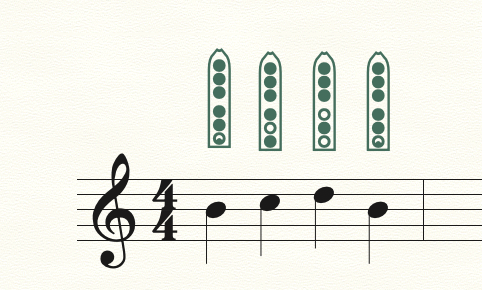
The font shown above is a modified Nakai native American flute tab, which is almost always shown with four sharps, but I am interested in playing the flute with a mountain dulcimer tuned DAD, so two sharps would be the preferred format.  This could be used for any sort of flageolet, including a penny whistle in the key of D and a native American flute in B minor.  Thank you for your response!  I did not expect it to come so quickly!  Peter

Acciones de comentarios Permalink
Avatar
0

If that refers to Carlos Nakai, I've never met him, but I used to work for William Eaton, who played with him on many recordings.


It's gotten much easier, or maybe I just didn't know what I was doing! (More likely)


In any case, with a cheat sheet, it's easy to enter them as lyrics. In this example, F#, G#, A, and B are entered as 1, 2, 3, and 4!


Acciones de comentarios Permalink
Avatar
0

Yes, Carlos Nakai invented the finger diagrams for native American flute, as far as I know.  How do I install the font?

Acciones de comentarios Permalink
Avatar
0

Download it to your computer. Double-click it, and Font Book will launch. Click Install Font.

Acciones de comentarios Permalink
Avatar
0

OK - have installed the font, but can't seem to make it work - you are dealing with one with only basic skills on Finale.

Acciones de comentarios Permalink
Avatar
0

How are you trying to use it? What are you doing?

Acciones de comentarios Permalink
Avatar
0

I am trying to put the fingering diagrams just below the staff, as shown on my post above.  Have not been able to make diagrams show up.  Peter

Acciones de comentarios Permalink
Avatar
0

… How are you trying to use it? What are you doing? …

… I am trying to put the fingering diagrams just below the staff, as shown on my post above …


Peter Irvine,


I guess that Mike Rosen’s questions were not specific enough.

To give the best possible help we need you to be more specific.

“How are you trying to use it?” means “What tool in Finale are you using?”

“What are you doing?” means “What are your steps in Finale?”


Quoting from an old post:

“Describe what you want to achieve; what you do, when you try to achieve it; what happens; and what doesn't happen, that you expected.”

Acciones de comentarios Permalink
Avatar
0

Thanks for the clarification, Peter T.


Peter I.,

Are you trying to duplicate the blank template you showed above, or so you want to do what I did, where I attached the correct fingerings to the different notes?

Acciones de comentarios Permalink
Avatar
0

The latter approach - what you suggest - seems preferable (and easier to read).

Acciones de comentarios Permalink
Avatar
0

Peter,

Where are you located? Maybe we could do Zoom, and I can get you started.

Contact me via email. My address is in my signature.

Acciones de comentarios Permalink

Iniciar sesión para dejar un comentario.