Nueva publicación
Avatar
0

Windows 10, Finale 25

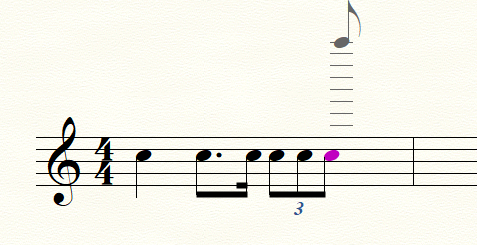
I have a 4/4 measure consisting of triplet eighths; dotted eighth-sixteenth; triplet eighths; triplet eighths. Finale insists on spelling the second beat as eighth tied to sixteenth-sixteenth. How can I make it into dotted eighth-sixteenth?

5 comentarios

Fecha Votos
Avatar
0

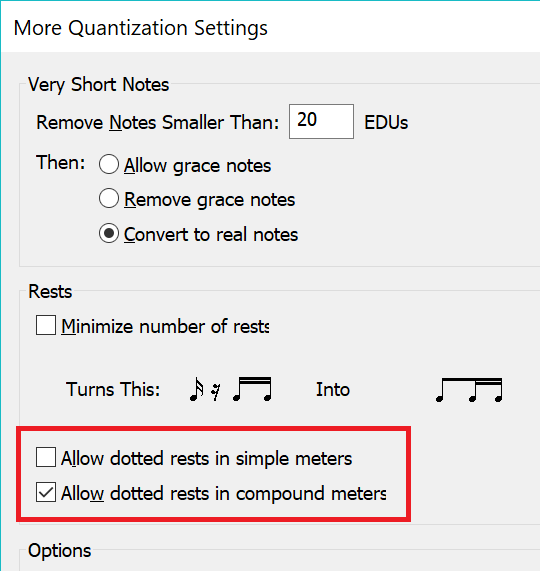
MIDI/Audio menu > Quantization Settings…


* What are your settings in the window Quantization Settings?


MIDI/Audio menu > Quantization Settings > More Settings…


* What are your settings in the window More Quantization Settings?

Acciones de comentarios Permalink
Avatar
0

To amplify what Peter has said, what have you checked as far as dotted rests are concerned? Even though the screen asks about rests, the quantization applies to notes as well.


Acciones de comentarios Permalink
Avatar
0

This accomplished exactly nothing. The problem is with note entry in a score and has nothing to do with audio. I enter "dotted eighth-sixteenth" on beat two and all is fine; I enter triplets on beat three and beat two instantly changes to "eighth tied to sixteenth - sixteenth". And nothing I try will change it back. Any ideas?

Acciones de comentarios Permalink
Avatar
0

That's not what I get.


I also find that (after I type in the measure with a tied sixteenth) selecting the measure and running MIDI/Audio > Retranscribe also produces the result I illustrate above

Acciones de comentarios Permalink
Avatar
0

Must be computer demons having fun! Thanks.

Acciones de comentarios Permalink

Iniciar sesión para dejar un comentario.