Nueva publicación
Avatar
0

Why does finale only record  1minute of each of my files. Windows 8.1 Finale 2014.5 NEED HELP ASAP.


17 comentarios

Fecha Votos
Avatar
0

Are you recording from MIDI or Audio Units? To what format are you exporting?

Acciones de comentarios Permalink
Avatar
0

On the finale file I am clicking export then "Audio file"

Acciones de comentarios Permalink
Avatar
0

Are you waiting until the export status indicator is complete?

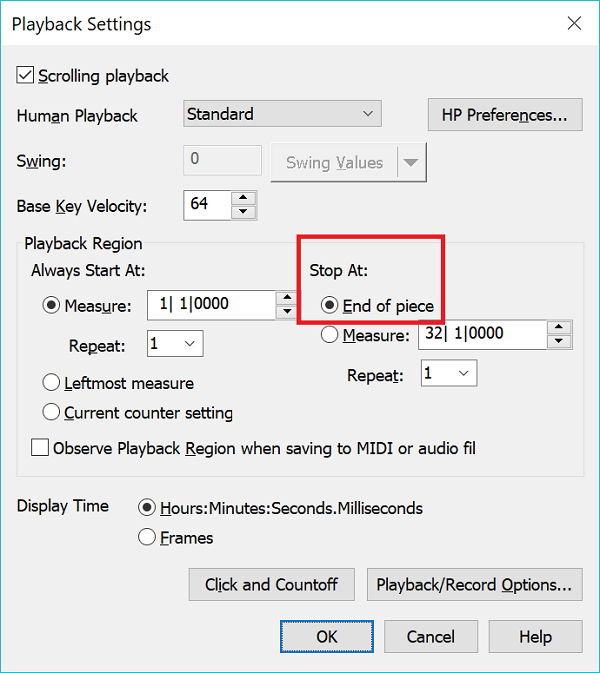
And a long shot, is your playback panel set to play to the end of the file?


Acciones de comentarios Permalink
Avatar
0

Yes, I have been waiting until it scrolls through the entire doc. As to playback settings I have to check

Acciones de comentarios Permalink
Avatar
0

Got them working. Thank you

Acciones de comentarios Permalink
Avatar
0

One more file with problem. Because I moved the green dials in studio view for all tracks to the middle position now only 5 instruments play. How can I restore the different tracks to where they should be?


Acciones de comentarios Permalink
Avatar
0

Is each instrument on its own channel?

Acciones de comentarios Permalink
Avatar
0

Yes. On score manager each instrument is on its own channel and the banks are correct. But like I mentioned in Studio View I moved that green dial on the right of each channel to the up position (ie; between L and R. ). Looks like that could be the culprit

Acciones de comentarios Permalink
Avatar
0

The green dial is L/R balance and should not affect volume. The blue slider of course could mute a track if moved fully left.

Acciones de comentarios Permalink
Avatar
0

Thanks so much Adrian. Found out the problem was that I had those 5 instrumens marked SOLO in studio view. Thus, all other channels were muted


Acciones de comentarios Permalink
Avatar
0

One last request. Please send me the user manual link where I can learn how to input percussion by placing cursor on staff and scrolling to find instrument I want. I only know speedy with midi. Thanks

Acciones de comentarios Permalink
Avatar
0

"scrolling"?

I'm not sure I understand what you mean.

If I'm not using speedy, as when I input drum notation, I use the mouse.

Acciones de comentarios Permalink
Avatar
0
Acciones de comentarios Permalink
Avatar
0

Aha! yes, simple entry for sure. What I was asking is as follows- select speedy tool, then go to one of the percussion parts (indefinite pitch), click on that staff like you would like you would to enter speedy with midi, then push up down arrow up or down till you find the instrument you want to write for, SO WHAT COMES AFTER THAT - IE; HOW DO I INPUT THOSE NOTES USING THE CURSOR WHERE IT HAS THAT INSTRUMENT SELECTED?


Acciones de comentarios Permalink
Avatar
0

The Enter key, if I recall correctly.

Acciones de comentarios Permalink
Avatar
0

The enter key will enter rests but not notes. No problem seems like simple entry is best. THANK YOU!!!


Acciones de comentarios Permalink
Avatar
0

Enter key only enters rests from what I can see. No problem. looks like simple entry is best. Many thanks

Acciones de comentarios Permalink

Iniciar sesión para dejar un comentario.